
Hy-Line Computer Components
Please do not touch!
The operation of devices and machines without direct physical contact has attracted increased interest during the coronavirus pandemic. One option for contactless operation is holographic input.

According to a study by UltraLeap, a manufacturer of touchless interfaces, the acceptance of touchscreens has declined. Assuming a certain level of complexity, there are various alternatives. One of these is holographic input, which works with a projected hologram and an infrared touchscreen. This system consists of two parts: an infrared touchscreen that detects touch events and gestures with an invisible IR curtain, and an image that is holographically projected into the air.
In the physical sense, the virtual image is not a hologram - monochromatic, coherent light is not used, nor does the image change depending on the viewing angle. Instead, a special material property is used here that convergently bundles the diffusely emitted light rays at the location of the virtual image, thus creating the impression of a free-floating display. The term 'holography' is used for this.
The infrared touch technology
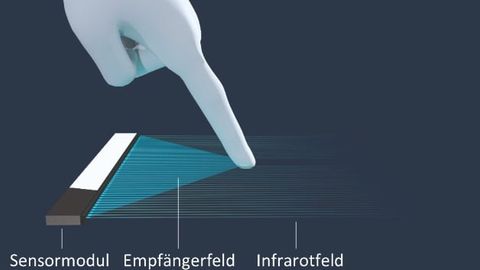
The new technology infrared touchscreen uses the light rays reflected by an object to detect one or more touch events. Photodiodes in the sensor detect the reflected rays.
© NeonodeThanks to the infrared sensor, touchless operation can be carried out with any object that reflects light - including protective gloves, credit cards and pens, and operation is easy even with wet or dirty hands and long fingernails. In contrast to other touch technologies, there is no layer between the finger and the display to impair the image quality. In addition, if the display is to be protected from adverse environmental conditions and vandalism, the sensor can be mounted at an appropriate distance from the display. The infrared touchscreen uses the reflection from objects in the beam path
to recognize several events simultaneously or gestures.
The 3D projection
The holographic image appears free-standing in the air. The key element is an optical plate that deflects the image generated by the source and projects it according to the laws of optics. Similar to a head-up display in a car: the driver sees an image through the windshield that displays additional information such as speed, traffic signs and navigation instructions in augmented reality. The driver's attention remains focused on the road ahead and the virtual image. The distant display takes the strain off the driver's eyes, which do not have to accommodate between close-up - looking at the instrument panel - and distant - looking at the road. The image itself is generated by a display or projector in the footwell and projected through a lens unit onto the windscreen, which has a partially reflective coating in this area.
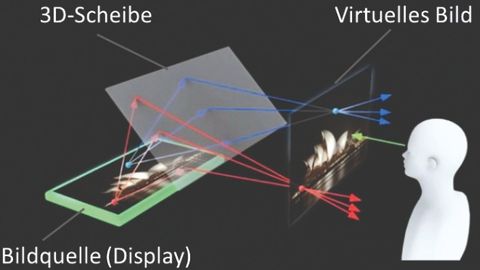
Functional principle of the holographic display. The virtual image is displayed floating freely in space thanks to the special 3D plate.
© Aska3DIn this system, the structure looks very similar: The 3D plate creates a virtual image that is 'within reach' of the user. This virtual image is created at the same distance from the mirror as the display itself. If an infrared sensor is now mounted at the position of the image plane, which overlooks the image surface, touch events and gestures that are drawn 'in the air' can be recognized and evaluated without the need to touch any parts.
The holographic projection
The image projection in the air - the holographic display - makes it possible to project the image of an LCD screen 90° away from the screen. The resulting image appears to float freely in space on an invisible screen. A special holographic plate consisting of several layers of micromirrors deflects the light emitted by the display. The plate is positioned at an angle of 45° in the beam path and deflects the light emitted by the display by a further 45°. The divergent light beams converge at one point, creating the floating image. The size of the plate determines the maximum distance and the size of the image.
As there is a fixed angular relationship between the display, the projection plate and the final image, the installation geometry of the display and projection plate determines the orientation of the virtual image. A vertical image is produced by a horizontally mounted display and a 45° plate, while a horizontal projection plate produces a 45° tilted image.
The holographic screen as a user interface

The position of the hologram - vertical or inclined - is defined by the geometric arrangement of the image source (display) and 3D slice.
© NeonodeAs with all touch applications, the graphical user interface (GUI) should be ergonomically adapted to the operating conditions. While sensitive movements can be made with a mouse because it is moved on a surface, a pen can be moved in three dimensions until it touches the surface. With holographic operation, on the other hand, the haptics of a surface are completely absent, so that even after touching a button, the hand must be guided completely freely. Filigree structures are therefore difficult to operate, especially for inexperienced occasional users. Designers of software interfaces must take this into account when arranging and sizing control elements. The use of gestures should also be chosen carefully to avoid inadvertently triggering an operating gesture while accessing an element by moving it sideways. Thanks to their high resolution and parameterizability, Neonode's infrared sensors enable precise cooperation with the holographic input.
Application scenarios
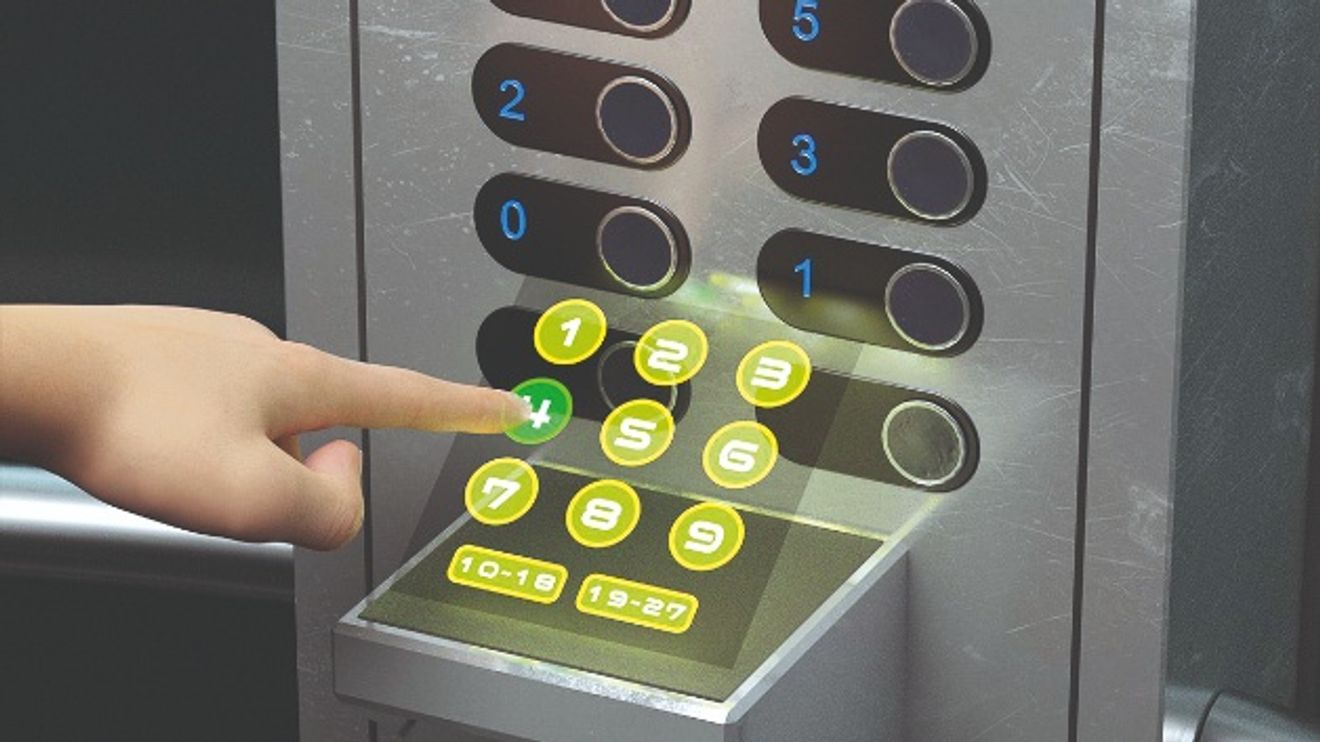
By operating the hologram floating in the air, it is possible to avoid touching the operating buttons on the elevator and prevent the transmission of viruses and germs.
© NeonodePlaces and devices that are used by many people are predestined for contactless applications. In public, for example, these are elevator controls. Even though they are often made of stainless steel to make them easy to clean and resistant to vandalism, they still allow bacteria and germs to accumulate.

Another example is the control terminal in a self-service restaurant. Using holography, the numbers assigned to the food and drinks can be entered on a virtual keyboard. The virtual presentation on a display also allows the content to be changed or even divided into several menu levels - main courses, desserts, drinks.
In the medical environment, the technology can show its strengths where actions have to be carried out by people who would otherwise work in a sterile environment. Assistants can change parameters that the surgeon calls out while remaining sterile. There is no need for subsequent cleaning.


You might also be interested in
Up to 100 m reading distance
Both the outdoor and indoor versions of the miline model from Microsyst have a dustproof and waterproof housing.
 read more...
Can be used from -20 to +80 °C
Data Modul is expanding its display portfolio with an industrial 21.5-inch high-brightness display for the extended temperature range.
read more...Remote assistance in maintenance
Maintenance and repair work is also required during a pandemic. New operating concepts can help. Service providers are driving their digital transformation with merged reality.
read more...The table as a user interface
A table that facilitates the care of dementia patients and people in need of care is the result of the Fraunhofer IZM's DAYSI project. Controlled by gestures, the table communicates using text, images and sound.
read more...Modular platform for operating and monitoring
Pepperl+Fuchs is presenting a new platform for operating and monitoring solutions with VisuNet FLX. With the modular HMI operating station, the company is addressing the pharmaceutical industry, among others.
read more...Not standard but special formats
There are many standard formats: from 4:3 to 5:4 to 16:9. But what if an application requires completely different formats? - There are various approaches to producing such a display.
read more...The modular HMI concept
Customize HMIs according to your needs! A modular system for glass, display and touch sensor from the drawer should make this possible for machine builders.
read more...Products of the year - The e-paper special
"Products of the Year 2023" goes interactive: the new e-paper including video news is here! The winners of the readers' poll have been chosen and in our interactive special edition you will find all the winning products at a glance and exclusive...
read more...Operating & monitoring - The winners
Voice control, smart glasses and safe HMI were convincing in the 'Operating & monitoring' category.
read more...