
Operating devices
IP65 protection for every application
Dust, dirt, moisture: operating devices must be able to cope with these challenges. A system family of IP65-protected HMI devices provides solutions for the entire range of stationary, machine-oriented operation and monitoring.
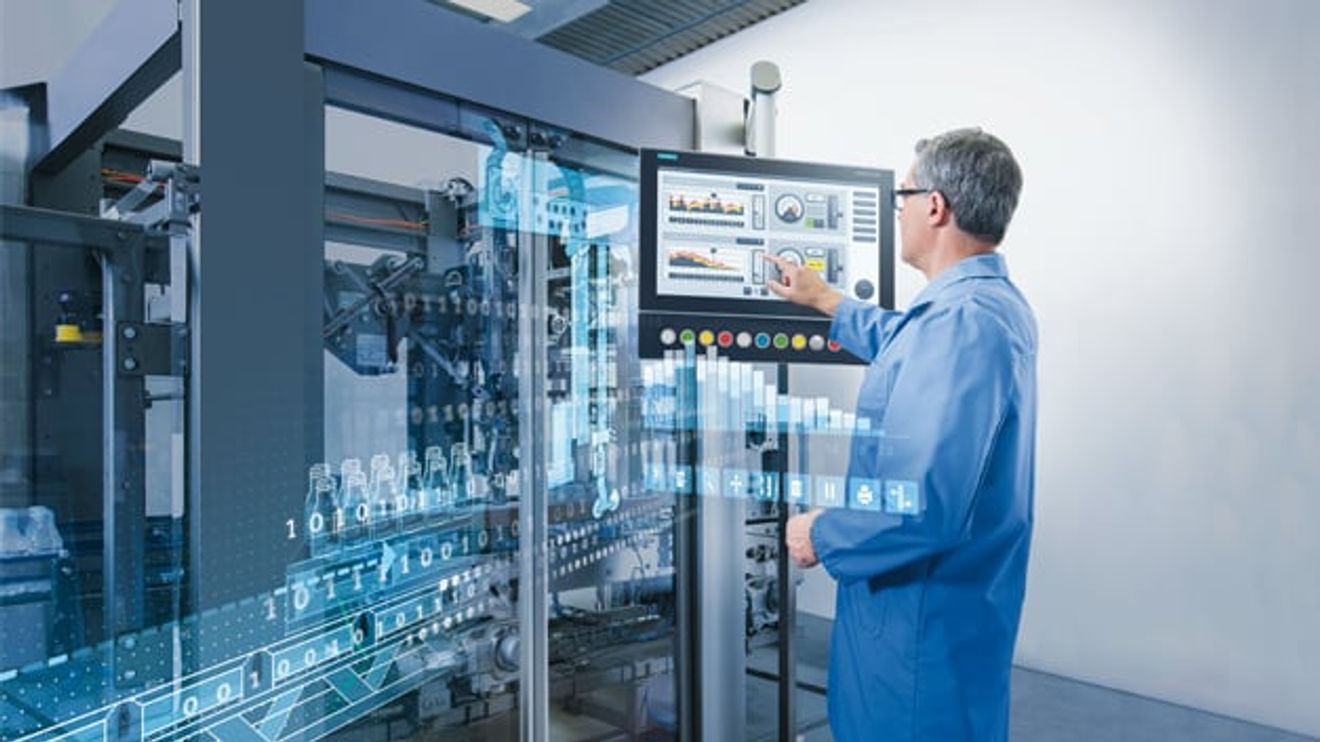
Most production facilities are now clean at first glance - but the saying still applies: "Where there's planing, there's chipping." Dust and moisture are generated not only during metalworking, but also during other manufacturing and logistics processes. For this reason, all electrical and electronic components in the system or on the machine must have a correspondingly high degree of protection. This degree of protection can be achieved either by installing them in an enclosure or cabinet - or by using appropriately encapsulated components. For controllers, inverters or contactors, installation in cabinets is usually unproblematic, as access to these components is not necessary during normal system operation. The situation is different for systems that are responsible for operation and monitoring: Not only do they have to be visible by definition, they also have to be ergonomically positioned and easy to operate. As operating devices are the central interface between man and machine, an attractive design is also becoming increasingly important. A range of fully encapsulated HMI devices have now become established on the market, which no longer require any additional protective measures thanks to their complete IP65 classification and therefore represent a lean solution for machine-oriented operation. The user does not need to purchase a separate housing, but can mount the device directly on the machine.
It is often not easy for the machine or system manufacturer to develop an HMI solution with these components that fits the application exactly: Will the HMI operating device 'only' be used for operation or should larger amounts of data be pre-processed? Do safety-relevant functions need to be implemented? How complex is the information to be displayed? Should additional operating elements such as buttons or switches be available? - The list of possible requirements goes on and on. In addition to a high degree of protection, the devices must therefore offer a high degree of flexibility so that a solution with a control cabinet does not have to be implemented again in the end because the HMI is not able to map the required functionality.
With an integrated system of hardware and matching software, Siemens has had a powerful platform in its portfolio for years that covers the entire range of stationary, machine-oriented operation and monitoring with display sizes between 4 and 22 inches. With the Simatic Comfort Panels, the Advanced HMI system family offers ready-to-use, industrial-grade operating devices.
IP65 protection for the entire system family
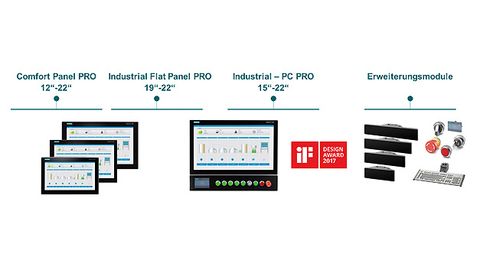
The Simatic HMI PRO family consists of a graduated portfolio of panel PCs and HMI devices with IP65 protection. The operating devices can be flexibly expanded with extension units.
© SiemensThis portfolio also includes suitable, all-round IP65-protected devices: both the panel PCs and industrial monitors as well as the comfort panels are available as PRO versions with a robust aluminum housing, which means that the devices achieve IP65 protection all round and can be installed directly on the machine. The PC-based operating devices support multi-touch and gesture control. They offer configuration options for storage space, processor performance and data connection up to embedded systems with Intel Core i7 processor (3rd generation) with Turbo Boost, high-performance HD graphics integrated in the processor, up to 8 GB DDR3 RAM and either removable (externally accessible) or internal fast mass storage (configurable, up to SSD 240 GB and CFast 16 GB) and modern interfaces (USB 3.0, DisplayPort). As the devices are designed for ambient temperatures of up to +45 °C, they are suitable for industrial use. They are also characterized by a low-maintenance design without a fan. The PRO systems can be installed either as a combined solution consisting of visualization and PC in one device or as a decentralized solution with an industrial monitor as a flat panel. In addition, the new PRO versions of the Comfort Panels with robust, anti-reflective glass front have the same performance features as the standard Comfort Panels: they are designed for the implementation of demanding visualization tasks in machine-related areas, but are also suitable for larger quantity structures for complex processes. The PRO devices are available with displays from 12 to 22 inches.
Design increasingly important
The appearance of the HMI devices also plays an important role. This is because the demands on the design of the human-machine interface are increasing in the industrial environment. The HMI can only become the flagship of the machine if it is intuitive to use, easy to handle and well thought out in terms of design. This also increases the acceptance of the operating personnel.
For this reason, attention was paid to a modern, simple and compact design when developing the PRO devices. Thanks to a special design of the front and housing, the display makes good use of the dimensions of the devices. The PRO devices have a crystal-clear and scratch-resistant glass front with high chemical resistance. They are anti-reflective so that they are easy to read in difficult lighting conditions in production, deliver excellent display quality even at wide viewing angles and therefore enable fatigue-free working. The projected capacitive touch technology (PCT) allows single and multi-finger operation, even when wearing work gloves, which create a conductive connection between the fingers and the monitor surface thanks to a special material. For example, image content can be moved intuitively and quickly, zoomed or supplemented with hidden components; two-handed operation can also be implemented. The operating units can be mounted either on the stand or support arm. There are also economic reasons in favor of a cabinet-free HMI solution. On the one hand, this configuration saves costs and space for an additional housing on the machine; on the other hand, the graduated concept of the Simatic PRO devices offers a model that is optimized in terms of price and performance. The design also saves time and money with the interfaces: the cable interfaces are designed as standard connectors, so that no IP65 connectors are required. The technician can reach the interfaces and connections via the service flap or the removable rear panel cover, so that the device does not have to be dismantled for this - this makes maintenance during operation much easier.
Flexible expansion
The solution can also be flexibly adapted to individual requirements. If required, special 'extension units' can be used to implement electromechanical operating elements such as emergency stops, selector switches, push buttons, key switches, indicator lights or RFID readers, or an external keypad can be added to the PRO device. These extension units are matched to the operating device and fit seamlessly into the operating concept and the slim, ergonomic look of the system. They can be easily connected to the operating and automation system. This allows functions for which electromechanical feedback is required or additional components to be implemented. For example, the RFID reader enables operator identification, as required in the food or pharmaceutical industries. For safety-relevant applications, the emergency stop can be installed directly on the control unit if required or the system can be locked via the key switch. Selector switches are useful, for example, where the system is operated in different production modes (manual and automatic). In addition to the extension unit with connection via terminals, there are two variants for connection via Profinet and Profisafe, which greatly reduce the wiring effort.
Assembly is simple: the individual elements can be mounted and wired in the pre-punched positions without the need for special tools - even retrospectively during operation. The machine or system manufacturer can put together the appropriate configuration in the 'TIA Selection Tool' and order the selected components as a complete kit. The extension units can be configured with a graphical editor in the 'TIA Portal' using drag & drop.
Authors:
Marcel Roske is Marketing Manager for Simatic HMI at Siemens;
Ralf Kloessinger is Product Manager for Simatic HMI at Siemens.
Project planning via 'TIA Portal
All HMI devices in the PRO series can also be configured via the integrated TIA Portal engineering framework as part of an integrated portfolio for production automation - making the engineering of the visualization and automation solution significantly more efficient. Depending on the complexity of the application or the external conditions, the user can opt for a tailor-made solution and still benefit from the advantages of a common device family.
TIA Portal is also the gateway to digitalization and also gives the project engineer complete access to the entire digitalized automation, from digital planning to integrated engineering and transparent operation. The TIA Portal openness interface can be used to integrate your own tools, for example to automatically generate program code and use external planning data from various applications such as EPLAN or the TIA Selection Tool. This planning data can be transferred directly to the TIA Portal via the open AutomationML standard. The code generator analyzes the objects in the planning data and generates the code for the PLC using defined blocks. As the blocks are tested, the code does not contain any errors.
In addition, TIA Portal brings automation and operational IT together by means of open communication - including the connection of cloud solutions. The standardized communication protocol Simatic OPC UA enables production data to be transferred to ERP and MES systems as well as other applications. The IndustrialDataBridge is used for bidirectional, cross-system communication via standard interfaces (including OPC, SQL, ODBC, OLE-DB or Office formats) without any programming.
Automated visualization
TIA Portal supports the design of user interfaces with intelligent tools and wizards. Among other things, the user can use the Simatic Visualization Architect (SiVArc) to automatically generate the visualization based on the control program and an HMI library using rules. This means that the visualization is generated much faster than before. As changes in the PLC program are automatically updated, typical sources of error are eliminated. In addition, the user can easily define standards in libraries so that the visualization always has the same structure and the operator can quickly find his way around the system. This saves training and familiarization time and reduces sources of error.


You might also be interested in
Siemens and UL Solutions digitize certification process
For the first time, an industrial product was certified for the USA after some of the required tests were digitally simulated and the results confirmed by physical tests. This was made possible with the help of the digital twin.
 read more...
Strong finish to the 2023 financial year
According to Siemens, revenue and order intake increased by 10% and 6% respectively on a comparable basis in the fourth quarter of 2023. In the Industrial Business, Siemens recorded its highest earnings and profitability figures ever.
read more...Security test suite for industrial networks
Siemens has expanded its industrial cybersecurity portfolio by launching an all-in-one security test suite for industrial communication networks.
read more...Innomotics launches as a Siemens subsidiary
Siemens is bundling its range of motor and large drive systems under the name Innomotics. The company was launched in Germany on July 1, 2023 as a wholly owned Siemens subsidiary.
read more...Cooperation expanded
Prostep and Siemens Digital Industries Software have expanded their collaboration: Now the Siemens software Polarion ALM and Teamcenter Manufacturing from the Siemens Xcelerator portfolio can also be connected to Prostep's OpenPDM integration...
read more...Plus 27 % in industrial business
Siemens has continued its strong growth momentum with comparable order growth of 20% since the beginning of the fiscal year, as CEO Roland Busch explained on the occasion of the publication of Siemens' quarterly figures. The figures in detail.
read more...Prototype interface for advanced robotics
The coupling between PLC and robot controller is crucial for the integration of advanced robotics applications in an automation environment. With ArTIA, Artiminds and Siemens have developed a software connector that links their engineering tools.
read more...Siemens stops new business with Russia
More and more German companies are withdrawing from Russia due to the war in Ukraine. Siemens is now discontinuing new business in the country. The impact on sales is likely to be limited.
read more...Siemens raises forecast - also thanks to demerger
Splitting up Siemens was a huge experiment. Less than a year after the IPO of the energy division, the move is proving to be the right one - at least from the perspective of the booming remaining group.
read more...