
Touch system
Add haptics
Extension units can be used to add haptic elements to HMI devices. There are several options for the connection - from direct hard wiring to bus-compatible communication via Profinet or Profisafe.
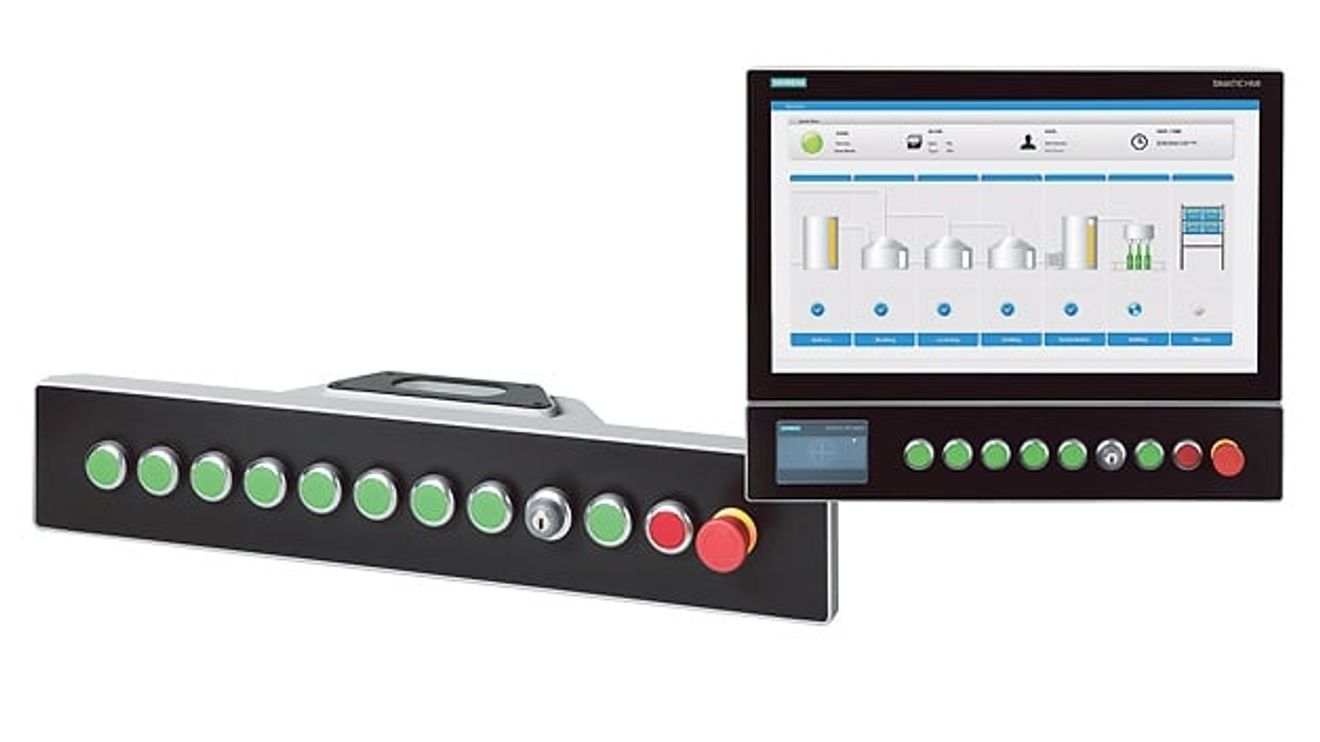
Machine and system manufacturers often have to supply their customers with individual HMI systems that are best accessed directly on the machine - mounted via a support arm or stand. A new all-round IP65-protected system solution now combines the advantages of an operating device with flexible and individual expansion options using buttons and switches. The extension units are designed as additional components of the Simatic HMI PRO devices from Siemens. They supplement operating devices with freely selectable and easy-to-install control panels in the same high degree of protection. The units are available in a total of four sizes from 12 to 22 inches, each with a different number of possible operating elements. The extension unit can be selected to match the display size of the operating unit. Furthermore, up to two extension units can be used on one device - the number of possible configurations is practically unlimited. In addition to the classic hardwired version, in which the operating elements are wired directly to the higher-level controller, bus-compatible versions with Profinet and Profisafe are also available. Depending on the requirements, available space and design aspects, the machine builder has the option of selecting and implementing the right combination for their machine - using standard components.
Another advantage: the extension unit and control unit can be replaced separately, meaning that retrofitting and/or replacing just one component is also possible. For example, a new extension unit can easily and cost-effectively fulfill the customer's wish for more or different operating elements, as the operating device can still be used. The modular system of operating device and extension unit thus enables standardized visualization and system operation. The machine manufacturer can thus create an individual solution for each customer and integrate it into their machine design.
Selection and configuration
The selection and configuration of the correct extension begins for the user in the TIA Portal: using the TIA Selection Tool, he can put together the right solution via drag & drop using an intuitive graphical editor including an image preview of the operating elements and then order the components. They can choose from three communication variants - Hardwired, Profinet and Profisafe - as well as numerous operating elements such as illuminated pushbuttons, indicator lights, selector and key switches and emergency stop pushbuttons. The expansion modules can also be equipped with a USB interface on the front and an RFID reader. The operating elements are supplied as a kit that contains all the parts required for installation: an electronic connection module, fastenings and - depending on the type - light attachments in five colors or label holders for identification.
For assembly, the devices have corresponding cut-outs for the mounting positions so that the operating elements can be mounted, wired and labeled with insert labels or label holders in just a few simple steps. Users can also create individual labels themselves using a standard laser printer. Finally, the extension unit is connected to the HMI-PRO device and mounted.
Integration into the automation system
Thanks to its communication module, the Hardwired extension unit simplifies installation when integrating into the automation solution where the operating elements are to be wired directly to the inputs/outputs of a PLC controller: the I/O modules of the controller are simply connected to the communication module using two connector strips, meaning that no individual cables need to be connected.
With the bus-compatible versions, the user also saves the time-consuming laying of cables and additional hardware investments for integrating the control elements into the network architecture. The Profinet and Profisafe extension units have two Profinet-capable onboard Ethernet interfaces and can be integrated directly into existing automation networks thanks to the integrated switch functionality. In safety-relevant applications, the integrated Profisafe safety functionality ensures error-free transmission of safety-relevant signals from the control panel to the controller: via two additional failsafe inputs, the device detects signal states of up to two emergency stop buttons in fail-safe operation and sends safety telegrams to the PLC. The safety functions can be conveniently parameterized via the parameterization of the F module of the Profisafe variant in the TIA Portal. For safe communication with a Profisafe device, the Profisafe address only needs to be set on the extension unit using the DIP switch and configured as a numerical value in the TIA Portal. By configuring the safety functions of a fail-safe controller (F-CPU) in the TIA Portal, fail-safe operation up to SIL3 (Safety Integrity Level) in accordance with IEC 61508 is possible in the event of an emergency stop.
In addition, the units with Profinet and Profisafe have a redundancy mechanism that can be used to bridge any faults that occur. The Media Redundancy Protocol (MRP) for networks in ring topology compensates for a line break or component failure by the switch opening a second communication path through the network. The respective extension unit is entered as an MRP client. This makes it easy to set up a ring topology to further increase availability.
With the extension units, machine and system manufacturers benefit from the advantages of an integrated solution as well as the flexibility of a modular system that can be mounted on a support arm or stand without a control cabinet. Subsequent replacement or expansion is possible, allowing the user to implement the desired functionality quickly and cost-effectively.
Authors:
Luisa Fernanda Garcia Cuartas is Product Manager for HMI/IPC at Siemens,
Mathias Albrecht is responsible for HMI/PCbased automation marketing at Siemens.
Up to 12 installation slots
The extension units are available in different versions, which differ in width and the number of installation positions:
- Extension Unit 12 inch with 6 installation positions
- Extension Unit 15 inch with 8 installation positions
- Extension Unit 19 inch with 10 installation positions
- Extension Unit 22 inch with 12 installation positions
Each extension unit can be combined with any display size or a second extension unit can be mounted below the PRO device. Up to eight standard operating elements and two emergency stop buttons can be installed and connected in a Hardwired Extension Unit. In a Profinet or Profisafe extension unit, all installation positions can be occupied by operating elements. Two of these operating elements can be emergency stop buttons.


You might also be interested in
Siemens and UL Solutions digitize certification process
For the first time, an industrial product was certified for the USA after some of the required tests were digitally simulated and the results confirmed by physical tests. This was made possible with the help of the digital twin.
 read more...
Strong finish to the 2023 financial year
According to Siemens, revenue and order intake increased by 10% and 6% respectively on a comparable basis in the fourth quarter of 2023. In the Industrial Business, Siemens recorded its highest earnings and profitability figures ever.
read more...Security test suite for industrial networks
Siemens has expanded its industrial cybersecurity portfolio by launching an all-in-one security test suite for industrial communication networks.
read more...Innomotics launches as a Siemens subsidiary
Siemens is bundling its range of motor and large drive systems under the name Innomotics. The company was launched in Germany on July 1, 2023 as a wholly owned Siemens subsidiary.
read more...Cooperation expanded
Prostep and Siemens Digital Industries Software have expanded their collaboration: Now the Siemens software Polarion ALM and Teamcenter Manufacturing from the Siemens Xcelerator portfolio can also be connected to Prostep's OpenPDM integration...
read more...Plus 27 % in industrial business
Siemens has continued its strong growth momentum with comparable order growth of 20% since the beginning of the fiscal year, as CEO Roland Busch explained on the occasion of the publication of Siemens' quarterly figures. The figures in detail.
read more...Prototype interface for advanced robotics
The coupling between PLC and robot controller is crucial for the integration of advanced robotics applications in an automation environment. With ArTIA, Artiminds and Siemens have developed a software connector that links their engineering tools.
read more...Siemens stops new business with Russia
More and more German companies are withdrawing from Russia due to the war in Ukraine. Siemens is now discontinuing new business in the country. The impact on sales is likely to be limited.
read more...Siemens raises forecast - also thanks to demerger
Splitting up Siemens was a huge experiment. Less than a year after the IPO of the energy division, the move is proving to be the right one - at least from the perspective of the booming remaining group.
read more...