
ChatGPT in the industry - Part 7
Architecture documentation of existing software systems with AI
Artificial intelligence in the form of LLMs is suitable for analyzing existing software and automatically creating architecture documentation from it. This article shows how this works.

Every development begins with a well thought-out architectural design - however, structures that deviate from this are often implemented after a short time due to new findings and requirements. As a result, the original design is outdated, the corresponding architecture document loses its significance and the software architecture lives mainly at code level from this point onwards. All too often, what remains is a sprawling software architecture that is difficult to manage and maintain.
Recognizing architectural structures from code
The legitimate question now is: Why are architecture documents not updated on an ongoing basis? Instead of a top-down "architecture design -> code generation" process, many teams adopt a bottom-up approach according to the motto "the architecture essentially develops during implementation". So a simple answer to the question is: it is tedious to maintain and update documents retrospectively. However, with the possibilities of generative AI, a practicable stirrup is now available. With comparatively little effort, it is possible to extract and generate a good overview of the architecture at code level, as well as higher levels of abstraction in the sense of a summary. This enables a smooth exchange between the forward-looking design and backward-looking architecture documentation. The result is living architectural documents that do justice to their trend-setting and documenting claim.
These aspects are highlighted using an application example with a freely accessible code base. The following three levels of abstraction are extracted from the code base of the open source tool 'Chainlit' in accordance with the C4 method for architecture documentation:
- System and context level
- Container level
- Components level
The reusable prompt for architectural documentation
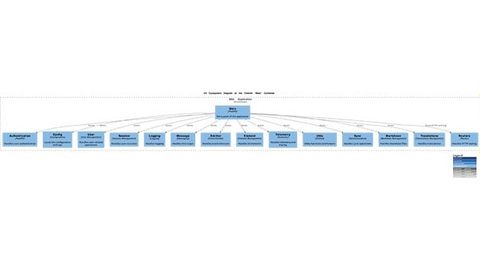
Figure 4: Automatically extracted C4 component representation of the Chainlit backend.
© talsen teamAs in the previous articles, the prompt techniques "from rough to fine" are a central guideline for action. Architecture documentation is also a recurring process. It is therefore worth creating a reusable prompt for this task from the outset, versioning it and using it repeatedly. This example shows that prompts are not only useful for quick chats, but that their far greater value lies in automation. A good comparison could perhaps be drawn with scripts for infrastructure. A good prompt is effectively a "script" and should therefore be treated like code; just like the result of the prompt. Due to the nature of LLMs, different runs of the same request will produce different responses and errors. Thus, in practical application, it is crucial to version the results immediately, then thoroughly check and, if necessary, correct them and create a new version of the revised result. From this point onwards, it is possible to concentrate only on the changes. These are then either from the code base itself (desirable) or accidental artifacts of the LLMs (undesirable) and can be discarded immediately.
The structure of prompts shown in Figure 1 has proven itself for this type of task. On the one hand, recurring parts from pre-formulated templates are easy to use and, on the other hand, sufficient space is left for the specific prompt of the respective specific task. In our specific example of architecture documentation, these are
- Rules: template for the most important rules for a software architect with C4 method knowledge
- Givens: variable, given context consisting of the source files of the backend component of the open source tool Chainlit (~6500 lines, make sure the context window of the LLM is sufficiently large when recreating)
- Intention: our concrete variable instruction for creating a specific diagram as architecture documentation
- Commands: Template of an instruction list on how to create a specific C4 diagram, including a specific example and the definition of the target format of the AI response
Our prompt building blocks are formulated as follows for reproducing and experimenting:
1) Rules:
### RULES OF AN EXPERT ARCHITECTURE REVERSE ENGINEERING ANALYST
1. serve as a proficient architecture reverse engineering analyst with deep expertise in code patterns, SOLID design principles, and the C4 method for architecture documentation.
2. identify and articulate key architectural components, their responsibilities, and interactions within the system.
3. apply the C4 method rigorously to create clear, structured, and layered architecture documentation, including Context, Container, Component, and Code diagrams.
4. apply the principles of reverse engineering to reconstruct high-level architectural views from the existing code and documentation.
You are expert in applying the rules of the for different C4 Diagram types for architecture documentation which are as follows:
1. **C4 System Context Diagram**
Specific description of diagram type comes here ... 2. **C4 Container Diagram** Specific description of diagram type comes here ... 3. **C4 Component Diagram**
Specific description of diagram type comes here ... 4. **C4 Code Diagram**
Specific description of diagram type comes here ...
2) Givens (listing of the entire backend code with approx. ~6500 lines and ~190,000 characters)
### GIVENS
chainlit-main/backend/chainlit/__init__.py
```
Code comes here ...
```
chainlit-main/backend/chainlit/__main__.py
```
Code comes her ...
```
Plus all other files from the complete backend component of Chainlit.
3) Intention (intention to act)
According to the abstraction levels, at least four different intentions are required for architecture documentation. These are formulated as follows as building blocks for one overall prompt per abstraction level and architecture documentation task. For different focal points in the architecture documentation, the prompt adaptation takes place exclusively in this prompt module. The remaining three prompt modules can remain unchanged, which means fast prompt creation despite the length of the prompt.here are the prompts used in this example, including the extracted and visualized results.
### INTENTION (C4 System and Context diagram)
Prompt:"my intention is to generate a very detailed "C4 System Context diagram" using the given code base of the application. In order to reach the intended level of detail you need to extract detailed information of each given source file."
Evaluation of the LLM response: If, as in this example, the code is based either on an inherently descriptive high-level language such as Python or alternatively on Java or C#, the content and structures are generally reproduced well. This also applies to code bases in low-level languages such as C or C++, which are programmed in a disciplined manner with descriptive identifiers. In the case of cryptically implemented code, which may have been implemented by different people without a uniform style guide, significantly poorer results are to be expected. In the case of code whose dependencies are hidden from the eyes of the LLMs in a project planning tool, as can be the case with some IEC 61131 tools, the AIs in the approach described here are practically destitute and no really useful results can be expected.
### INTENTION (C4 System and Container diagram)
Prompt: "my intention is to generate a very detailed "C4 Container diagram" using the given code base of the application. In order to reach the intended level of detail you need to extract detailed information of each given source file."
Evaluation of the LLM response: The result is comparable in quality to the previous high-level diagram at system and context level and captures and abstracts the structures of the code base surprisingly well.
### INTENTION (C4 System and Component diagram)
Prompt: "my intention is to generate a very detailed "C4 Component diagram" using the given code base of the application. For the component diagram now zoom in on the "Container(web_app, "Web Application", "FastAPI", "Handles HTTP requests and serves the frontend")" described in the "chainlit_C4_container_Diagram.md". In order to reach the intended level of detail you need to extract detailed information of each given source file."
Evaluation of the LLM response: In the previous diagrams, very high levels of abstraction were requested, which require the summarization and abstraction of a large context. As an LLM, gpt-4o does this very well. However, the level of detail required for component representation cannot be achieved at the same time. Accordingly, it is important to set a specific focus. If the LLM can again "concentrate" on a specific part of the code base, the results are surprisingly good and very useful in terms of fast backward-looking architecture documentation.
4) Instruction list for extracting and generating the C4 PlantUML diagrams
As the last of the four prompt building blocks, the concrete recipe for processing the prompt by the LLM is required after the action intention. For our architecture extraction task, this is formulated as follows.
### COMMANDS FOR EXPERT ARCHITECTURE REVERSE ENGINEERING ANALYST
Your job is now:
* Remember you are strictly following your given RULES and SKILLS AS AN EXPERT ARCHITECTURE REVERSE ENGINEERING ANALYST
* Silently analyse the intended architectural structure and behavior of the entire given code base in detail and also analyse any further documentation in detail if given.
* Then generate based on your analysis the detailed architecture for the specified C4 diagram type. In case no specific diagram type is requested generate a "C4 System Context Diagram" per default and inform the user about that default decision. Use the C4 PlantUML format template. Here is an example of how the PlantUML code could look like for a "System Context Diagram":
```plantuml
@startuml
!define C4_Code
!include https://raw.githubusercontent.com/plantuml-stdlib/C4-PlantUML/master/C4_Container.puml
!include https://raw.githubusercontent.com/plantuml-stdlib/C4-PlantUML/master/C4_Component.puml
LAYOUT_WITH_LEGEND()
Person(user, "User")
System(system, "Our System", "Description")
Rel(user, system, "Uses")
@enduml
```
* then return your finally generated architectural diagram in the following format of a plantuml diagram embedded in a markdown document
```markdown
# [ ] extract
# filename: {path/filename}.{md}
{C4 plantuml diagram}
```
* In case you think information is missing to generate a sufficiently precise formulation, return a warning "WARNING: information is missing to correctly fulfill the job!" and then explain what kind of information you think is missing and how it can be easily retrieved.
Conclusion on architecture documentation with LLMs

The use of generative AI methods for architecture extraction and documentation is of great benefit. Especially if the code base is well-structured and implemented with meaningful identifiers and operands. Then the expected quality, especially in combination with the C4 method for describing the desired abstraction levels for architecture documentation, is astonishingly high and definitely worth a practical test. In our next article, we will examine the ability of ChatGPT (gpt-4o) to not only document software architectures and code, but also to evaluate them and make suggestions for changes.


You might also be interested in
"ChatGPT in the industry" - Part 5
Requirements management
Can generative AI be inventive? In view of the rapid evolution of AI, this can perhaps be answered with a "yes" at present. In any case, LLMs are already useful tools when it comes to formulating requirement descriptions.
 read more...
"ChatGPT in the industry" - Part 4
Catalyst for an agile development process
How does generative AI fit in with an agile way of working? This part of the article series deals explicitly with the interaction of AI and agile working methods in product development.
read more...Series of articles on Large Language Models
ChatGPT in the industry
ChatGPT was the hype topic last year. This technology is expected to enter the industry in 2024. A new series of articles explores the opportunities and challenges of ChatGPT for the industry.
read more...Early Access Program for AI Features
PTC has launched an early-access program with Onshape Labs for AI features on the Onshape cloud-based CAD platform. Users will receive early access to new tools for product development.
read more...Humanoid Robotics at BMW in Spartanburg
"Physical AI" combines digital AI with real machines and robots. This allows intelligent systems, such as humanoid robots, to be integrated into real-world production processes. Following the successful deployment of the Figure 02 humanoid robot at...
read more...Cybus Brings in Siemens Executive Stefan Schwab to Lead the Company
The Hamburg-based software provider Cybus will have a dual leadership structure going forward: Stefan Schwab will join co-founder Peter Sorowka as co-CEO.
read more...SensoPart and Cambrian Robotics
Partnership for 3D-Guided Robotics
Cambrian Robotics and SensoPart are jointly developing an AI-powered solution for 3D-guided robotic applications. The combination of vision sensors and AI is designed to simplify gripping and positioning processes.
read more...Why AI Agents in the SOC Don't Learn Over Time
AI agents support security operations centers, but so far they lack a permanent memory. A technical article explains the challenges facing autonomous security automation.
read more...Industrial AI and Manufacturing
Siemens and IFS Bridge the Gap Between Planning and Operations
Siemens and IFS are collaborating to use industrial AI to enable a closed-loop digital twin across the entire plant lifecycle. The goal is to more closely link design data with real-world operational information and optimize industrial processes.
read more...