
Codesys
The car wash at the Cloud
Fully automated car washes are the expertise of the Swiss company AWT. AWT relies on the cloud-based administration platform from Codesys for its control technology.

With its fully automatic car wash systems, AWT Autowaschtechnik focuses on the economical use of energy, water and cleaning chemicals as well as careful cleaning of dirt and process water. And, of course, on the result: consistent cleaning quality with the greatest possible protection of the car surfaces. The intelligent control technology of the car wash systems plays a central role in this. Because even if the systems are standardized, they differ depending on the ambient conditions on site, for example in terms of water hardness or typical vehicle soiling. AWT sells its systems under the brand name Soft Car Wash as turnkey wash centers, not least in order to be able to monitor and optimize all operating parameters.
The control technology of the systems is based on Codesys. The company leaves the development and optimization of the control applications to the system integrator Inasoft, which was involved early on with the Codesys Automation Server, the cloud-based administration platform for control systems.
An Industry 4.0 platform
And so Inasoft set about clarifying important questions on the basis of the Industry 4.0 platform:
- How can Soft Car Wash, as the operator, or AWT, as the system manufacturer, quickly gain an overview of the status and version information of the control systems supplied? After all, the systems are widely distributed - at several dozen locations in Germany and Switzerland.
- How can the application software of the control systems be centrally managed and used as source or executable binary code? How can authorized employees easily gain access to the latest versions - especially when they are not at the company site?
- How can updates to the control software be quickly rolled out to the car washes already installed? And centrally, without employees on site with a PLC programming tool?
- What are the current values of important operating parameters at the various operating sites? How can these parameters be adjusted centrally to optimize the washing results without having to travel to the respective operating site?
- How can a replacement machine be loaded with the previously running application software as quickly as possible after a control system failure? How can losses in operating income be minimized through such a replacement?

"We are already considerably simplifying the development, maintenance and management of the control application with the Automation Server. At the same time, we are looking forward to the new features. This will enable us and our customers to achieve savings that will catapult the competitive advantage of car washes to the top!"
In consultation with the customer, the system integrator set up a pilot project to connect the car washes to the Automation Server.
Steps to go

Four steps were necessary for Inasoft to connect the Codesys controllers to the Automation Server:
1. create and manage an account in the Automation Server. This can be done online in the Codesys Store.
2. connect the controllers to the Internet. The system integrator already uses a whole range of security measures provided by the system to secure the Codesys-based controllers. After all, the devices and applications should be protected against unauthorized access and misuse. A further level of security is introduced with the Codesys Edge Gateway: This software service separates the control network from the Internet and, for its part, communicates exclusively with the cloud platform in a secure manner. Signing and encryption are based on X.509 certificates and therefore the same procedures that have proven themselves in online banking, among other things. Depending on the system constellation, Inasoft can decide whether the gateway is installed on a selected controller in the network or remotely on dedicated Linux or Windows devices. In either case, the gateway becomes the transition point between the cloud platform and the local control network.
3. register the Edge Gateway in the Automation Server account. One or more Edge Gateways are registered by command in the Automation Server development system. This allows the controllers of different locations to be mapped in one account.
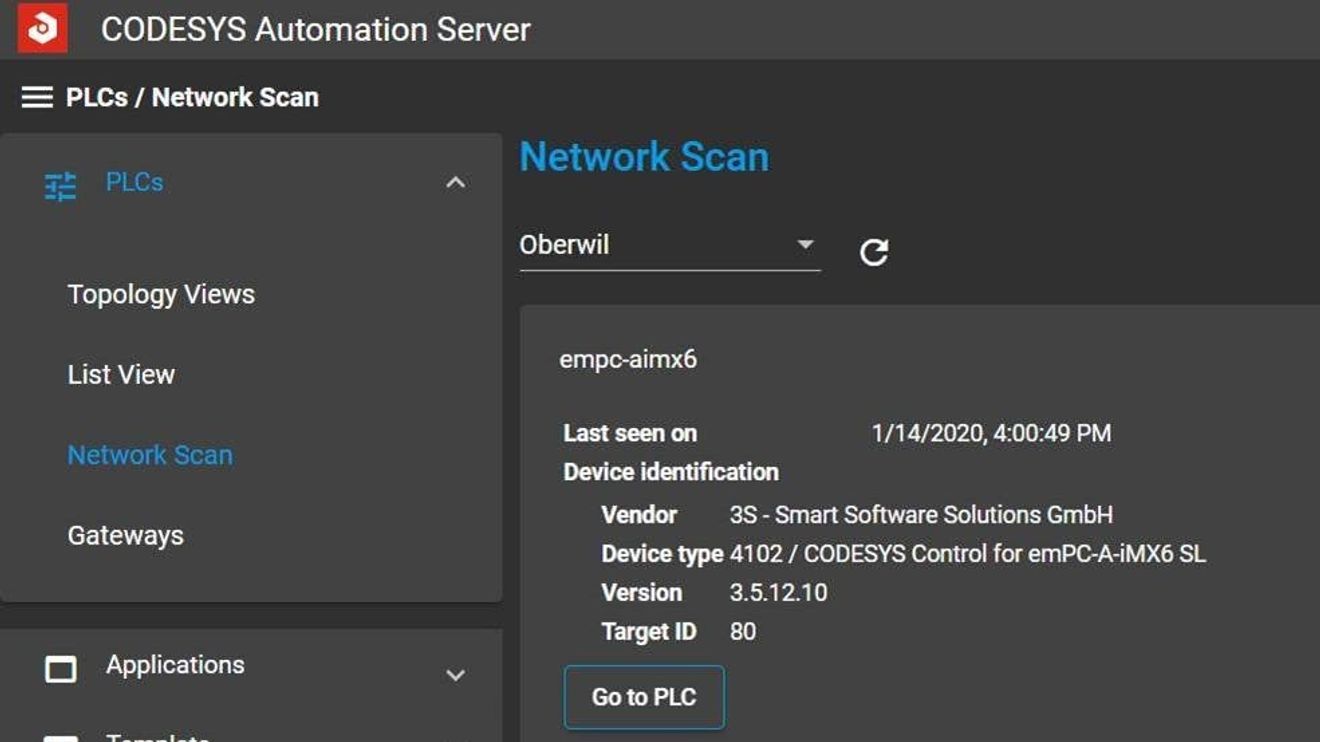
4. integrate controllers via the Automation Server web interface. A network scan for each gateway enables all connected controllers to be found in the web interface, which can be transferred to the Automation Server administration with a click of the mouse. Initially, nothing more needs to be done for the central list view of the devices. This list can be displayed in any browser, for example from PCs or mobile devices such as tablets or smartphones. The controllers can also be clearly structured in topology views, for example in map views for the locations in Germany and Switzerland, or graphical overviews of the different system types.
Further features

The topology view for plant locations in Switzerland: Regional detailed views or control information for individual plants are immediately available at the click of a mouse.
© CodesysPublish parameters of the control applications: In order to be able to access variables of the control project from outside, they must first be published in the project. A special configurator is available in the development system for this purpose. Just as variables are released for data exchange via OPC UA, they can be published for use by the Automation Server. They can then be displayed and changed from the server's web interface - no matter where the system is located.
Save control project in the Automation Server: Source and executable binary code can be uploaded directly from the development system to the cloud. This means that the project information is stored in a central location and can be downloaded to an application developer's local PC from anywhere in the world and edited there. The prerequisite for this and all other actions is the necessary access authorization, which is granted by user profiles. Conversely, applications that have already been translated can be rolled out directly from the server's web interface to one or more suitable controllers. The server rolls out a tested new version of the application, which is to be used on all delivered car washes of the same type, with just a single command.
Create work orders via ticket: Typical work orders can be forwarded to employees on site via the web interface, such as "Put application XXX into operation on the new controller YYY". Employees do not need any programming knowledge or experience with server systems to do this. All they need is an Internet browser; an e-mail address that can be accessed locally is also recommended. The work order can be described to an employee created in the server web interface via such a ticket, e.g. "Hello Christian, please replace the defective controller with the identical one from the warehouse. If the PLC is electrically in operation, click on the link below and enter the serial number of the new controller via QR code using the integrated camera on your tablet. Thank you very much, Roger."
The link mentioned in the email takes Christian to a restricted view of the Automation server account. Here he does exactly what he was told to do: He changes the device, enters the serial number of the new PLC and confirms the entry - that's all! The connection to the back-up of the failed controller is already stored in the ticket. Using the serial number entered, the Automation Server registers the replacement device and automatically transfers the backup of the application and parameters. A few minutes later, the new control unit and therefore the entire car wash are back in operation.
Display web visualization of the control unit: The system integrator's employees do not need to be on site to view the control system's user interface. Prerequisites for this: The control system is integrated in the Codesys Automation Server and has a stored web visualization. The web visualization can be called up directly from the list view of the controllers. To do this, the Automation Server establishes a connection to the local controller, synchronizes the data and displays it in the browser window of the device with which the server is currently being operated. The transmission uses the same secure mechanisms without the need to provide an infrastructure.

Inasoft is already solving typical tasks for its customers with the Automation Server. By hosting the platform on a central server, integrators always benefit from the latest version. Further features in the course of the year will make it possible, for example, to easily save application data directly in the server and evaluate it graphically. Simple remote debugging via the established data connection to the server will also be possible in the near future.


You might also be interested in
More power in the servo system
Modularity, flexibility and a higher power density are the trend in the development of new production machines. This has an impact on integrated drive technology. A modular, very compact multi-axis servo system meets the challenge.
 read more...
The second phase
The BMBF project 'Basissystem Industrie 4.0' came to an end a year ago. Now, small and medium-sized companies are to be supported in the introduction of Industry 4.0 on the basis of the project. Project manager Dr. Thomas Kuhn explains the...
read more...Annual press conference of ebm-papst
Further expanding digital business models
The aim of the newly founded ebm-papst neo is to market and sell digital solutions. And ebm-papst is also focusing on digitalization in other ways.
read more...Peripheral devices according to protection class IP65/67
With the Simatic ET 200eco PN, Siemens is launching a new generation of machine-oriented block peripherals onto the market. The I/O family in protection class IP65/67 initially consists of five digital peripheral devices and an IO-Link master device.
read more...New functions for safety and industrial security
When selecting the operating mode and managing access authorization, the configurable safe small controller PNOZmulti 2 from Pilz now takes on additional industrial security and safety tasks.
read more...The e-paper of the June 6 issue has arrived
The new issue 6 is now available for you as an e-paper or for download. We have lots of practical examples, exclusive reports and product presentations for you.
read more...Implement 5G now!
Should the factory data be stored in the cloud or rather on site in your own data center? The next generation of mobile communications should be taken into account in these considerations. After all, 5G can make a decisive contribution to the...
read more...IoT and AI are gaining in importance
Artificial intelligence and the Internet of Things are more important than ever for one in five SMEs - especially when it comes to surviving the coronavirus pandemic. This is the result of a study commissioned by Microsoft.
read more...New functions and free of charge until the end of the year
The Codesys Group is now making its "Codesys Automation Server" available to Codesys users free of charge throughout the year due to the coronavirus crisis. In addition, the cloud-based Industry 4.0 platform for managing globally distributed control...
read more...