
Codesys
News from the profiler
Whether performed regularly, prophylactically or sporadically as required: If you examine the runtime of your IEC 61131-3 project with a profiler as an additional tool, the effort involved is minimal, but the benefits are considerable. A plea for this category of software tools.

If a 'profiler' makes you think of crime thrillers, you're on the right track: such case analysts use available facts to search for possible patterns in order to solve (criminal) cases. Profilers can also be found in computer science. These are auxiliary tools for programming. Similar to police work, these tools analyze the facts, specifically the runtime behavior of software. The aim is to uncover problem areas that slow down processing, optimize the source code through structural and algorithmic improvements and ultimately accelerate code execution
"I only measure when problems occur!" Many PLC programmers think this way. If no problems occur, then they have done everything right. After all, the prophylactic measurement of runtime behavior costs valuable engineering time if it is carried out with on-board resources: This involves manually setting time stamps in the source code before the start and after the end of the application part to be measured and calculating their difference. Similar to the LTIME function in the IEC 61131-3 tool Codesys, most PLC programming tools offer a high-resolution timer function to read out the real-time clock of the controller with µs or even ns resolution. A simple subtraction and a little additional program code are all it takes to determine the runtime and statistical evaluations of the executed routine.
When are transit time measurements required?
In general, runtime measurements are only required if problems occur. Such problems can become apparent when the real cycle time of the PLC application and thus the response time to an event increases sharply during the course of the project. The reason for this may be a frequently executed loop that contains unnecessary queries or waits for asynchronous events. Or the application engineer realizes that the originally intended controller is too weak for the project because additional options have used up its performance reserves. A quick reaction is then required.
The programmer uses runtime measurements on the target system to track down the causes: he gradually takes suspicious program modules and tries to narrow down the cause. Once they have found it, they must eliminate it. Depending on the cause, he can optimize the code, outsource parts of the application or even install a more powerful controller. If such an incident occurs shortly before commissioning, during commissioning or even during productive operation of a machine or system, then this is a super-GAU for every application programmer. If potential causes had been identified in good time, emergency intervention would not be necessary at all. At the very least, the necessary measures could be taken carefully.
Whether in advance or in an acute situation, the described method of manually 'injecting' additional code for the measurement is annoying in any case, especially if the code has to be placed in several places in the project. Finally, the code must also be removed again after the measurement, as it is no longer required for operation. After all, it consumes part of the available performance.
Automatic instrumentation through additional tools
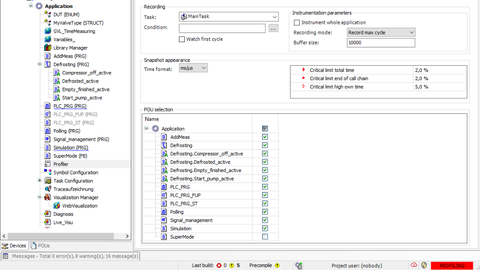
If, on the other hand, the measurements are carried out with additional tools at the click of a mouse, they can be carried out regularly during application development. Corresponding tools are not only available for high-level languages such as C++ or C#, but also for IEC 61131-3 code in the Codesys Development System. The Codesys Profiler lives up to its name: it examines the 'case' using various methods and thus provides valuable insights in every project phase without manual effort.
With the simplest method, 'instrumentation', additional code is injected into the modules to be measured - exactly as described, but automatically. The result of the measurement gives the application engineer a detailed picture of the execution time, share of the overall project and call frequency of each block. Because it is immediately visible which blocks are critical for the overall performance, he can concentrate precisely on these objects during optimization. The measurement of the longest cycle time in the observation period provides information about sporadically occurring outliers. With further configuration options, the measurement can be started dynamically via Boolean variables. The first initialization cycle or individual blocks can be deliberately included in or excluded from the measurement, and the proportion of the runtime accounted for by library blocks can also be taken into account.

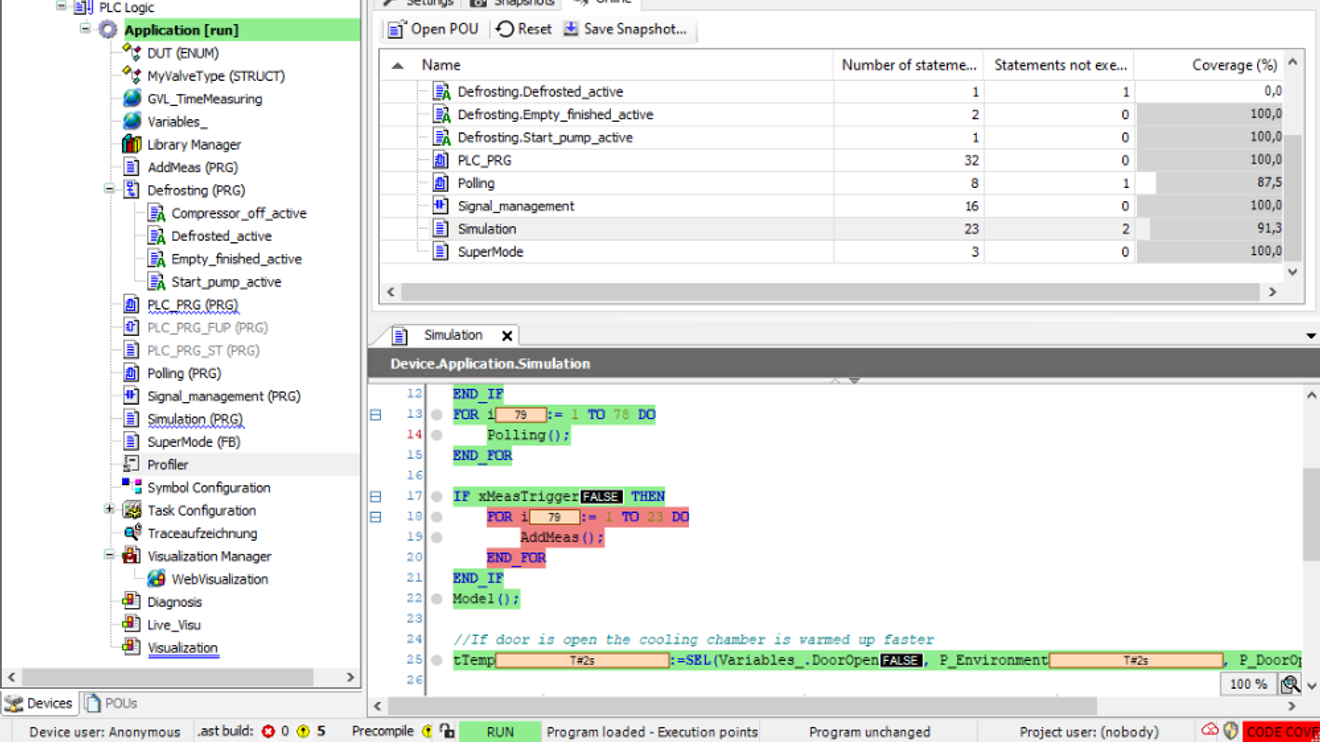
The snapshot of the processing time and the call frequency is displayed for each module and can be saved for later tracking.
© CodesysHowever, such an instrumented measurement is at the expense of the application, i.e. the execution time. In some cases, the additional load can also cause the watchdog to kick in, meaning that the task time monitoring reports an error. However, there is no way around this, especially when it comes to detecting the aforementioned outliers. It has proven to be a good idea to measure the runtime at the end of each working day, for example, to continuously monitor the progress and to immediately examine any sudden changes in individual blocks. When the profiler is switched off after the measurement, the additional code disappears in any case, and with it its effects.
Sampling and code coverage
Sampling the application is suitable for determining long-term effects with significantly less influence from the measurement code. For this purpose, the profiler intervenes in the program flow at definable intervals from the outside, so to speak, and randomly determines the current call stack, i.e. the block that has just been processed, and by whom it was called. An increasing number of such random samples sharpens the impression of which blocks take more time than others. The longer the measurement runs, the more accurate the statistical average calculated from this becomes.
How can such a measurement be realized in a tool like Codesys? By
Using multicore technology: A sampling task generated by the profiler and the associated measurement code run in their own task group on a separate CPU core. This code samples the execution of the actual application at regular intervals and uses this to measure the runtime. The running application code is not changed, and the resulting interruptions to the application are also minimal. This measurement method will not trigger a watchdog. However, sampling cannot detect outliers.
An additional method in the Codesys Profiler also provides valuable facts about the application: by checking the code coverage, the Profiler displays the lines of code or networks that are traversed during the measurement. The user can jump from the view of the entire project to individual blocks and get an overview of the result in the source code. This information is very helpful when commissioning and testing the application and provides answers to questions such as these:
- Have all operating modes already been run?
- What part of the code is responsible for the runtime of the tested operating mode?
- Which part of the application still needs to be specifically tested or put into operation
Incidentally, the quality assurance of modules can be documented very well with additional tools for test automation such as the Codesys Test Manager.
The application

The Profiler must first be installed so that a measurement can be carried out in the Codesys Development System. A corresponding add-on package is available in the Codesys Store, which is licensed together with four other tools as an annual subscription. For measurement, the application programmer inserts the profiler as an object in the project tree and configures the measurement method and its parameters. The measurement is started automatically when the application is downloaded to the controller. As a result, all executed objects are immediately displayed in different views: Hierarchically according to the call tree, as a list sortable according to different criteria and in an inverted display of the call tree for tracing the call chain. From the list, the user can jump directly to the individual blocks in order to optimize the code there.
An overview with basic information on the measurement is also available. If the measurement result is saved as a snapshot in the project, the programmer can document the runtime behaviour and later trace its progress. This makes it easy to trace or rectify jumps in individual objects and their causes. And because it is sometimes sufficient to monitor just one or more individual blocks, the profiler also provides a kind of 'real-time view': If the user drags a block into the profiler watch list during program execution, he can immediately see its execution time together with statistical information.


You might also be interested in
The automation solution for users, manufacturers and operators
With the manufacturer-independent IEC 61131-3 suite CODESYS, the CODESYS Group covers the entire software side of automation.
 read more...
Stable sales in 2020 and plans for 2021
In the past 2020 financial year, the Codesys Group generated a slight increase in sales of 3.2% to just under EUR 25 million with its IEC 61131-3 automation software Codesys, despite the pandemic and the sometimes tense overall economic situation.
read more...Kempten University of Applied Sciences
First experiences with OPC UA PubSub
Codesys already offers an object-oriented IEC library for implementing PubSub. Kempten University of Applied Sciences has now equipped an Industry 4.0 demonstrator with the communication system. A first field report.
read more...From data analysis to OPC UA PubSub
With the Codesys Automation Server, Codesys added an Industry 4.0 platform to its IEC 61131-3 automation software last year. The latest innovations for this platform and a library for OPC UA-PubSub communication will now be presented at SPS Connect.
read more...The car wash at the Cloud
Fully automated car washes are the expertise of the Swiss company AWT. AWT relies on the cloud-based administration platform from Codesys for its control technology.
read more...Dual leadership in Shanghai
Stefan Becker has been appointed Managing Director of Eckelmann Automation Technology in Shanghai and will manage the subsidiary together with Zhongwei Huang.
read more...20 % increase in sales in 2023
Hima, a provider of safety-related automation solutions, has closed the 2023 financial year as the most successful in the company's history to date. In addition to its global presence, the solution portfolio for the process industry and railroad...
read more...Seita Hagihara is the new President
Yokogawa has appointed Seita Hagihara (49) as the new President of Yokogawa Europe B.V., effective January 1. He succeeds Takayuki Matsubara, who is moving to the role of CEO of the Yokogawa Group company KBC.
read more...Plant honored as Sustainability Lighthouse
Schneider Electric's plant in Hyderabad, India - one of India's most important technology locations - has been recognized as a Sustainability Lighthouse by the Davos World Economic Forum. This is the third award of this kind for Schneider Electric.
read more...