

Inexpensive prototyping
Raspberry Pi as a controller, small computer, gateway
The third generation of the Raspberry Pi is the latest development stage of the popular maker platform. However, the increase in computing power is limited - the Raspberry Pi's extensive hardware/software ecosystem is much more interesting.

The third generation of the popular small computer, the Raspberry Pi 3, was released in February 2016. Although there are now many more versions of the Raspberry Pi (see table), the real boom began with the Model B. Although this board was announced for the end of February 2012, the Raspberry Pi Foundation was overwhelmed by its own success and the far too few units were sold out immediately. Together with the distributors Farnell and RS Components, the Foundation ramped up production so that large quantities of the boards could begin to be delivered from June 2012.

Family tree: In addition to the models listed here, there was also an A+ model, which, like the A model, has practically no market significance. More important are the three generations of the Broadcom SoC used.
© BroadcomThe success of the Raspberry Pi is partly due to the fact that you can get a fully operational Linux computer for the fabulous price of 35 dollars. In practice, the bare board including VAT costs between 35 and 40 euros in retail stores. You also need a (micro) SD memory card as a mass storage device, a USB power supply and a case. Even with these parts, a Raspberry Pi still costs well under 100 euros. A keyboard, screen and cable should be available in most computer-savvy households.
It seems a little strange today that almost all Raspis bear the suffix "Model B". Initially, there was a "Model A" without an Ethernet socket and with only a USB port, but this did not achieve any market significance. A "Model A+" also followed in the meantime, but due to the different board dimensions, it did not fit into any of the existing housings and was also not accepted. What the first-generation Raspis have in common is the ARM1176JZF-S computing core, which was not up to date even back then. However, the decision to use the outdated ARM11 was due to the costs and the lengthy development period until it was ready for the market.

A real breakthrough came last year with the Raspberry Pi 2, which, with the quad-core ARM Cortex-A7, brought a not brand new but inexpensive and powerful computing core. The Raspberry Pi 2 is a fully-fledged Linux computer that boots the Linux distribution "Raspbian", maintained by the Raspberry Pi Foundation, in a graphical desktop and has a large number of installed application programs. Although web browsing and working with the Libre Office programs feels a little sluggish, the price-performance ratio is unbeatable for a sub-100-euro computer.
This also applies to the current Raspberry Pi 3 (Fig. 1), in which a 64-bit ARM architecture with ARM v8 instruction set has been introduced with the four Cortex-A53 cores. Benchmarks show the Raspberry Pi 3 to be around 30 percent faster than its predecessor. In direct work, this is a barely perceptible acceleration, which alone would hardly make the purchase of the new version worthwhile. Much more practical, however, is the integration of WLAN and Bluetooth 4.0 in the new Pi, which makes the corresponding USB dongles superfluous. Since May 2015, Raspbian has finally also included integrated driver support for the Bluetooth module, making manual downloading and configuration of drivers superfluous.
Failed compute module
The Compute Module and the Raspberry Pi Zero occupy a special position. The Compute Module has an SO-DIMM edge connector and is plugged into an I/O board. Accordingly, the module itself has no I/O interfaces - the corresponding connectors must be soldered onto the I/O board. Following the paradigm of the ARM and x86 computer modules à la Qseven and COM Express, the Compute Module is aimed at professional use, where an application-specific carrier board is developed.
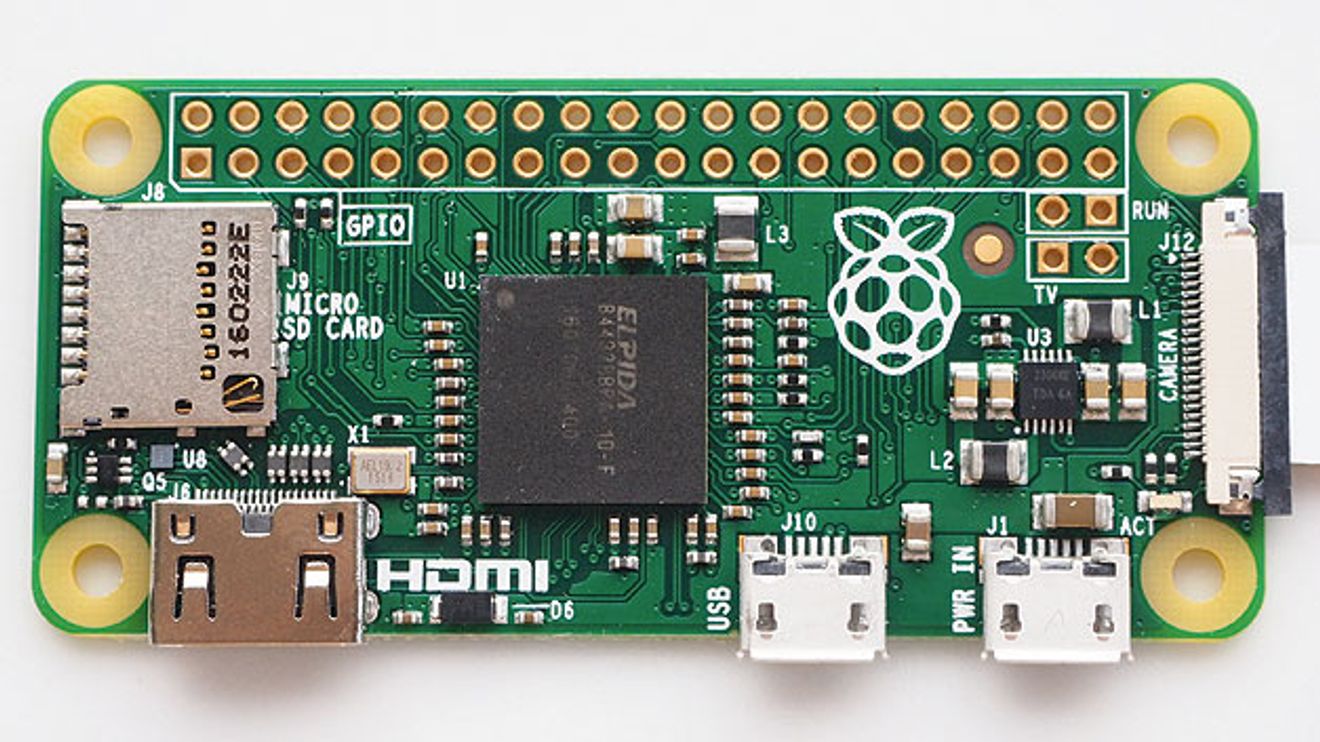
Figure 2: The Raspberry Pi Zero is a particularly small implementation of the Raspberry Pi at 65 × 35 mm2 - but no longer with the latest processor generation.
© FarnellThe advantage should be that the interfaces for the integrated peripherals (display, audio, USB) and other peripherals connected via GPIO can be combined. This was a well-intentioned approach by the Raspberry Pi Foundation; in practice, however, the industry prefers to use the original Raspberry Pi, which is cheaper and, since version 2, much more powerful.
The Raspberry Pi Zero(Fig. 2) seems to be more popular. At 65 × 35 mm2, this extremely compact module has been spared on the processor and interfaces: it carries the SoC of the first Raspberry Pi generation, albeit with a higher clock rate, and only has HDMI and USB interfaces on board in miniaturized form. The GPIO strip is not populated and must be soldered on by the user. In return, the board costs "only 5 dollars" - in practice, it costs 15 euros with the necessary USB and HDMI adapters.

Figure 3: The housing from EMTrust can be used to mount a Raspberry Pi Zero on the DIN rail
© EMTrusEMTrust, an industrial system manufacturer, also relies on the Raspberry Pi Zero. Various housings for the Zero are available in the EMTrust webshop (Fig. 3). The robust housings provide access to all interfaces and are easy to install. The EMTrust module system can be used as a supplement. These modules were actually developed as robust USB extensions for x86 industrial PCs, but can also be connected to the Raspberry Pi Zero via USB. The product range includes CAN, serial and Gigabit Ethernet modules as well as a card carrier for Mini PCI Express cards.
Many Raspberry Pi fans would have liked more RAM or Gigabit Ethernet, perhaps even a SATA port. However, the Raspberry Pi Foundation's hands are tied here due to the architecture of the Broadcom SoC. It is noticeable that one component has remained the same across all Raspberry Pi generations: the VideoCore IV of the three Broadcom chips BCM2835/36/37. This video processor is the actual heart of the chip. The ARM processors are only connected to it and are booted by the VideoCore. The peripherals and the main memory are also controlled via the VideoCore. The Broadcom SoC was selected at the time by Eben Upton, co-founder of the Raspberry Pi Foundation, who had previously worked at Broadcom. As he was familiar with the special architecture of the component, it was obvious to use it, but the Videocore IV cannot address more than 1 GB of RAM and is also reaching its limits with the third generation of Raspberry Pi. It will be exciting to see how the Raspberry Pi will develop under these constraints. Especially as the Foundation has so far done everything in its power to maintain software compatibility across the various generations. It is precisely the extensive software support that has made the Raspberry Pi so successful.
Raspberry Pi with Matlab and Simulink
With its inexpensive hardware, the Raspberry Pi is ideal as an experimental system for makers and in an academic environment, but is also popular as a prototyping system in companies. Commercial providers have jumped on the bandwagon and offer hardware and software extensions that are also useful for professional and industrial users. One of the pioneers in this field is Mathworks, which is very active in supporting universities and licenses its Matlab and Simulink products to scientific institutions at relatively low cost.

Figure 4: The support package for Matlab turns the Raspberry Pi into a sensor from which values can be read into Matlab on the development PC.
© MathworksMathworks supports the Raspberry Pi with its own additional packages and libraries. There is a support package for Matlab with which the Raspi can be used as a remote-controlled sensor system. The support package establishes a communication connection with the Raspi via WLAN and Ethernet(Figure 4) in order to read in data from the sensors or the peripherals of the Raspi. This data can then be analyzed, processed and displayed on the development computer using Matlab. The Matlab Support Package contains libraries with Matlab functions for the Raspberry Pi Camera Board, the I2C interface, the SPI interface, the serial interface, the GPIO pins and the Linux command line. The data from these devices or connections can be transferred to the development computer. With additional add-ons such as the DSP System Toolbox and the Image Processing Toolbox, the data can be processed on the host system. A local installation of Matlab on the Raspberry Pi is not possible.
This is different with the Simulink Support Package. Real cross-development is possible here. This means that a circuit is designed with the Simulink blocks on the development computer, which is then simulated - also on the development computer. If everything works satisfactorily, the code is transferred to the Raspberry Pi and runs there independently. The support package extends Simulink with blocks that control and read out the I/O connections of the Raspberry Pi. An interactive mode is also possible, in which the parameters can be changed while the Pi is running the Simulink program. With the audio interface, the Raspberry Pi has a D/A and A/D converter whose signals can be read and written by Simulink; the camera and display interfaces and the GPIO pins are also supported. UDP packets can be sent and received via the network interfaces, and Simulink can also be used to send data to the cloud platform Thingspeak.
Use as a PLC
Codesys is synonymous with soft PLCs on the PC. There is also a PLC runtime system for the Raspberry Pi, but it is not intended for productive use, but for teaching and prototyping. The reason given by 3S, the manufacturer of Codesys, is that the Raspberry Pi runtime system is not real-time capable. The jitter depends on various factors, including the Linux applications running in parallel. Ideally, it is around 50 µs with maximum values of around 400 µs.
A programmable logic controller works in cycles: first all inputs are read in (process image), then the PLC program is processed and the results are written to the outputs. For this principle to work in dynamic control loops, each cycle must be processed within a fixed time, otherwise the system will get out of step. However, the Raspberry Pi will not be used to synchronize the fast drives in any printing or packaging machines. Often it is just a matter of switching a few LED displays on or off, actuating valves or relays and displaying read-in sensor values. Codesys on Raspberry Pi is ideal for this.

Figure 5: The Raspberry Pi as a controller - with the Codesys runtime system and visualization via the integrated web server Webvisu.
© 3S SoftwareThe Codesys runtime system is integrated into the Raspbian or Debian Linux of the Raspi and is loaded automatically with every system start. To ensure that everything works later, a few precautions must be taken on the Raspi, for example that SPI and I2C are activated, a fixed IP address is assigned and a few more things, which are described in detail on the Codesys website. The runtime system can then be transferred from the development computer to the Raspberry Pi via an IP connection. Here too - as with Simulink - cross-development takes place: Development takes place on a PC, the developed program runs on the target system, the Raspberry Pi.
The unlicensed version of the runtime environment terminates itself after two hours, but a license that allows the system to run indefinitely is also available for 35 euros, which is practically pocket money. The Codesys package contains some sample applications that demonstrate the range of functions. One component of Codesys, for example, is the integrated web server "Webvisu", which visualizes process data(Fig. 5). The status of inputs/outputs, numerical values and curves can be displayed in various visualizations in the browser. Individual images or a video stream can also be displayed via the web server if a camera is connected to the Raspberry Pi. Another example shows the control of GPIO signals and their visualization in the web browser. Other examples require hardware extensions that can be used to read inputs/outputs in the standard PLC form of a process image, display information on a line display, control a servomotor, etc. The possibilities with Codesys are very extensive and the required additional hardware, e.g. from PiFace, is inexpensive.
A similar system to Codesys is the soft PLC programming system from logi.cals. This company also offers an evaluation system for the Raspberry Pi. Here, the PLC program is created with the logi.CAD 3 development environment. A lean version, logi.CAD 3 compact, can be downloaded free of charge from the manufacturer's website. A runtime is also installed on the Pi, the free version of which stops working after one hour.
Robust hardware for PLC use
Most control applications can hardly manage without hardware extensions, because with the four USB interfaces and the GPIO strip, the Raspberry Pi's application possibilities as a controller are extremely limited. However, the wide range of accessories on offer from accessory manufacturers includes many finds - both with a professional appearance and for on-the-fly assembly on the lab bench. The latter includes the modules from PiFace, which can be used to connect a line display, a terminal strip for digital I/Os, a board with four relays and an SPI bus circuit board with four slots to the Pi.

Figure 6: PIXtend has numerous expansion ports for control applications. The Raspberry Pi is plugged into the center and looks almost lost. The system can even be used productively in a control cabinet under the metal housing.
© ReicheltIn contrast, the PiXtend expansion board looks quite professional, although the question is who is expanding whom here(Fig. 6). The Raspberry Pi is plugged in and looks almost a little lost. The list of connections is extensive: digital and analog inputs and outputs, PWM/servo outputs, relays, serial interfaces including CAN, real-time clock, connection for temperature sensor, 433 MHz radio module and integrated switching power supply. All inputs/outputs are short-circuit proof. A plastic housing for the top-hat rail and a stainless steel cover are available as accessories.
The boards from Horter & Kalb are also professional. The manufacturer specializes in components for (Simatic) controllers and the I2C bus and also offers some of these accessories for the Raspberry Pi. An I2C module is plugged into the GPIO strip of the Raspi. From here, the expansion modules are connected via cable. These include analog and digital input/output modules (8 bit each) as well as cards with five analog inputs or four analog outputs (resolution 10 bit each).
Ethernet Powerlink
Ethernet Powerlink also falls into the control technology category. Kalycito has implemented this real-time Ethernet protocol on the Raspberry Pi 2. The software consists of an openPowerlink master and slave with Linux. Kalycito has developed a demo application that shows that Powerlink on the Raspberry Pi 2 in combination with controllers and decentralized I/O systems can be an interesting platform for networked industrial and home automation. The demo was created with the unmodified open source package. A quick start guide and pre-built demo binaries can be used to get started before further modifying the C programs for sending and receiving data via the I/O pins. Further information on the demo application is available on the Internet.

Figure 7: Raspberry Pi in the industrial housing from Janz Tec. Not visible: The base board developed by Janz Tec, which also contains the D-Sub connector with the CAN interface. The software for using the Raspberry Pi as a CAN gateway is also available.
© Janz TecUse as a CAN gateway
With the emPC-A/RPI, Janz Tec has developed an industrial housing for the Raspberry Pi(Fig. 7). However, this Pi is mounted on a base board developed by Janz Tec, which contains a 24-volt power supply unit and adds a CAN interface, real-time clock, serial interface and some digital inputs/outputs to the system. In a robust metal housing, this system can be used as a cost-effective and flexible gateway, for example. For this purpose, Janz Tec has put together a bundle with software from emtas. The CiA 309 gateway allows access to CANopen networks via a network connection. The gateway can also act as a CANopen master and send NMT commands in addition to standard services such as SDO and PDO. The node number can be set when the program is started. The gateway provides a TCP server on a configurable port to which TCP clients can connect. Communication takes place via ASCII characters. The software is supplied in a free demo version on every device. It contains all the features of the full version and is only limited in terms of runtime.
Pre-compiled examples for evaluating CANopen applications are also included with the emPC-A/RPI. The examples implement the CiA 401 profile for generic I/O modules. They make it easy to test and implement SDO, node guarding, heartbeat, PDO and EMCY services. The examples use the SocketCAN interface of the emPC A/RPI.
Finally, the package also includes the open source tool "horch", which converts CAN Layer 2 messages into text form. This allows CAN messages to be recorded and displayed on the Raspberry Pi. In addition, horch can also work as a server that transports CAN Layer 2 messages to a client via TCP/IP. With horch, the Raspberry Pi can therefore be used very easily as a data logger, for troubleshooting or as a CAN gateway.


You might also be interested in
IPC based on Raspberry Pi
Open, modular and cost-effective: these are the key words with which Kunbus is launching the Raspberry Pi-based Revolution Pi industrial PC and platform onto the market. Project manager Dr. Volker de Haas talks about the background to the platform.
 read more...
Smart microchip ideas receive awards
The 'Invent a Chip' competition for young scientists organized by the VDE and the BMBF took place for the 15th time. Five microchip ideas under the motto 'Internet of Things' convinced the jury the most. The first prize of 3000 euros was awarded...
read more...Laptop construction kit for Raspberry Pi
The Raspberry Pi world has been enriched by an attractive project: a laptop kit that is equipped with a Raspberry Pi board. The project originators have even created their own operating system variant for it.
read more...Snapshots with the Raspberry Pi
RS Components is expanding its range of Raspberry Pi accessories: A camera module can be used to create videos or photos. In addition to HD quality, the module also offers additional functions such as time-lapse and slow motion.
read more...Taxes with open source platforms
Are Raspberry, Arduino & Co. suitable for industrial use?
Raspberry Pi, Arduino & Co. - these platforms have so far been used in the industrial environment for training purposes or in development or prototype projects. To what extent are these 'mini-computers' also suitable for professional use in the...
read more...RS now also sells Raspberry Pi & Co to private customers
RS Components now also welcomes private customers. Raspberry Pi innovations will also be available at www.rs-online-privat.de in future.
read more...Raspberry-Pi-Ökosystem erweitert
Sensorsystem für den Raspberry Pi
Mit dem 'Sense HAT' erweitert Farnell sein Zubehör für den Raspberry Pi: Die Aufsteckplatine bietet verschiedene Sensor-Funktionen und kommt auch in der 'Astro Pi Space Competition' zum Einsatz.
read more...Zehn Erweiterungen für den Raspberry Pi
Der Raspberry Pi hat trotz seines antiquierten Broadcom-Prozessors die Herzen der Entwickler-Community erobert. Zehn Erweiterungen, mit denen man noch mehr aus dem Mini-Computer heraus holt, stellen wir in einer Bilderstrecke vor.
read more...New cores, more memory, more displays
The Raspberry Pi 4 comes with new computing cores and improvements, especially to the peripherals. The new features in detail in a picture gallery.
read more...