
Operate
When looks control
The trend in production is towards batch size 1, which means that workers need assembly instructions more frequently and have to document work steps for quality assurance purposes. Gaze and gesture control in the worker guidance process can lead to increased efficiency here.
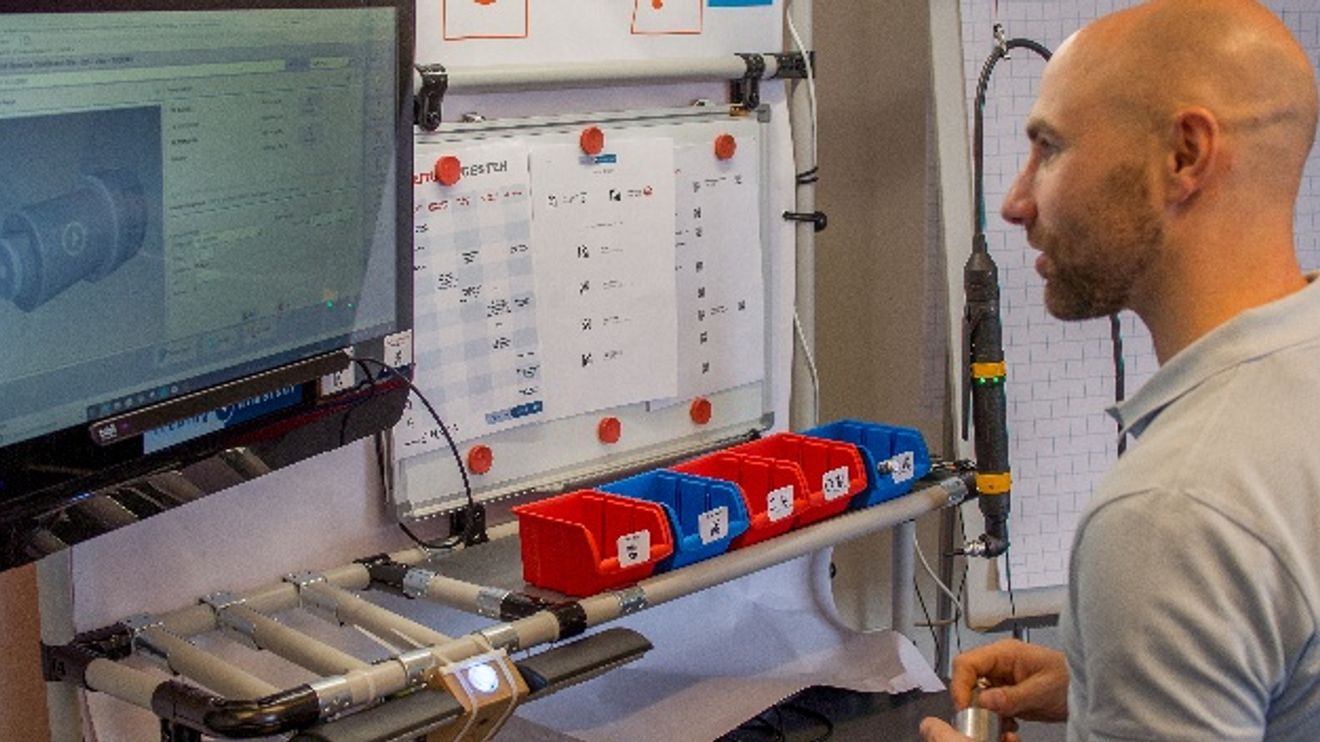
Making customized products available in a short time - trends like these are driving technological developments in the smart factory. Methods, systems and technologies are therefore being sought that support workers in producing individual series quickly and error-free according to customer requirements. Gaze and gesture control is now also finding its way into production halls, not least because it is a robust technology that supports natural movement sequences and can be learned quickly.
Manageable effort
The technological effort required for gaze and gesture control is limited: All that is needed for gaze control is a standard eye tracker - such as the Eye Tracker from Tobii - and the Nuia Productivity+ software from 4tiitoo. The eye tracker emits a weak infrared light, which is reflected by the user's eyes and calculates the direction of gaze. To get started, the user simply needs to calibrate the device, which takes less than 30 seconds. In principle, the software is placed transparently over the program to be controlled without changing it. The software recognizes where buttons and menu bars are located on the underlying user interface.
Gaze recognition
Now there are two possibilities: For non-critical functions, a simple glance to click the button is sufficient. The duration should be in the millisecond range to increase effectiveness. A gaze selector is used for double confirmation. First, the target button is marked with a quick glance. Another button then appears in the immediate vicinity, which must also be clicked for confirmation. Animated assembly instructions, for example, can be started using gaze recognition and stopped automatically when the worker looks away from the screen again. When he looks at the screen again, the instructions continue. Experience has shown that traditional screen workers such as accountants, software developers or CAD program users increase their efficiency by up to 12% with these operating aids.
If the worker is a little further away from the screen, gesture control can replace gaze recognition. A wristband equipped with sensors for acceleration, position and rotation provides feedback from the worker to the system and the wristband acknowledges this with the help of vibrations. The appropriate software translates the movements of the arm into functional controls for the program to be operated. The wristband, which has a battery life of around 10 to 12 hours, communicates with the computer via the standard Bluetooth interface.
The gesture control
The advantage of gesture control is that the worker does not have to operate a mouse or touch display and put down the workpiece or tool. The worker can simply swipe back and forth through the work instructions, start and end work processes. To mark a work step as completed or a part as 'OK', it is sufficient to draw a tick in the air or the other way round: If a problem needs to be documented, the worker indicates a cross, for example, and a dialog box with error causes opens. If a mouse is required, this can also be simulated using the AirMouse function. To do this, the arm is moved slightly up or down.
Twelve gestures are currently possible with the wristband described as an example, the function of which can also vary depending on the context. However, more than six gestures are not normally necessary, as the complexity on the store floor is generally not that high. In addition, the limited number of gestures also means that the worker is not overwhelmed.
To prevent unintentional commands during work, a short pause in movement of less than one second is required before a dialog. Safety-relevant feedback can also be combined with a confirmation gesture. The algorithm for recognizing gestures is also constantly being optimized through machine learning.
At this year's Hannover Messe, Trebing+Himstedt integrated the technologies of the start-ups 4tiitoo (gaze control) and Kinemic (gesture control) into the standard process of an SAP ME worker guidance system for a manual assembly process, thus demonstrating its feasibility.
Author: Ulf Kottig is Senior Marketing Manager at Trebing+Himstedt.


You might also be interested in
Double security through redundancy
The 'Safety Key' from Hy-Line allows the simple integration of safety-relevant switches in glass displays.
 read more...
Operation via touch, glove, pen or digitizer
Getac launches the next generation of 'F110' and 'K120' tablets: The new F110 is suitable for use in a variety of harsh outdoor and indoor scenarios.
read more...Flexible visualization
'Prime Panel Touch' and 'Prime Panel Extend' from Schubert System Elektronik (SSE) are suitable for sophisticated visualization concepts in industry.
read more...Support arm panel expands portfolio
The 'TT 1564' multi-touch operating panel for mounting arm installation extends the Sigmatek range.
read more...Managing Board expanded
Kontron expands its Management Board with Philipp Schulz and Dr. Johannes Fues. As COO, Schulz will be responsible for the Aerospace and North America business units, while Dr. Fues will assume the position of COO for the GreenTec business unit.
read more...Tablet for the Ex area
With the 'Pad-Ex 01 P12', Pepperl+Fuchs is launching a new tablet for professional use in potentially explosive atmospheres in Zone 2/22, Division 2.
read more...Modular embedded touch HMI
Irlbacher, provider of free-form touch solutions, has a new solution kit for modular embedded HMIs.
read more...Control elements that can be used for security
The control element PIToe ETH with activatable Ethernet port from Pilz protects freely accessible Ethernet interfaces in industry against unauthorized access.
read more...Control panel series updated
Kontron has developed a new generation of its Control Panels which, thanks to the more powerful Arm NXP i.MX8M Plus processors, provide a significant performance boost compared to previous models.
read more...