
Operate & monitor
HMIs in the cloud
Browser-based HMIs are gaining ground in the industrial environment - with advantages in terms of device independence and simplicity. A new technology now makes it possible to program the interfaces in the web browser and connect the HMIs to the cloud.

Until now, HMI software has generally worked according to the following recipe: The user interfaces are programmed on the PC using a specially developed editor. The project created in this way is copied to the industrial panel, which displays the HMI runtime and exchanges data with a PLC. In recent years, however, new requirements have been added. It all started with the fact that users could not only run programs on PCs, but also use the web browser as an alternative user interface.
Now, as part of Industry 4.0, networking with the cloud has been added. In this context, HMIs are taking on a very central function, as the linking of systems and the networking of data on a large scale is creating a new level of complexity. All of these devices generate vast amounts of data and relationships, the significance of which is almost impossible for a single person to grasp. If you want to find your way as a programmer or user, it is the user interfaces that open up access to the data and explain the relationships visually.
It starts with a small operator panel on a machine or module that displays a schematic representation of the system with its most important characteristics and control functions. At this level, data can be clearly assigned and its function is explained by the local HMI. The same HMIs or individual components from them should also work on the smartphone or tablet so that the operating personnel have access even when they are not directly on site. Furthermore, the individual machine and system components must be brought together on a control system so that a quick overview (collective alarms, trends, system circuit diagrams) can be obtained and the functions of an entire system can be controlled.
The HMI requirements
Networking in the cloud means, for example: Specific tasks such as managing a global machine park or monitoring and maintaining the infrastructure of a retail chain's branch network can be mapped in a central web application. This requires the continuous collection and storage of key data on the one hand and a user interface that processes the collected data in a suitable form and enables interaction (monitoring, control, observation, intervention) on the other. In summary, a web-enabled HMI technology is required that must be able to do two things:
■ The interfaces must work on all clients - from low-cost on-site panels for 100 euros to Android/iPhone to Windows and Linux PCs.
■ The HMIs must work on every server, from the PLC with embedded web server to the control system in the plant and the cloud portal.
But how complex and how expensive is the development of such a distributed application? It is important to bear in mind that the majority of programming costs are not primarily incurred in the creation of a new solution, but that more than 70% of the costs are usually incurred for the maintenance and modification of this solution in subsequent years. If Industry 4.0 is to improve our efficiency, then special attention must be paid to this area, because this is where the advantages of modularity, reusability and uniformity come into play. The most important point: it should be possible to use the same tool for all the applications described - or all HMI components once developed on a PLC should be able to be reused for the control system, the cloud portal and the smartphones (or vice versa).
Web tool for HMI programming
It is also advantageous if the HMI interface can also be programmed using a purely browser-based HTML5 tool. The developer then does not need to install any specific software on their computer. Programming works with both a PC and a tablet.
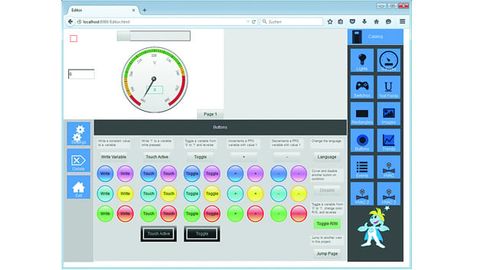
The web editor can be used on the cloud portal, for example: To do this, you switch an HMI module in the existing cloud application to edit mode and make the desired additions. The same HMI editor is also integrated into the embedded device. This allows the programmer to create the HMI interfaces between the local browser and the device without the need for a network or internet connection. This is essential because the network connection is often not yet available during commissioning or, in some cases, is expressly not desired. The solution thus combines the advantages of the Internet with the option of being able to work autonomously on a case-by-case basis. The 'Spider-Control-HMI-Toolchain' for web-based visualization from Ininet is used by many PLC manufacturers as an OEM product. The purely browser-based editor fulfills the requirements described above and can therefore cover many possible applications.
What do these new tools mean in practice? A typical task for today's applications serves as an example: Many geographically widely distributed systems are to be programmed, combined and managed in a cloud. Each system has control technology (PLC), fieldbuses, actuators, sensors and operating panels with touchscreens. In the example, a solution with a cloud portal has already been developed and now a new location is to be set up, programmed and connected. In this case, users can reuse existing software components or parts of them.
Use in practice
The first step is to create the intended components in the cloud portal and copy existing programming, for example a gateway that connects various sensors via Modbus and directly via I/O, maintains communication with a PLC and links various variables. There is also a web-enabled touch panel for on-site operation, which displays HMIs from the gateway's web server and from the PLC. Installers can already start editing this software now, as the configuration and programming software works in any HTML5 browser, is integrated into the portal and can edit the program codes allocated there. Once the devices have been delivered, the prepared code can be copied onto them. If there is no internet connection on site, the commissioning engineers can use tablets or laptops to access the same programming software via a browser - which now runs from the gateway's embedded web server - and install the devices.

If the previously copied solution is not exactly the same, for example because the electrician has changed the wiring or additional components have been added, the web HMI allows the new I/Os to be recorded and linked and the HMI of the local operating panel to be adapted. The new HMIs can also be tested directly with the tablet, as they run both as HTML5 and in the microbrowser panel.
The PLC comes from a third-party manufacturer and also has a web visu that enables the PLC functions to be operated. The web-visu on the gateway has a button with which the client jumps directly to the web server of the PLC, so that the user has a continuous navigation.
Once commissioning is complete and an Internet connection is established, the programs on the system can be automatically synchronized with the status on the portal - in other words, a backup is automatically created via the Internet connection for each device instance known in the portal.
The next step is for the commissioning engineer to connect some key data such as alarms and trends to the database and to the portal's central control system. For example, when it comes to applications for optimizing energy consumption, it is necessary that certain functions on the system can be controlled remotely - for example, load control. This task of implementing such an optimization solution in the cloud is usually carried out by a person who was not on the construction site. But how does this person find the relevant data points? The HMIs for on-site operation are available via the portal and explain their function on the running system. Once the required value has been identified on the HMI, the variable name can also be obtained from there.
With 'Spider-Control', existing Webvisu's from many PLC manufacturers can also be imported (for example Codesys or all Spider-Control OEM products) and trend and alarm configurations configured in them can be identified by the parser. If users have used macros for certain functions or system parts in these Webvisus, these are automatically found and provide further semantic information for understanding and filtering relevant data (this filter and summarization function is also known as 'fog computing').
In the next step, the system is visualized in overview graphics. Users can create these HMI interfaces using the web front end in the cloud portal. As many HMI elements from the system visualization are already available, these (or individual components from them) can be reused simply by copying and pasting. And if the functional scope of the web editor needs to be expanded for a specific task, a macro can be built on the PC using the existing Spider Control HMI editor, thereby expanding the functional scope of the HMI, as all elements of the Spider Control modular system harmonize.
If a fault occurs, a technician can access the system via a browser - using his account on the portal - and analyze the problem. If the device is defective, an employee must replace the hardware. All that then needs to be configured is a unique device identifier and the correct program can be automatically downloaded and installed from the portal, as a backup is updated in the cloud every time a change is made (on site or in the portal). This means that companies can often avoid having a service technician visit them on site.
Author: Peter Brügger is Managing Director at Ininet Solutions.


You might also be interested in
Double security through redundancy
The 'Safety Key' from Hy-Line allows the simple integration of safety-relevant switches in glass displays.
 read more...
Operation via touch, glove, pen or digitizer
Getac launches the next generation of 'F110' and 'K120' tablets: The new F110 is suitable for use in a variety of harsh outdoor and indoor scenarios.
read more...Flexible visualization
'Prime Panel Touch' and 'Prime Panel Extend' from Schubert System Elektronik (SSE) are suitable for sophisticated visualization concepts in industry.
read more...Support arm panel expands portfolio
The 'TT 1564' multi-touch operating panel for mounting arm installation extends the Sigmatek range.
read more...Managing Board expanded
Kontron expands its Management Board with Philipp Schulz and Dr. Johannes Fues. As COO, Schulz will be responsible for the Aerospace and North America business units, while Dr. Fues will assume the position of COO for the GreenTec business unit.
read more...Tablet for the Ex area
With the 'Pad-Ex 01 P12', Pepperl+Fuchs is launching a new tablet for professional use in potentially explosive atmospheres in Zone 2/22, Division 2.
read more...Modular embedded touch HMI
Irlbacher, provider of free-form touch solutions, has a new solution kit for modular embedded HMIs.
read more...Control elements that can be used for security
The control element PIToe ETH with activatable Ethernet port from Pilz protects freely accessible Ethernet interfaces in industry against unauthorized access.
read more...Control panel series updated
Kontron has developed a new generation of its Control Panels which, thanks to the more powerful Arm NXP i.MX8M Plus processors, provide a significant performance boost compared to previous models.
read more...