
HMI surfaces
Flexible visualization
Flexibility and openness, separation of appearance and function as well as web technology as a basis: these are the core attributes for a visualization tool with which developers can easily implement the requirements of modern HMI solutions.
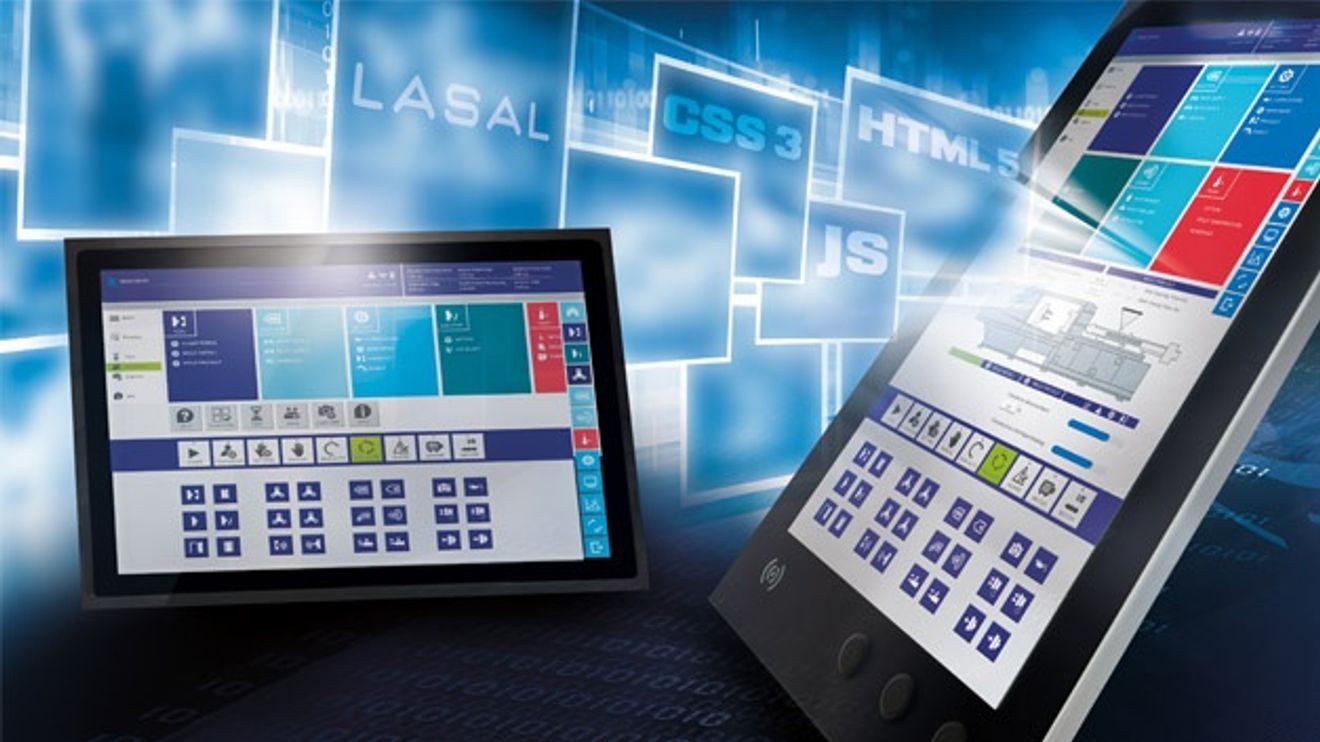
The visions and goals of Industry 4.0 demand maximum flexibility and openness from production systems. Visualizing the data made available in the Industrial Internet of Things (IIoT) is no longer tied to a specific location within the automation solution.
In the future, machines will make more and more decisions autonomously. Nevertheless, or perhaps precisely because of this, human operation and monitoring will remain an important function of any machine automation system. However, the requirements for visualization have also changed at the transition to the new world of automation.
Visualization requirements

Maximilian Leschanowsky: "With its modular system, 'Lasal VisuDesigner' makes it possible to create complex visualizations without any significant programming knowledge."
© SigmatekEquipping each machine with a monitor including specific display and operating software is no longer enough. Operators already expect to find terminals of different sizes at various points on a machine - often on the individual option modules. The use of mobile operating devices is also increasing. Furthermore, maintenance is to be simplified through visualization via Internet access. Finally, managers expect information and intervention options via office computers and mobile devices, if possible also across machines and also outside the company. The expectation of a modern user interface at all levels is characterized by the user-friendliness of today's smartphones and tablets.
All these requirements must be taken into account when designing HMI interfaces. The creation of visualizations was already conveniently possible in Sigmatek's 'Lasal Screen' engineering tool, even across several automation projects. Now the company is offering a new solution with 'Lasal VisuDesigner'. "In order to provide automation software developers with the best possible support in mastering their future tasks, we have created a completely new, flexible and open tool using the latest web technologies," explains Maximilian Leschanowsky, Head of Software Tools at Sigmatek. "The operating philosophy has remained very similar, so that developers of previous Lasal visualizations feel at home."
Runs on a wide range of display devices
HTML5, CSS3 and JavaScript form the technical basis for the 'VisuDesigner'. The code is therefore manufacturer-independent and the visualization is decoupled from the automation solution. This also gives the graphical user interface the ability to run on various display devices. Data can be transferred via the manufacturer-independent OPC UA protocol, among others. This makes it easy to integrate multiple control systems, including different makes and other data sources, right down to individual sensors.
An extensive selection of design themes, i.e. design templates, is available for designing uniform user interfaces across multiple screens. The use of the .svg file type (scalable vector graphic) enables graphic elements to be easily adapted to different screen formats. This makes it easy to create a solution with variants for different target devices.
No responsive design
After carrying out field tests, Sigmatek deliberately decided against a responsive design, as is common in web design today. "Machine manufacturers rely on sophisticated operating concepts," explains Maximilian Leschanowsky. "It is important to determine the exact positioning of all elements so that they can be found in a precisely defined position when the layout is transferred to other page ratios." If only the screen size changes, it is automatically adjusted to the target resolution. However, the screen layout can also be designed differently.
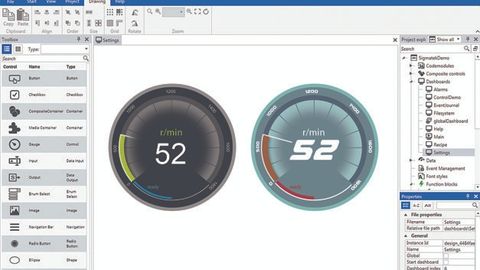
The graphical editor and the symbol libraries make it possible to create the visualization simply by configuring it.
© SigmatekA fully graphical editor with intuitive operation ensures that visualization developers can use the web technologies without having to come into direct contact with them. Project planning and configuration of the graphical user interface are carried out using modern design templates and an extensive library of ready-made display and operating elements. These include buttons, sliders and menus as well as frequently used functions, such as for trend display or recipe management. The graphical editor follows the principle of "What you see is what you get" (WYSIWYG). When editing, the developer always sees the screen mask being worked on as it will be displayed later. The online preview makes it possible to test the operating concept: the fully-fledged visualization can run without HMI via the network connection with actual machine values.
Unlimited adaptability
The modern HMI tool is designed as a modular system and also supports multi-touch interactions. It makes it easy to combine visualization functionalities. This means that extensive solutions can be created simply by configuring them. The ready-made control elements are largely open source. Users can simply adopt them, but also adapt or modify them as required. Existing control elements can be grouped into control element groups known as 'composite controls'. An example of this would be recipe management, which can be made up of buttons, input fields and a file explorer.
Self-created controls can also be easily integrated. The software offers programming and visualization experts every conceivable freedom to use web technologies. Individually designed graphics and controls, animations, videos and audio files can be easily integrated. The visualization solution thus enables companies to develop individual operating concepts as unique selling points.
Content and layout separated
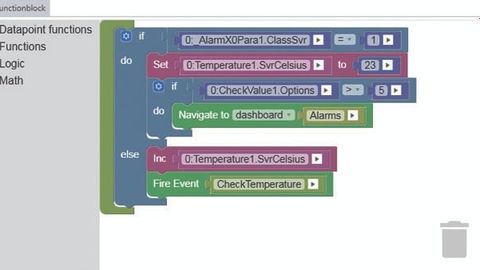
The logic behind the graphical elements can also be easily assembled from modular elements in a graphical editor without in-depth programming knowledge.
© SigmatekContent and layout are deliberately kept separate; the logic behind the graphic elements is independent of these. It can also be easily assembled from 'puzzle-like' elements (function blocks) in a graphical logic editor without in-depth programming knowledge. The advantages of object orientation have also been successfully used in the field of visualization. Like the graphical elements, the underlying functions can also be reused and modified as required. Visuals and functions are linked by simple referencing in the graphics editor.
"The separation of content and visuals enables machine builders to implement visualization projects in numerous display variants, for example for different user groups or in OEM customer-specific topics," says Maximilian Leschanowsky, citing a further advantage. "Bug fixes, improvements or functional changes still only need to be made in one place in order to be valid for everyone. That was particularly important to us."
The separation also allows the design of individual components to be flexibly adapted without affecting their content. For example, usability improvements can be made at a later date without changing the application. In many cases, this saves the need for re-certification.
Another advantage of separation is that the developers do not have to worry about the internal connections of the target system. They can concentrate fully on the ergonomics of the user interfaces. The visualization can therefore be created independently of the automation solution. VisuDesigner supports work in development teams with a connection to source code management and version control. This means that the task can also be outsourced to an appropriately specialized software service provider.
Fast and reliable results
Integrated administrative functions such as localization support with language and unit conversion and user management ensure rapid development. The latter enables the role-dependent definition and assignment of different access modes, including an authorization check for mobile access. The developers also do not have to worry about secure data exchange between the web-based visualization and the sequence or process control. This takes place in encrypted form via secure connections.
The HMI tool provides developers with simulation options to check their work on an ongoing basis. By using the Lasal Runtime System Simulation Tool (LARS), the interaction of the visualization with the automation solution can be tested even before a physical prototype of the machine exists. This not only speeds up the creation process, but also shortens commissioning on site when the machine is delivered.
Prerequisite for Plug & Produce
The solutions created with Lasal VisuDesigner use a resource-saving HTML5 browser specifically optimized for this task and therefore also run with good performance on less powerful hardware. This solution is therefore also suitable for applications that are under high cost pressure and for machine concepts with optional modules.
The ability to define limit values as nested variables proves to be an advantage here. This allows the parameter sets of actually existing options to be dynamically reloaded and visualized. As a result, the visualization does not need to know the exact configuration of a machine at the time of delivery. "This allows dynamic consideration of equipment variants," explains Maximilian Leschanowsky. "VisuDesigner therefore offers the prerequisite for creating modular machines with the ability to plug & produce.
Author:
Ingrid Traintinger is Head of Marketing Communications at Sigmatek.


You might also be interested in
Hans Seifert to Become Chief Sales Officer
Sigmatek has appointed Hans Seifert as Chief Sales Officer (CSO). His area of responsibility includes international sales, marketing, application engineering, and support.
 read more...
Rethinking disaggregated infrastructure
Dell Technologies presents innovations for disaggregated data centers. They cover the areas of storage, cyber resilience, software and integrated partner systems. These infrastructures combine computing, storage and network resources in pools and...
read more...Autonomous AI shapes the future
The latest edition of "Accenture Technology Vision" predicts a new era of digitalization: AI systems are increasingly acting autonomously and thus transforming the reality of work in companies. The key success factor here is the trustworthiness of...
read more...Zebra Technologies at Vision 2024
Deep learning tools for image processing
Zebra will showcase end-to-end machine vision solutions with AI at Vision 2024. It will demonstrate how industrial manufacturers can equip their engineers, programmers and data scientists with flexible deep learning machine vision solutions - on...
read more...ChatGPT in the industry - Part 8
Evaluate and improve code structures
Are gpt-4o and Google Gemini also suitable for evaluating code quality and code structures? Or would developers be better off using traditional software tools? Questions that are worth a closer look.
read more...Software from the cloud conquers industry
Software from the cloud is becoming the standard in industrial companies. This is shown by the current study "Spotlight Future 2024" commissioned by PLM provider Aras.
read more...Test digital simulation live
On September 26 and 27, students at Amberg-Weiden University of Applied Sciences will be able to find out how computer simulation can be applied directly to research and development projects. CADFEM and Ansys invite you to the big live simulation...
read more...New Managing Director of Proalpha Switzerland
Stefan Inderbitzin took over the management of the Swiss branch of ERP software provider Proalpha on August 1, 2024. With his expertise in the technology sector, he will further strengthen the company's position on the Swiss market.
read more...New threat to industrial control systems
FrostyGoop is the name of a new malware variant that specializes in industrial control systems (ICS). It poses a threat to critical infrastructures worldwide. OT cyber security expert Dragos has identified FrostyGoop.
read more...