
User interface
Browser-based versus native
Since the introduction of HTML5, browser-based solutions have been making increasing inroads into the market for industrial applications. However, native applications simply make more sense in some areas. Decision-makers must therefore be aware of the strengths and weaknesses of both approaches.
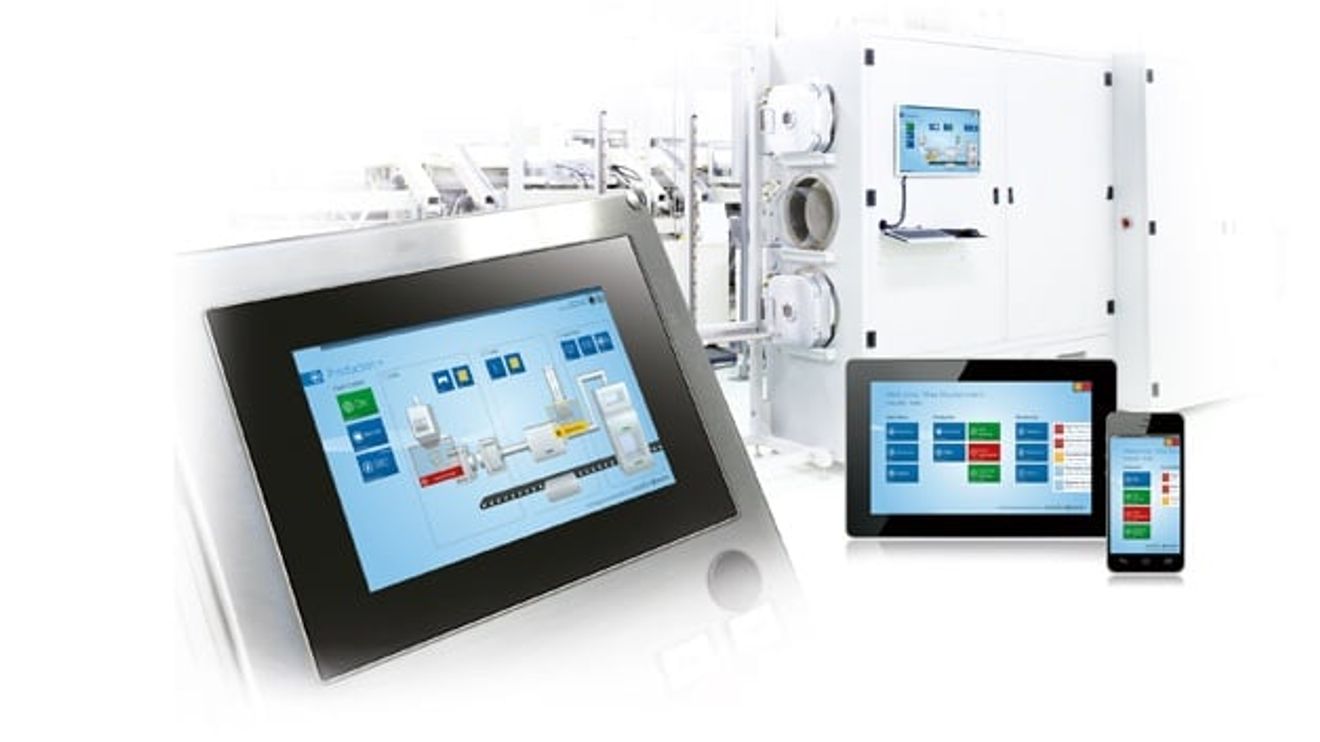
The popular browser approach undoubtedly has many advantages - especially in terms of usability and the usability of mobile devices. Instead of one operating terminal, for example, several mobile devices can be used as HMIs that are individually adapted to the user. They are always to hand, never 'occupied' - for example, if different people want to access a stationary device in different functions at the same time - and only display the information that is relevant for the respective user. The variety of devices that can be used, from stationary to mobile, from current IPCs, smartphones and tablets to future wearables, is also a clear pro-argument for this technology. Browser solutions also score points in terms of practicality - for example, through remote maintenance concepts and easier servicing thanks to centralized updates.
However, these advantages do not come for free - the more browsers, platforms and devices are to be usable, the greater the associated background work and therefore the development and maintenance costs. Because even if Safari, Chrome, Edge, Firefox and the like work in a similar way, software has to be adapted for each version of a browser in order to maintain not only the optimal, but also the basic functionality. The cycle of new browser versions should not be underestimated. Driven by B2C platforms, permanent attacks on vulnerabilities and competition, updates are much more frequent than for other software offerings. Mozilla's Firefox, for example, receives a scheduled update every six weeks and there are also various small updates to close security gaps. The basic technologies for implementing websites are also evolving at an ever faster pace - Google's Angular is just one example - forcing users to change continuously. Although there are providers of HMI software that require their own fixed browser versions, this forfeits many of the advantages of the browser-based approach - such as flexibility.
The necessary development of responsive designs when using a large number of different devices also involves a great deal of effort. Building an interface for an end device such as a PC may be quick and easy, but if you also want to use various devices of different types such as smartphones, smartwatches, wearables and the like, you have to adapt this interface to the respective displays and functionalities. A detailed overview of a machine may be clearly visible and understandable on the large monitor of a desktop PC, but it would not work on the tiny display of a smartwatch, as all the details are displayed far too small. In this case, it may make sense to limit the display to certain data, alarms or simple overviews, but this brings us back to a large number of interfaces that need to be designed.
Bring your own device?
A major advantage of browser applications is that they are installation-free. The software does not have to be installed, but can be used directly via the browser on the server. This reduces the effort involved in rolling out new versions, troubleshooting or maintenance - because upgrades only take place on the server side. The approach also makes it possible to play with modern concepts such as "bring your own device". The idea: every employee can use their private and familiar devices such as smartphones or tablets to control the machines or monitor data during the day via the browser in the production plant. In the evening, the device can be used again for their favorite series, games or shopping on the Internet. The advantage: every user uses the device they are familiar with and has access to the most important information whenever they need it - at least in theory. In practice, most IT staff at manufacturing companies are beating their hands over their heads at this idea. The security risks posed to the company by the use of these privately used devices are enormous and, according to the current state of the art, cannot be contained or can only be contained with extreme effort.
In order to circumvent these risks, many industrial companies are introducing mobile devices as work devices that are intended exclusively for use within the company. However, this approach reduces the "bring your own device" concept to absurdity and does not take into account the human factor, which does not always act in a security-conscious and disciplined manner.
Security is and remains the central issue in the industrial context - especially in connection with the increasing networking in Industry 4.0 and the IIoT. Security also plays an important role when choosing the most sensible HMI solution for the respective application - and this is where browser solutions sometimes have serious limitations in terms of practicability compared to native applications.
The sandbox
Browsers are primarily intended for movement on the Internet. From an IT perspective, the Internet is the most hostile and dangerous environment imaginable, which is why browsers are particularly well protected by their providers against viruses, Trojans and other malware. A central element of the usual protection concept is the sandbox in which the browser operates. This represents an isolated area in which the applications are executed. This prevents changes in the sandbox - for example an attack on the browser - from also causing damage outside the sandbox, i.e. to hardware, the operating system and so on.

The sandbox is a common and necessary protection concept for browser-based HMI systems, but it also has clear disadvantages: the hardware can only be accessed when the sandbox is opened.
© InosoftOn the one hand, the sandbox is 'state of the art' for all relevant browser providers and essential for security. On the other hand, it restricts many HMI functions when using the web UI, as the browser-based solution is called at Inosoft. For example, the web UI cannot access the hardware without the sandbox being opened accordingly. However, opening the sandbox not only entails risks due to increased vulnerability to attacks from the Internet, but also means considerable additional programming effort: in order to keep vulnerability as low as possible and to make the opening usable in each version of a browser, each version of each browser would theoretically have to be adapted anew. However, this is not possible in standard browsers, as a corresponding option would represent a scandalous security vulnerability. In fact, openings are only conceivable in self-developed browsers - which would then have to be adapted to all platforms and devices. This is the only way to maintain the advantage of platform and device freedom, a central argument for browser-based solutions.
As useful as the sandbox is for Internet security, it also limits the practicability of web UIs. Although it prevents malware from accessing the system hardware, it also prevents the desired communication with external additional devices or the writing of files to the local hard disk. Although it is possible to outsource these functions to web servers, data exchange via client-server communication must be implemented in order to prompt the server to store the data from the client. Many companies also work with stationary solutions such as handheld scanners, electronic key systems or RFID chips. These external readers are usually connected to the system to be unlocked via USB - for browser solutions, this can only be implemented on the server side, and the server is not located where the scanner is.
The impermeability of the sandbox also poses a problem in the area of machine and system control. But even if this challenge could be solved, the browser solution could only be operated stationary. The Machinery Directive requires direct visual contact from the control unit to the system for any type of machine control. Otherwise, serious accidents could occur if, for example, a service technician puts his head into the system and the operator starts the machine from a different location. Control commands must therefore be issued directly at the machine - via a permanently installed panel or an IPC. As the mobile advantage would be lost here, a native application without a sandbox is usually the more efficient solution for this task.
Complex surfaces are stationary
If browser solutions can also be used on local IPCs and panels, the native Windows client can score points here. One of its strengths is its ability to run complex applications. Writing data and saving it locally as well as hardware queries have always been PC standard and possible, as the native application on the IPC can gain direct access to all available hardware and software components without the sandbox. Even complex displays paired with logical processes can be easily implemented with manageable effort and straightforward engineering, as both screen sizes and computing power provide the necessary infrastructure.
Speaking of computing power: regardless of whether the final HMI is stationary or mobile, server and computing power with the corresponding access and associated native applications must be provided somewhere in the system. In cloud-based concepts, the server no longer has to be located on the machine, but the production machine would have to be directly connected to the cloud. Although there are plans in this direction, implementation will take some time, as the manufacturing industry still has considerable reservations. HMI software manufacturers will therefore have to make the machines of today and tomorrow operable by then.
As far as usability is concerned, the stationary PC is at least as familiar to many plant engineers as the smartphone, as the Windows operating system in industrial applications is hardly any different from that on the home computer.
The combination makes the difference
Both approaches - the native Windows application and the one based on browser technology - have their advantages and disadvantages. In many respects, they are complementary - the strength of one is the weakness of the other. It is therefore essential for industrial companies to take a holistic view of the entire field of application and to think through the implementation carefully. What should be done when, where, how and by whom? Is it perhaps possible to look ahead to the technological production conditions of the near future? Can further conclusions be drawn about requirements? In other words, can the system be made "ready for the future"? The right software solution for the HMI area can be derived from all the available information.
In a remote machine system, such as a pump station or a wind turbine, where there is normally no technician on site, remote access via the browser is the only alternative for maintenance and monitoring operations - native apps on a panel PC on the system itself are therefore useless here. On a production machine, on the other hand, which is operated around the clock by an operator, stationary access via the IPC or panel PC is usually completely sufficient and the native app allows the required access to the hardware.
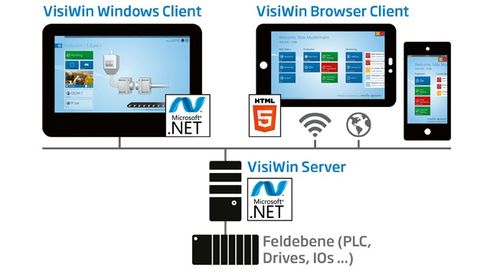
Visiwin from Inosoft is a flexible and open system in which browser clients can be used in addition to native applications for complex displays. These are responsive in order to provide the best possible information on both stationary and mobile devices.
© InosoftStrictly speaking, the combination of both approaches is already the basis of most mobile solutions today. The computing power required to collect and provide the database and to record, upload and analyze data cannot yet be provided by mobile devices. This means that both today and in the foreseeable future, the stationary computer with native applications will remain the server basis for all data processing on a large scale - regardless of whether this data is displayed natively or browser-based on mobile or stationary devices.
The farewell to the native Windows app is therefore certainly far too early. As a manufacturer of process visualization software, Inosoft relies on an open and flexible system for its Visiwin software, which can be adapted to both native and web-based solutions according to customer requirements. The native solution, which Visiwin calls 'Modern UI', is based on the very powerful Windows Presentation Foundation (WPF) graphics interface, which has been integrated as standard in Microsoft operating systems since Vista. This enables the creation and display of animated high-end graphics, sophisticated designs or 3D graphics. As a native system, any number of complex logics can be implemented thanks to .Net programming and even third-party components can be seamlessly integrated. Visiwin can also be used via a web UI, which enables browser-based, platform-independent user interfaces on mobile devices based on HTML5 and Java Script.
Authors:
Stefan Niermann works in sales and marketing at Inosoft;
Sven Kröger is Product Manager at Inosoft.


You might also be interested in
Double security through redundancy
The 'Safety Key' from Hy-Line allows the simple integration of safety-relevant switches in glass displays.
 read more...
Operation via touch, glove, pen or digitizer
Getac launches the next generation of 'F110' and 'K120' tablets: The new F110 is suitable for use in a variety of harsh outdoor and indoor scenarios.
read more...Flexible visualization
'Prime Panel Touch' and 'Prime Panel Extend' from Schubert System Elektronik (SSE) are suitable for sophisticated visualization concepts in industry.
read more...Support arm panel expands portfolio
The 'TT 1564' multi-touch operating panel for mounting arm installation extends the Sigmatek range.
read more...Managing Board expanded
Kontron expands its Management Board with Philipp Schulz and Dr. Johannes Fues. As COO, Schulz will be responsible for the Aerospace and North America business units, while Dr. Fues will assume the position of COO for the GreenTec business unit.
read more...Tablet for the Ex area
With the 'Pad-Ex 01 P12', Pepperl+Fuchs is launching a new tablet for professional use in potentially explosive atmospheres in Zone 2/22, Division 2.
read more...Modular embedded touch HMI
Irlbacher, provider of free-form touch solutions, has a new solution kit for modular embedded HMIs.
read more...Control elements that can be used for security
The control element PIToe ETH with activatable Ethernet port from Pilz protects freely accessible Ethernet interfaces in industry against unauthorized access.
read more...Control panel series updated
Kontron has developed a new generation of its Control Panels which, thanks to the more powerful Arm NXP i.MX8M Plus processors, provide a significant performance boost compared to previous models.
read more...