
Engineering
Modeling complex processes with Excel know-how
Programming services in manufacturing companies often have to be purchased at high cost and are not always available in a timely manner. One alternative is the code-free modeling of processes using so-called 'streamsheets'.

Spreadsheet programs such as Microsoft Excel or Google spreadsheets are widely used in everyday business. However, a major problem with spreadsheets is the fact that the data is stored locally and transported manually via a clipboard or CSV file. This leads to handling errors and to a decoupling of the data from the current process.
The obvious idea is to retain the advantages of spreadsheets in terms of acceptance and usability, but to develop a new, server-based technology that processes data not offline, but automatically as a real-time data stream via a continuously running server service. And this in the millisecond range, so that not only IT applications can be connected, but also sensors and actuators can be controlled on a cycle basis. And this is exactly what streamsheets do. The basis remains a formula-based calculation engine à la Excel. This is so universal and powerful that it can actually be used as a rule engine for an analysis or even control program for industrial smart factory applications.
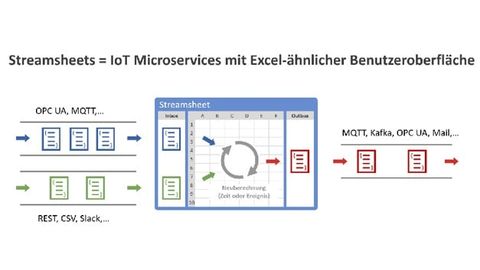
Figure 1: Streamsheets use Excel-like rules and formulas to receive, process and send messages every millisecond.
© CedaloTo make this work, streamsheets are proficient in common IoT protocols such as OPC UA, AMQP or MQTT. Streamsheets can also use the REST API, the Mongo database or the Apache Kafka stream processing platform to receive or feed data from business applications in real time.
Despite these new possibilities, the ease of use remains the same. Unlike in full or low-code development environments (Codesys, Node-RED, etc.), users do not need any programming knowledge, but can use their existing Excel know-how to achieve what was previously only possible with code development. And at a much lower cost and with a significantly reduced time horizon. Another advantage of the spreadsheet concept is the interactive modeling process. The application logic is built up step by step with direct return of results, because the process data is already running through the spreadsheet during modeling.
Possible use case for streamsheets
An exemplary industrial use case that could be implemented using the streamsheets describes an intelligent quality control system that not only records data from sensors and cameras within milliseconds during the inspection process, but also data from MES systems and cloud services in order to use this additional information - while maintaining the same production quality - to reduce the reject rate compared to traditional quality control. The reject rate is therefore not reduced here by improving production quality, but by making quality control more intelligent and thus enabling parts that have been prematurely rejected to be classified as conforming to quality standards.
The use case was simulated using OPC UA-capable factory simulation software (Factory IO) and sensors for humidity and temperature connected via MQTT. In addition, statistical data is published to a standard IoT visualization app on a smartphone via MQTT.
Another participant in this process is an MES system that supplies data via REST API. Finally, all the information is fed into a query to an AI system, which makes an intelligent decision based on a previously trained machine learning algorithm: can a part pass the inspection, must it be rejected (because processing is not possible) or should it be transferred to an automatic post-processing center?

Figure 2: General view of the simulated production plant and overview of the structure of the use case.
© CedaloThe simulated scenario looks as follows: A plant produces the blocks shown in Figure 2. A special feature of this company is that the blocks react very sensitively to humidity and temperature in terms of length and width due to the material. In the past, this has led to complaints being made about a product that does not show the correct dimensions at the quality control location, but does show the correct dimensions at the temperatures and humidity levels at the subsequent place of use. Furthermore, statistics on returns were continuously compiled, assigning a tolerance class (TC) to each customer. The same statistics also show the humidity and temperatures to be expected at each customer's production site.
With the help of the streamsheets, the company now implements intelligent quality control, which leads to a significantly lower reject rate with the same production tolerance. The following steps are carried out:
- The parts entering the conveyor belt are recognized by QR code.
- At the same time, the width and length are measured by an intelligent HD camera.
- Sensors record the humidity and temperature.
- The average values for humidity and temperature at the customer's location are retrieved from the MES system.
- The customer's tolerance class is also queried from the MES.
The streamsheet is connected to the production line via an OPC UA-based gateway and also pulls the order-specific data from the MES system. The combined data is transferred to an external machine learning-based AI system. This service carries out a previously trained assessment in milliseconds as to whether the corresponding part is ready for delivery, needs to be sorted out or can be reworked.
In the simulated scenario, the workpieces are first sent to quality control. If the parts are larger than the target size, they are reworked. If they are smaller, they are marked as rejects. Otherwise, they go straight to the warehouse. The decision is made in the short time between sensor detection and the pusher to the post-processing center. As the streamsheet can not only receive data, but also send data, it sends a command directly to the pusher or pivot arm on the conveyor belt via OPC UA during reworking or sorting. At the same time, the data can be sent directly from the streamsheet via AMQP or MQTT to a cloud for further evaluation (stream analytics).
How streamsheets work in detail
To get an impression of how streamsheets work, a few excerpts from the modeling are explained below.


On the almost empty streamsheet in Figure 3, the inbox can be seen on the left-hand side. It shows the data packets from the respective linked data stream. When creating a new streamsheet, you start by linking the supplied data fields with the cells of the streamsheet. This is done by dragging and dropping the data field (in this case the 'QR Reader 2' field) onto a cell in the streamsheet. In this case, the QR ident code is linked to cell C4. Each time a new QR code is read, it automatically appears in this cell. The other data fields supplied via OPC UA or MQTT are linked to the streamsheet in the same way.
In addition to the QR codes, the weight and the dimensions captured by the camera are linked to streamsheet cells. The workpiece ID captured by the QR code is also transferred to a special streamsheet table function. This is able to access the MES system via a REST request. The formula for this in cell B14 in Figure 4 is as follows:
=REST.REQUEST(|MES_REST_Call, "part_id="&C8, "GET",C14:H15)
The function then outputs the result of the call in the cell range C14:H15.

As a result, the MES system provides the order number, the required width and length of the part, information on temperature and humidity and the tolerances usually accepted. This data is compiled together with the other recorded sensor data in cell area B22:C33.
As streamsheets can handle the JSON data format commonly used in the IoT in addition to the classic A1 referencing system, this area was defined as a JSON area and thus automatically formatted in color. This JSON area is used as input variables for querying an AI system based on machine learning as shown in Figure 5. This is done in cell B35 with the following formula:
=REST.REQUEST(|REST_Call, "GetResult", "POST",C35:E36,,JSON(B22:C33))


The result of the call can be found in compact form in cell area C35:H36. Cell E36 is important because it contains the decision as to whether the workpiece has passed the check or whether it needs to be reworked or sorted out.
Also interesting is the row range 55 to 61 in Figure 6, where the control of the actuators is modeled and the data range of the circle and column diagrams shown above can also be found. Another JSON area was created in cells C56:C59. In column C, it contains the logical conditions underlaid with IF functions that trigger the triggering of the pusher or the pivot arm. In addition, the conveyor belt is controlled at the camera so that the belt always stops briefly for the measurement. The streamsheet server must be an OPC UA server so that these control commands can be transferred to the machine system. This is easily achieved with the formula
=OPCUA.VARIABLES(OPCUA.JSON(E19:F28))
in cell C61. Streamsheets are automatically always OPC UA client and OPC UA server.
Finally,Figure 7 shows a screenshot with the streamsheet described so far and two other streamsheets that send or receive data via MQTT. These are necessary in order to read in the data from the weather sensors and pass on the quality inspection statistics to an MQTT-capable standard app on a smartphone.
So much for the structure of the streamsheet. A video of the running stream machine and the corresponding factory simulation can be seen on the Cedalo website.
Author:
Kristian Raue is CEO of Cedalo, Kirchzarten.


You might also be interested in
Data acquisition despite protected S7 communication
With version 8.2, iba improves the connectivity of the scalable data acquisition software 'ibaPDA' to S7 controllers.
 read more...
Tickets, prices and key data on the trade fair
From November 8-10, 2022, the trade fair for smart and digital automation, SPS - Smart Production Solutions, will finally open its doors again after a two-year break. Around 1,000 exhibitors are expected to present their portfolio on site....
read more...With a focus on artificial intelligence
The e-paper of issue 05/06-22
Three trade fairs and the special issue Sensor&Vision await you in issue 5/6 of Computer&Automation. Find out in our special Robotics&Automation section why high plant efficiency does not depend on full automation and how SMEs can use...
read more...Products meet trends: automation technology at Conrad
Product selection, user recommendations and future topics: Parallel to the all about automation trade fair series, the Conrad Sourcing Platform also focuses on the automation of mechanical and electronic processes in industrial and logistics...
read more...The top articles in May 2022
The Top 10 shows clear movements in the market: all kinds of premieres were announced and automation companies reported positive results and forecasts. In addition, interest in product trends continued unabated, as did interest in our new medium....
read more...The top articles in April 2022
Did you miss one of this month's most exciting articles? We summarize the crème de la crème. Find out what artificial intelligence has to do with whiskey or what the situation is with PLCs in the cloud, among other things: the top 10 in April.
read more...The top articles in March 2022
Find out in the most-read articles from March how fears of robots can be reduced, what is behind the 'PLC from the cloud', why it doesn't always have to be 'six right ones' and also news about TSN in practical implementation. The top 10 in March.
read more...Focus on measurement technology &...
The e-paper of issue 2/2022
In our issue 2, you can find out, among other things, how ERP can be successfully introduced, whether the concept of a 'dark factory', i.e. a factory without people, is realistic and also desirable and what advantages low-cost automation with...
read more...The Marketplace is live
Eplan introduces a new service: The Eplan Marketplace is an international platform that connects CAE software users and service providers.
read more...