

Data diodes / firewalls
Create safe zones
Protecting production networks without having to forego the benefits of transparent communication: This is a key challenge for companies as production becomes increasingly networked. Data diodes and automation firewalls can help.

Many fieldbus devices and controllers have one thing in common: they do not have their own security features such as encryption or password protection. They were developed at a time when nobody was thinking about comprehensive networking. Gateways, which monitor and establish communication at the transition from the fieldbus to IP-based communication, for example using a data diode, are a suitable solution for protection. Essentially, this is a solution that only allows communication in one direction - from the data source to the cloud interface, but not vice versa. Basically, the functionality of the data diode can be implemented via a software application. However, this raises the question of vulnerability. If the device is hijacked with additional scripts or manipulated firmware, the protection is gone. More security can only be provided by galvanic, and therefore physical, isolation of the transmission line from the network to the fieldbus.
Secure and smart in the cloud thanks to data diode
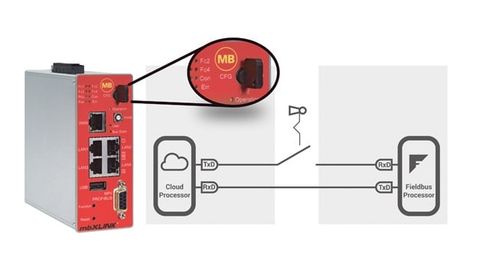
With the 'mbXLink' gateway, the transmission line from the cloud processor to the fieldbus can be disconnected and closed via a built-in key switch.
© MB Connect LineThis galvanic isolation has been implemented accordingly in the 'mbXLink' edge gateway from MB connect line. The basis for this is provided by two units, the fieldbus processor and the cloud processor. The cloud processor takes on the task of communicating in different cloud technologies and protocols. Both processors are installed in one device. They are only connected to each other via two serial transmission lines - as we know it from the classic RS232 connection. The transmission line from the cloud processor to the fieldbus can be disconnected and closed via a built-in key switch. The fieldbus is configured by the cloud processor once during the commissioning phase and the key switch must be set to the 'Config' position. This also closes the transmission line to the fieldbus, which then accepts commands. In Read or Read/Write key switch mode, the fieldbus then continuously sends the fieldbus data to the cloud unit. If access to the fieldbus is necessary, for example to set setpoints, the operator can enable the connection at any time. Once remote access is complete, the connection can be cut again. This means that it is possible to determine on site, depending on the situation, whether data communication towards the fieldbus level is enabled. The decision to establish the connection is therefore always in the control of the operator's system personnel.
Separation at hardware level offers greater handling safety and better protection than comparable software-based solutions. By integrating a data diode, the cybersecurity level can be significantly increased in a simple way without having to make changes to the existing network topology. For easy integration, the data diode supports common protocols such as MPI, Profibus, Profinet and Modbus on the fieldbus side. On the network side, the necessary interfaces to the cloud are provided, for example MQTT or OPC UA.
Security-by-Design
To further sharpen the data diode system, the entire hardware architecture of the cloud processor environment was also adapted, because security by design starts with the hardware.

Hardware architecture of the cloud processor environment: In addition to the classic elements (RAM module, processor and flash memory), the boot ROM and a secure element are also added here.
© MB Connect LineThe classic architecture in embedded systems usually has a RAM module, processor and flash memory. The firmware and user data are stored on the flash. In the concept presented here, two additional hardware elements have been added. The boot ROM with the permanently burned-in boot loader and the manufacturer certificates ensures that the system is booted with an unchangeable trust anchor (chain of trust). The firmware on the flash is signed with the manufacturer's certificate and is only accepted by the boot loader if it matches. A secure element was added as a second element. This is a separate hardware component (IC) that stores the digital keys and certificates separately from the flash. In this case, the encrypted user memory on the flash is released with a key from the secure element.

The software architecture of the data diode is based on so-called Docker containers. This architecture enables isolation from the operating system.
© MB Connect LineThe corresponding software architecture of the system is based on so-called Docker containers. This principle is comparable to virtualization, but has the advantage that it requires fewer system resources such as memory and CPU power. By dividing the applications into containers, isolation from the operating system is achieved and any vulnerability remains in the container and does not spread to the entire application.
One example is the IIOT construction kit Node-RED, which also runs in a Docker container and therefore represents an intelligent solution for pre-processing the collected data. Users can implement individual and secure edge computing with their own Docker applications.
Web server security risk
One example of insecure technologies is web servers in control systems and other automation components. In many control systems used in practice, web servers are already activated at the factory. Some of these systems provide information about the serial number, firmware version or order number without being asked. These functionalities, originally intended for the automation system operator, represent attack vectors through which hackers can gain information, data and, in the worst case, access to the components in order to influence the control systems. Even if these functions are secured by authentication measures, they are often provided with default passwords. Even if security and firmware updates are available for this purpose, no changes are usually made to a functioning machine during operation.
In terms of cyber security, it is generally advisable to check existing systems for known vulnerabilities. Web servers are often unknowingly activated and have no operationally relevant function in the network. In this case, it is urgently necessary to shut down these web servers and thus close this gateway.
In practice, however, two difficulties arise: On the one hand, interfering with a PLC involved in the running process means the risk of a production standstill and, on the other hand, the operator often does not even have the possibility of influencing the control program - either because the necessary programming tools are not available or because the warranty claim against the manufacturer is lost in the event of such an intervention.
Segmenting industrial networks

Segmentation of networks with the industrial firewall. Clear separation of identical IP segments from each other with simultaneous connection to a higher-level network.
© MB Connect LineTo still achieve effective protection against attacks, experts recommend segmenting the network into manageable logical units. By setting up secure zones, the user not only mitigates the update problem, but also protects devices such as panels and controllers that do not have their own security mechanisms. MB connect line has developed the 'mbNetflix' automation firewall for this purpose. This filters data traffic to and from the controller and is only able to allow authorized data to be established. This makes it easy and inexpensive to ensure the transparent flow of communication without running the risk of these known security vulnerabilities being attacked.
With the Automation Firewall, new machines can also be securely integrated into existing plant networks. Two networks - that of the operator and that of the new system - must be linked together. When designing the networks, both sides have each considered a structure and made specifications that rarely fit together directly in practice. Experience has shown that a great deal of coordination is required to link the two networks in a meaningful way. As the supplier, the machine manufacturer wants to retain its IP address space, which it designs identically for all systems. At the same time, he wants to prevent the system supplied by him from being influenced or changed from the outside. This is also a warranty issue. At the same time, the operator wants to ensure that the new system does not cause any disruption to the existing network and that sensitive data from his production system cannot be accessed.
The implementation of an automation firewall is not only in the interest of the operator. On the part of the machine builder who installs a machine or system as a supplier, there is the certainty that his customer will only make changes on the operator side via defined interfaces and not directly on the PLC. This increases mutual trust and reduces the workload for both the customer and their own support team.
Firewall as device protection
Put simply, a configuration in automation networks usually consists of a user interface (HMI) and a PLC controller. The user interface communicates with the machine controller via the corresponding control protocol and visualizes its data. Of course, this function must be maintained, while crisis-prone gateways such as the PLC's web server must be secured.
In this case, the automation firewall is connected between the HMI and PLC and activates whitelisting. The whitelist ensures that only one authorized data structure is permitted at a time. In this example, this would block all data transfer except that from the HMI to the PLC.
During the development process of the firewall, emphasis was placed on incorporating the workflow of the automation system right from the design stage - configuration takes place directly on the device (online) or on the computer (offline). Integrating the firewall is quick and easy, as it takes into account the way the automation system works. The configuration software is installed on a Windows computer for configuration. This is then connected to the firewall's programming interface via USB cable. With just a few mouse clicks, the user creates their own project for the installation and the firewall records all connections in learning mode. The so-called MapView then graphically shows which IP users in the network are communicating with which target via which protocols. On the basis of the recorded packet table, the user decides which connections are permitted and blocks all others. The communication settings can be made with just a few clicks and the configuration is completed in just a few minutes. No special IT knowledge is required, so the installation can be carried out directly by the technical maintenance staff.
In order to keep the attack vectors of the firewall as small as possible, a web interface for configuration was deliberately omitted. By default, the firewall can only be configured via the USB interface. Authentication is carried out using a so-called RSA key and offers a considerably higher security standard compared to password protection. An optional SSH interface is also available for IT experts.
Author:
Siegfried Müller is Managing Director at MB Connect Line.


You might also be interested in
No accidental changes to files
CodeMeter 6.80 from Wibu-Systems supports Universal Write Filter (UWF), a Windows option from Microsoft that prevents accidental changes to files, which is particularly important for embedded systems.
 read more...
Security through network segments
The Microwall Gigabit from Wiesemann & Theis is the first in a series of easy-to-use security products for industry and manufacturing.
read more...Mushroom is the victim of a targeted hacker attack
The automation technology provider Pilz from Ostfildern was the victim of a targeted cyber attack on Sunday, October 13. All server and PC workstations worldwide, including the company's communication network, were affected.
read more...Four out of ten ICS computers are under threat
Kaspersky's latest report on cyber threats for the first half of 2019 shows that 41.2% of ICS (Industrial Control System) computers were exposed to an attack. The energy sector is most frequently affected - including by generic malware.
read more...Kaspersky warns of "ticking time bomb"
More than a third of small companies and more than half of large companies are still using the 'Windows 7' operating system, support for which will expire in five months' time.
read more...Body reaction as a password
Forgot your password? The Paluno Software Technology Institute at the University of Duisburg-Essen (UDE) is researching a new approach that combines biometrics and password protection.
read more...Vulnerability discovered in Scalance switches from Siemens
Nozomi Networks Labs has discovered a new vulnerability in Siemens' Scalance Switches. It affects the Telnet server and allows a hacker to crash the service by sending large amounts of packets via TCP port 23.
read more...The four most dangerous authentication vulnerabilities
Authentication processes, which are the linchpin of the security of web, mobile and other applications, show various vulnerabilities in penetration tests. The four most common are described below.
read more...Beware of emails with social media in the subject line!
The security company KnowBe4 puts the growth rate of social media phishing attacks - i.e. attacks with a social media reference in the subject line of fake emails - at 75% this year. In particular, the company warns against 'LinkedIn' in the subject...
read more...