

Remote maintenance
Manage access
Machines and devices from different manufacturers are installed in a production network, each equipped with remote maintenance solutions. Management of the various solutions is required to restrict access when activated and prevent misuse.

Due to the increasing networking in the manufacturing sector, it should be reliably ensured that the machine manufacturer can only reach his machine during remote maintenance and not the entire production network. This is because, depending on the solution used, it is technically possible to misuse the remote maintenance connection - whether intentionally or simply by mistake. This is because many of the security barriers that IT departments use to protect their networks against attacks from the internet can be circumvented by a remote maintenance connection.

Figure 1: Functional principle of a conditional firewall: Activation of firewall rule sets by means of a switch.
© Phoenix ContactVarious solutions are described below that meet the requirements of operators with regard to comprehensive protection of their IT and production infrastructure and - with the exception of the third approach - allow machine manufacturers to retain their existing remote maintenance solution.
As a starting point, it is assumed that the manufacturing company (operator) works with numerous suppliers of machines and systems. These each use different remote maintenance solutions whose security parameters cannot be administered uniformly by the operator. A simple and flexible option here is to retrofit the machine manufacturer's existing hardware or software-based remote maintenance solution with an industrial firewall (security appliance), which includes the function of a conditional firewall(see Fig. 1).
Retrofitting with a conditional firewall
The security appliance is installed between the provider's existing remote maintenance solution and the production network and can be centrally administered by the operator's IT experts. The conditional firewall of the security appliance recognizes two states:
- Normal operation/production:
All necessary communication connections between the machine and the production network are permitted. The connection establishment of the provider's remote maintenance solution is blocked by the firewall. - Remote maintenance:
Data transmission between the machine and the surrounding production network is restricted to a minimum and, in extreme cases, even cut off completely. In this case, the machine/system represents an 'island' in the operator's production network. The provider's remote maintenance solution, which enables access to the machine/system, is permitted to establish a connection. The security appliance prevents the remote maintenance solution from accessing the production network.
The operator on site activates the remote maintenance status of the conditional firewall configured by specialists via a hardware switch. No special security knowledge is required for this activity and there is no need to consult the operator's IT managers. Once remote maintenance is complete, the operator restores normal operation by turning the switch back. In this way, the remote maintenance connection is interrupted and communication between the machine/system and the production network is allowed again.
Addition of a VPN connection

Figure 2: Two-stage activation of a remote maintenance connection via the conditional firewall and VPN.
© Phoenix ContactIf, in addition to the above-mentioned requirements of the operator, a central component for activating remote maintenance is also required, this can be achieved by combining the conditional firewall of the security appliance with VPN (Virtual Private Network) connections(Fig. 2). In this case, a security appliance with VPN function is installed between the machine manufacturer's existing remote maintenance solution and the operator's production network. If required, the appliance establishes an internal VPN connection to a VPN gateway installed in the operator's DMZ (demilitarized zone). All remote maintenance solutions from machine manufacturers can only connect to the Internet after the internal VPN tunnel between the security appliance and the VPN gateway in the DMZ has been established.
A two-stage activation of remote maintenance is now possible. After successful authentication, the employee responsible for production, for example, can activate the internal VPN connection between the security appliance and the VPN gateway installed in the DMZ via a web application. However, remote maintenance cannot yet be carried out because the firewall in the VPN tunnel blocks the use of the machine manufacturer's remote maintenance solution. This is only enabled by the operator on site using the switch described above and the conditional firewall. Both authorizations must therefore be fulfilled for remote maintenance to start.
The two remote maintenance variants described implement the following requirements:
- The machine manufacturer can continue to use its own remote maintenance solution.
- The operator's IT and security specialists can administer the connections centrally.
- Remote maintenance is activated and deactivated by the responsible persons/employees in production without further consultation with their IT department, either on site using a switch or on site using a switch in combination with prior approval via a web application.
Remote maintenance portal at the operator
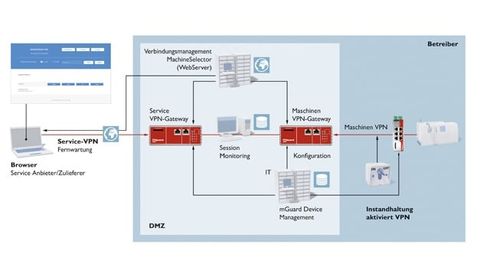
Figure 3: Control of remote maintenance connections through the portal including session recording and inspection of application data.
© Phoenix ContactIf the operator does not accept the different solutions offered by the machine manufacturers, they can prescribe a remote maintenance concept. In some cases, the operator's IT departments rely on approaches that they are familiar with from office IT. However, these approaches do not allow simple activation of the remote maintenance connection by the operator. Operating a remote maintenance portal in the operator's DMZ proves to be a practicable solution here(Fig. 3). The remote maintenance portal consists of a web server for connection management and two VPN gateways, each of which receives the VPN connections from the service technician of the corresponding supplier and the respective machines as the service destination. The data between the two VPN nodes is unencrypted and can be recorded, filtered or monitored. Each machine is connected to the production network via a security appliance including a VPN option.
If the machine operator requests remote maintenance on site in production, he activates the VPN connection from the machine to the machine gateway located in the DMZ via a switch. In addition to his VPN connection to the service gateway, the technician dials into the web application of the remote maintenance portal via a browser. This shows him which machines are online and he can connect to the machine that requires remote maintenance at the click of a mouse. The operator also uses an authorization model to determine which technician or supplier is allowed to remotely maintain which service target, i.e. which machines.
If desired, the operator can also combine the three remote maintenance solutions described. In this way, the diverse requirements with regard to secure yet practicable remote maintenance can be met and existing insecure remote maintenance solutions can also be retrofitted.
Author:
Frank Merkel is Business Development Manager at Phoenix Contact.
Achieve new access security

The robust and industrial-grade security appliances include firewall, routing and VPN functionalities to protect against cyber attacks.
© Phoenix ContactMachine and plant manufacturers have been using the internet for remote maintenance for more than 15 years. While in the early days they were usually able to prescribe their customers their preferred remote maintenance solution, this changed in 2010 with the first globally known cyber attack on industrial plants - keyword: Stuxnet. The increasing networking of machines and systems in production networks driven by Industry 4.0 is also contributing to this. In recent years, there has been a tendency for machine and plant operators to want to implement what they see as a standardized remote maintenance solution. This creates a dilemma between the machine manufacturer and its customer, as one of them has to accept the other's solution.
The security appliances of the FL mGuard product family from Phoenix Contact provide a way out of this situation as a stand-alone solution or in combination with the web applications VPNControl or MachineSelector from Propius and meet the requirements of all parties involved with regard to secure remote maintenance.
The devices in the FL mGuard product family are network components that combine the functions of a router, firewall and VPN device (Fig.). The goal of maximum security and system availability is achieved through the following features:
- the highest level of security with IPsec protocol on layer 3
- up to ten parallel VPN tunnels (optionally up to 250)
- High VPN data throughput of up to 70 MBit/s
- Support for current certificates such as x509.v3
- Connection for VPN release button and VPN status LED
- Use of only the outgoing user datagram protocol connections of the operator network (UDP)
- Stateful inspection firewall for dynamic filtering


You might also be interested in
No accidental changes to files
CodeMeter 6.80 from Wibu-Systems supports Universal Write Filter (UWF), a Windows option from Microsoft that prevents accidental changes to files, which is particularly important for embedded systems.
 read more...
Security through network segments
The Microwall Gigabit from Wiesemann & Theis is the first in a series of easy-to-use security products for industry and manufacturing.
read more...Mushroom is the victim of a targeted hacker attack
The automation technology provider Pilz from Ostfildern was the victim of a targeted cyber attack on Sunday, October 13. All server and PC workstations worldwide, including the company's communication network, were affected.
read more...Four out of ten ICS computers are under threat
Kaspersky's latest report on cyber threats for the first half of 2019 shows that 41.2% of ICS (Industrial Control System) computers were exposed to an attack. The energy sector is most frequently affected - including by generic malware.
read more...Kaspersky warns of "ticking time bomb"
More than a third of small companies and more than half of large companies are still using the 'Windows 7' operating system, support for which will expire in five months' time.
read more...Body reaction as a password
Forgot your password? The Paluno Software Technology Institute at the University of Duisburg-Essen (UDE) is researching a new approach that combines biometrics and password protection.
read more...Vulnerability discovered in Scalance switches from Siemens
Nozomi Networks Labs has discovered a new vulnerability in Siemens' Scalance Switches. It affects the Telnet server and allows a hacker to crash the service by sending large amounts of packets via TCP port 23.
read more...The four most dangerous authentication vulnerabilities
Authentication processes, which are the linchpin of the security of web, mobile and other applications, show various vulnerabilities in penetration tests. The four most common are described below.
read more...Beware of emails with social media in the subject line!
The security company KnowBe4 puts the growth rate of social media phishing attacks - i.e. attacks with a social media reference in the subject line of fake emails - at 75% this year. In particular, the company warns against 'LinkedIn' in the subject...
read more...