
Augmented reality
The Hololens in practice
Augmented reality offers interesting application scenarios in industry - for example in assembly, quality inspection or training. The Hololens glasses from Microsoft can also play to their strengths here. A guide for practical use.
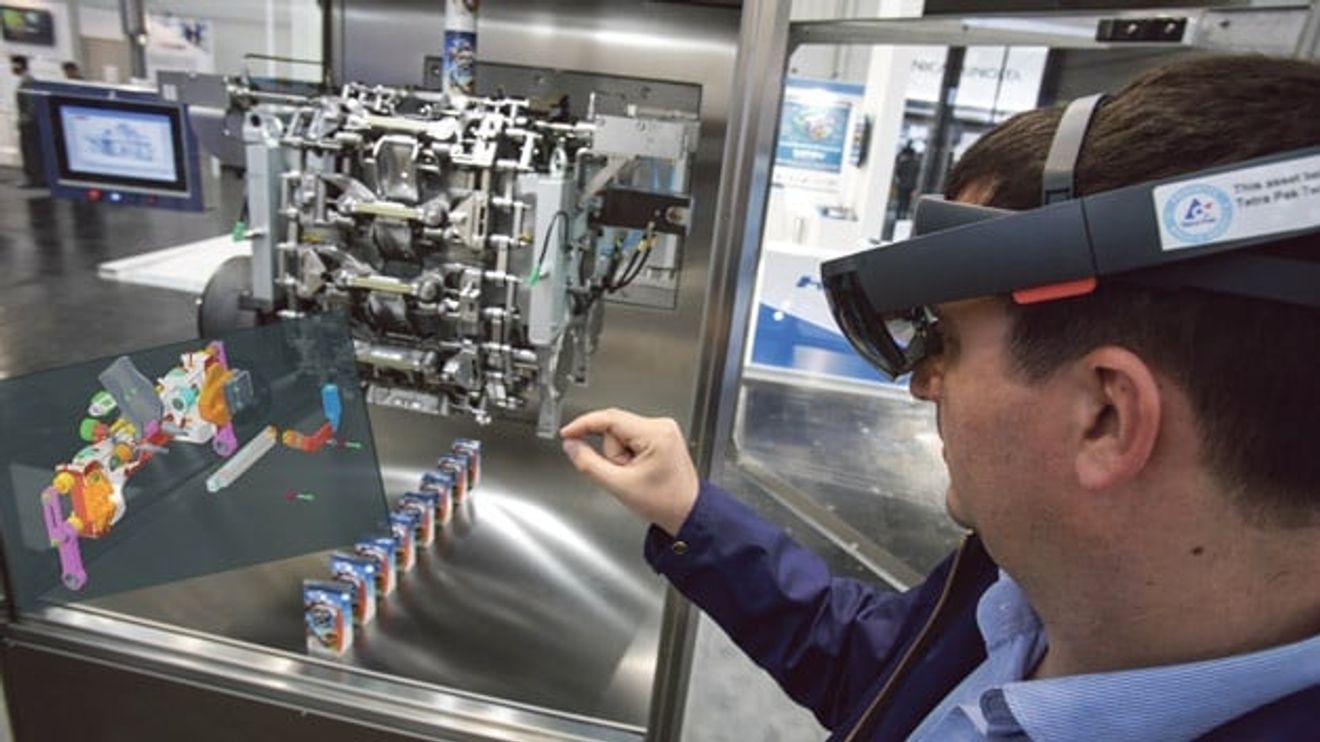
The topic of augmented reality (AR) is currently attracting a lot of attention in the industrial sector. There are two reasons for this: Firstly, numerous hardware products are currently coming onto the market. Most of these are data glasses such as the Hololens from Microsoft. Secondly, industry is predestined for the use of AR, as there are a large number of potential application scenarios.
But what is AR and what makes it so interesting? It is a computer-aided extension of the perception of reality. In theory, all human sensory organs can be addressed. In practice, however, the virtual influence is limited to sight and hearing.
In many cases, virtual objects are not simply superimposed on the user's field of vision, but are also integrated into their reality. This means that they behave like an actual object in terms of position, distance and orientation. Microsoft has coined the term mixed reality (MR) for this form of integration into reality. MR is therefore a sub-form of AR. The following criteria must be met in order to be able to speak of mixed reality:
- Position: The object has a defined position in the real world that is not dependent on the user (the object does not move with the user).
- Distance: The object has a defined position, which is why the distance to the user is variable and changes as soon as the user moves closer or further away.
- Orientation: The orientation of the object is fixed. This means that if the user moves around the object, it does not rotate.
- Interaction: The virtual object can interact with reality and vice versa. For example, it can be moved or be subject to gravity.
In addition to the definition of AR and MR, the distinction from virtual reality (VR) provides a better understanding of the topic. AR and VR have a lot in common - but there are some key differences. The most important difference is the reference to reality. While this remains the same in AR and reality is merely augmented by virtual objects, the user is cut off from reality in a VR application and is completely immersed in the virtual world. Due to this difference, the areas of application for the two technologies also differ.
The functions and processes
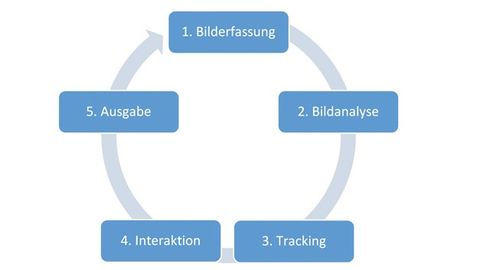
Figure 1: From image capture to output: the steps for setting up a Hololens application.
© M&M SoftwareAR applications are used where contact with reality is essential, such as for navigation. VR is used where this reference is not required, for example in video games.
But what functions and processes does an AR-based application offer? The process is based on five repetitive steps - as explained below using the Microsoft Hololens as an example and shown in Figure 1 .
It all starts with image capture (1). The Hololens is equipped with six cameras for this purpose. The image analysis (2) is based on the input provided by these cameras. This is used to map the environment. A map, so to speak, is drawn of the space in which the user is located. With the Hololens, this process is also known as 'spatial mapping'. If the existing environment changes or the user moves to a new environment, the map is updated. Spacial mapping is then used as the basis for tracking (3) the virtual objects. Tracking refers to the localization of virtual objects. Once they have been placed in the real space, the user can interact with them (4). As a rule, the interaction will lead to a change or reaction of the virtual object. This reaction is referred to as an output (5). With the output, a cycle is completed and a new one can begin.
The development process
In order to develop a deeper understanding of AR-based applications, it is also worth taking a look at the development process. Everything starts here with the creation or procurement of the virtual objects that are to be used. These can be very simple or highly complex, depending on the requirements. There are libraries of virtual objects, which is why it is worth checking whether existing objects can be used. If this is not the case, the required object must be created yourself. This is a point that should not be underestimated, as special experts are usually required for this. The creation of complex 3D models with tools such as Blender or Maya is a professional field in its own right. For this reason, an expert in this field should be part of a development team for an AR application.
At this point, the development workflow becomes platform-specific. In the case of an application for Hololens, this means that the '3D engine Unity' is used. Even if there are no technical limitations that would prevent the use of other 3D engines, Unity is still the de facto standard for Hololens development. The engine makes it possible to create so-called 'scenes'. This involves organizing and configuring various objects in a 3D space. The types of objects range from 3D models to animations and sounds. A project can contain several of these scenes.
Once the developer is satisfied with the scenes created, the project can be built as a Universal Windows Platform (UWP) application. The UWP project is then further processed with Visual Studio. Visual Studio is a development environment from Microsoft for creating a wide variety of software such as websites, apps, web services and desktop programs. Visual Studio is also used to build the application.
A Hololens does not necessarily have to be available for this. The development environment has an emulator that can be used to run the application. As the application is a UWP app, it can be run on mobile devices, PCs and the Xbox, among others. UWP apps can also be developed in various programming languages (e.g. C++, C#, Visual Basic and JavaScript).
Many applications possible
There are many use cases for the Hololens, particularly in the industrial sector. This is because AR - and the Hololens in particular - can play to its strengths when it comes to providing visual and acoustic support for work processes. Keeping hands free during use is another important factor for industrial use. The following areas of application are particularly suitable:
- Assembly: step-by-step guidance through the workflow
- Order picking: Specification of parts and quantities
- Quality inspection: Specification and logging of inspection steps
- Training: Process-accompanying training with virtual information
- Maintenance: Instructions for service and maintenance work
However, there are a few pitfalls that need to be overcome in order to take advantage of AR-based applications. One of these pitfalls is employee acceptance. Without this, even the best application will fail. There are no guarantees, but by consistently involving users in the conception phase, you can ensure that employee acceptance increases significantly. An application in whose development process the employee has already been involved is more likely to be perceived as something 'of their own'.
Avoid cognitive load
A common problem with Hololens applications is the high cognitive load. This is because many dynamic virtual objects can very quickly become too strenuous for the user. However, there are ways to avoid this problem. The design of the application is particularly important here, and the following guidelines must be observed in order to make the experience as comfortable as possible for the user:
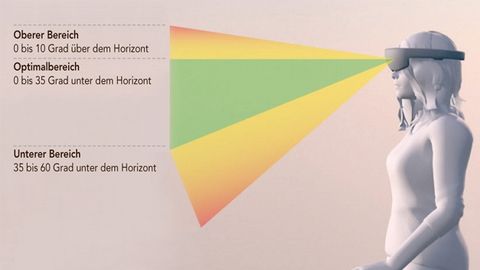
Figure 2: An important criterion when setting up applications is the viewing angle: if the virtual objects in his field of vision are too far up or down, this leads to increased strain on the eyes and neck.
© MicrosoftThe user's viewing angle must be taken into account(Fig. 2). If the virtual objects in their field of vision are too far up or down, this leads to increased strain on the eyes and neck. The user will therefore feel uncomfortable more quickly, which can ultimately lead to rejection of the application. It is therefore ideal to place the objects at an angle of 0 to 35 degrees below the horizon. Movements of the head by more than 45 degrees in a horizontal direction should also be avoided.
Another stumbling block on the way to a user-friendly AR application are so-called head-up displays (HUD). These are static displays with information within the user's field of vision. HUDs are often used in first-person video games. In an AR application, they can cause discomfort if used incorrectly. This is especially the case if the HUD is linked to the movement of the head, causing the HUD to constantly realign itself. Instead, it is recommended to use the movement of the body to align the HUD. In order to realign the HUD correctly when the head moves, a threshold value can be defined for the rotation of the head above which repositioning is performed.
When designing an AR application, particular importance should be attached to gesture control, as this can also have a negative impact on the user experience. To prevent the user's arms from getting tired, care must be taken to ensure that the application does not require them to be stretched out for long periods of time. It is generally advisable to avoid frequently repeated gesture inputs. The physical effort for the user should be kept as low as possible.
The selection of the rendering rate is another important point for the user experience. This aspect is more of a technical nature, as the rendering rate influences whether a hologram looks stable and can be animated clearly. A minimum rate of 60 frames per second is required for this. If it is set lower, there may be delays in the display and the holograms may jitter. If the AR device used allows a higher frame rate than 60 frames per second, the higher rate should be selected.
Users who want to use augmented reality are often faced with questions such as: How will the topic develop in the future? Will the technology be successful in the long term or is it a short-term hype that will quickly die down?
What happens next?
It is not possible to answer these questions conclusively, but some trends can be identified. As technology advances, it can be assumed that the hardware of the Hololens and data glasses in general will continue to develop - especially in terms of size and performance. Some very interesting new approaches are also currently being pursued. These include the development of an AR contact lens. Although this is certainly not a product for everyone, it shows that the ideas and possibilities are far from exhausted and that there will continue to be innovations in the future that indicate that the hype is not dying down.
Author:
Stefan Höfler is a software developer at M&M Software.


You might also be interested in
Converging Digital Twin Models
Siemens and Microsoft are working together to facilitate the exchange of digital twin models and data. To this end, they are merging Digital Twin Definition Language with the W3C Thing Description Standard.
 read more...
Facilitate the replacement of digital twin models
Siemens and Microsoft are working together to facilitate the exchange of digital twin models and data. To this end, they are merging Digital Twin Definition Language with the W3C Thing Description Standard.
read more...Vodafone and Microsoft agree on comprehensive partnership
Microsoft's share price has shot up in recent months in anticipation of good business with AI applications. Now the first major orders are trickling in. In return, Microsoft is buying telecommunications solutions on a large scale.
read more...The e-paper special: looking for products of the year 2024
They've earned it: all 96 nominated products from 12 categories in their own e-paper. Browse through the individual areas and make your personal selection. You can also find out more about the companies and their solutions in the accompanying video...
read more...AI is what we make of it
Everyone is talking about generative artificial intelligence. But what added value does it bring? How can it be integrated into industrial processes? An assessment from Microsoft.
read more...25 years of Computer&Automation - The e-paper
For 25 years, Computer&Automation has accompanied the growing influence of IT in automation technology. Ultimately, IT and automation can no longer be clearly separated. In this anniversary issue, you can read about the importance that...
read more...The top articles in May 2023
The fact that the fight against climate change is undisputedly the biggest global challenge is also reflected in the most-read articles of May. New applications with the digital twin and trends in AI in dialog continue to top the list.
read more...The chatbot as a teacher
The potential of text-based dialog systems is demonstrated by a free interactive online course from Münster University of Applied Sciences. A chatbot acts as a teacher to teach the basics of programming.
read more...Cooperation in the field of AI
Siemens and Microsoft are bringing together the products Teamcenter, Teams and the language models of Azure OpenAI Service to tap into the strengths of AI for the manufacturing world.
read more...