

Apptio
Optimizing cloud costs - but how?
Cost management for multi-cloud environments is an art in itself. A wide range of options are available for optimization - if they are understood and used correctly. But what really matters and which criteria are essential?

With cloud costs, it's like in real life: you already know roughly how things could actually be done better. But firstly, you have to do it, and secondly, you have to understand exactly how.
Billing and usage analyses, recommendations and overviews in dashboards - tools for cloud cost optimization are available and can simplify many things. However, in order to manage multi-cloud ecosystems efficiently and economically, a cross-provider view and automation for cloud financial management are required. In order to exploit these opportunities, Apptio has developed a guideline for the seven most important levers from project practice.
It shows exactly what cloud cost optimization measures are aimed at, where the pitfalls lie and how automated analyses can be used effectively.
1. discount models - puzzle of discounts and terms
With the providers' discount models - Reserved Instances, Savings Plans or Committed Use Discounts - the user commits to a specific purchase of cloud services or use of cloud instances for one or three years. In return, they receive more favorable conditions for the agreed scope during this period. The more expensive "on-demand" price must be paid for anything beyond this.
Here it is important not to fall into over-commitment, i.e. not to buy too many advance discounts that are then not used at all. Or the even more common reverse case: not making any commitments because it is not possible to predict with certainty whether these will actually be fully utilized. It is usually cheaper to boldly make a few commitments, even if some of them don't pay off, than to make none at all and always pay the most expensive on-demand price.
If you enter into a few commitments each month, you can also adjust their scope upwards or downwards each month. And if you keep an eye on the terms of the commitments, you can seamlessly add further agreements with the most favorable price models.
Cloud commitment management tools should therefore be able to map the current discount agreements in the company across all providers and support comparisons for follow-up contracts. On the other hand, automated, timely notifications to those responsible are important before cloud commitments expire.
2. rightsizing - act, and in the right place

There are a number of tools that provide more or less good suggestions for dimensioning cloud instances so that they are the right size for actual use. The problem is that someone has to implement this.
Rightsizing only becomes practical with more far-reaching solutions: First, the cloud services booked should be determined automatically using the cloud billing data and combined with monitoring data. This makes it clear what has been oversized or not used at all. Tickets then need to be generated, for example in Jira, with recommendations in the respective (Jira) projects. This allows DevOps teams to schedule their implementation in their sprints.
If the status is synchronized back, it is possible to see what has already been implemented. Ideally, the rightsizing solution calculates the savings achieved and what potential is still open.
3. elasticity - expand and shrink as required
A special feature of the cloud compared to the data center is its elasticity. It makes it possible to allocate cloud resources on the basis of an analysis of usage behavior and to rely on elasticity for peak loads. To this end, it is worth discussing this with all those involved in the cloud architecture and the business: when are high peak loads to be expected, both technically and business-related, for example Black Friday or other special events.
Instead of permanently designing the cloud infrastructure for the maximum load - and paying for it every minute - it is better to design the cloud infrastructure for the base load and only increase cloud resources when peaks are expected. Here, it can make sense to reserve compute capacities in advance, also known as "capacity reservation" - not to be confused with the "reserved instances" discount model from the previous section. Conversely, unused instances, for example non-productive environments at the weekend or at night, can also be switched off, thus saving up to half or more of the costs.
4. autoscaling - economical, but prepared for anything
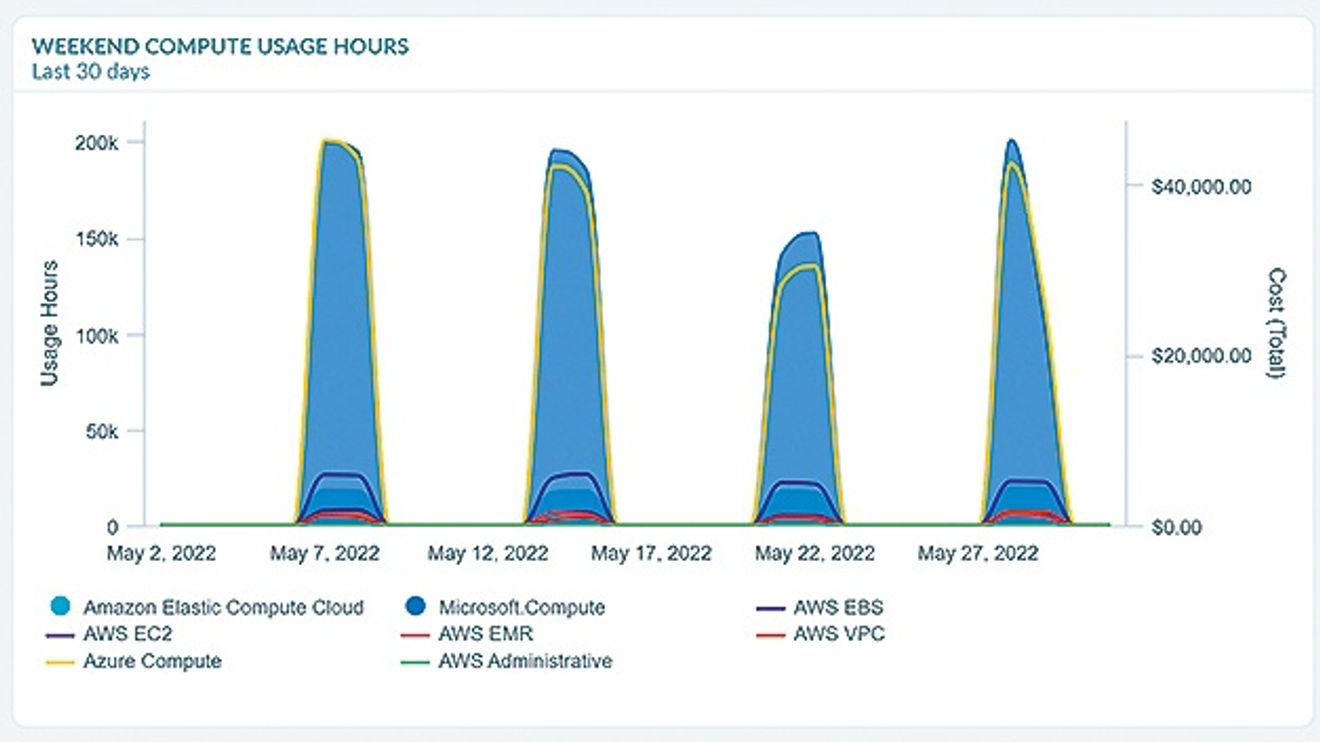
Figure 2: By analyzing usage behavior, cloud resources can be scarcely commissioned in order to cover possible load peaks via elasticity.
© Source: ApptioThe autoscaling function can be used to automatically adjust the required cloud capacities based on predefined rules. If there is little computing to be done, low computing capacities are sufficient; if computing-intensive tasks are pending, capacity is increased on-the-fly. An autoscaling group defines the minimum and maximum capacity to be made available, which instance types are to be used and how scaling is to take place.
Scaling can be manual, time-controlled or automatic based on application-specific metrics (monitoring) and/or predictions. This ensures the availability of services and reliable performance levels in a demand-oriented and cost-efficient manner.
Although modern architectures usually allow autoscaling, it must be clarified in each individual case which applications are suitable for this. The application must at least support load balancing so that the load can be distributed across several compute instances. Applications that show a stable and recurring pattern in the load volume (depending on the time, day of the week and/or calendar week) are very good candidates for autoscaling. Auto-scaling groups can be populated with both on-demand resources and spot instances, as explained in the next section.
5. spot instances - worthwhile additional effort
Spot instances offer a particularly attractive cost structure. However, they are not guaranteed: The provider can terminate the instance at any time if they need it to back up a workload elsewhere, for example. Typically, there is a two-minute warning before the instance is shut down. It's a bet on free capacity in the cloud, so to speak.
One thing is clear: this is not suitable for every application! What are spot instances suitable for?
Computing-intensive tasks that can be interrupted and resumed at any time: Batch jobs, compiler runs or learning processes for artificial intelligence, complex video or image editing processes, scientific calculations or simulations, computationally intensive financial analyses and models.
- Distributed databases that store data even when individual instances are restarted.
- Big data: All types of mass data processing.
- Testing: Load tests, regression tests, security tests or tests with mass data.
The reward for the effort: spot instances are available for up to a tenth of the price of on-demand resources. Tools that visualize cloud usage in terms of spot, reserved instances, savings plan and on-demand usage are therefore worthwhile. They help to understand which workloads are suitable and how the spot instances, which providers make available according to different regulations, can best be used. However, a system for managing interrupted spot instance workloads is also important.
6. waste management - clean out, but with caution

Figure 3: Practical rightsizing: Automated determination of booked cloud services based on cloud billing data compared to monitoring data makes it clear what was oversized or not used at all.
© Source: ApptioWaste management is about identifying unused cloud resources and avoiding unnecessary expenditure. Sounds simple at first - but with typically several hundred thousand cloud resources, it is not possible to find out manually which resources are actually not needed.
By comparing billing data with monitoring data, tools can identify potentially superfluous cloud expenditure. In addition, among all the hundreds of thousands of cloud resources, those that are not needed at night or at the weekend can be identified. A distinction can also be made between productive and non-productive environments.
But beware: unused or barely used cloud instances or cloud services should not simply be switched off automatically, but notes on this should be created as tickets in the appropriate Jira projects. Only the cloud architects and DevOps teams can make informed decisions about which cloud services are actually superfluous and which are not. Even if monitoring shows that they are hardly used, there is a risk of production downtime if individual cloud instances or services are not available without detailed knowledge of the context and architecture.
7 Workload management - creating comparability

Figure 4: By comparing billing data with monitoring data, Apptio tools identify potentially superfluous cloud expenditure. This helps cloud architects to identify services that can be switched off from thousands of cloud resources.
© Source: ApptioThe costs for virtual machines vary greatly from provider to provider. The designation of the workloads in the cloud, the offers and configurations of the cloud providers also vary significantly. This makes it difficult to compare offers. However, the price of workloads is not the only reason to choose a provider. Cloud providers try to bind customers to their cloud platform by offering ready-made cloud services. And their use is indeed attractive, as the provider takes care of maintenance and updates.
As a decision-making aid, tools can show which cloud instances are most likely to cover a particular workload. In most cases, there are between 40 and 50 similar configurations that could be suitable in principle. If the tool knows the configurations of existing on-premises servers, it can also determine which cloud instances could replace them. This enables comparisons to be made as to which cloud offerings are best suited - also, but not only, in terms of the price/performance ratio.
Transparency creates responsible handling

The important thing is: In addition to all cloud cost optimizations, a responsible use of resources in the cloud is required. The first step is to create the necessary sense of responsibility through cost transparency and allocation according to who is responsible. The teams need to understand what costs they are incurring through their cloud usage and what the core cost drivers are. In the second step, it makes sense not only to show the costs, but also to charge them to the teams via internal cost allocation. If cost-effective use of the cloud is one of the objectives, cloud costs will no longer rise unchecked, but will be invested in cloud services where the business benefits justify the expenditure.


You might also be interested in
Interview with Thomas Frahler, Microsoft
IT meets OT
With Edge and Cloud, classic IT technologies are finding their way into the factory. How is the acceptance of these technologies in the production environment? Where are misunderstandings occurring? What opportunities arise from the convergence of...
 read more...
What are 'cloud services'?
Cloud computing types are deployment models that allow you to determine how much control you have over the information and types of services you provide. There are three main types.
read more...What is 'edge computing'?
"Edge computing" is a framework for distributed computing in which enterprise applications access data sources such as IoT devices or local edge servers.
read more...What is 'cloud computing'?
Cloud computing involves renting computing resources via the internet, i.e. the cloud, on another company's computers.
read more...Sovereign edge-to-cloud platform for the industry
Hilscher Gesellschaft für Systemautomation and Schwarz Digits have announced a cooperation to provide sovereign European edge-to-cloud solutions for the industry.
read more...Marco Geiser becomes new Vice President Secure Power DACH
Marco Geiser has held the position of Vice President of Secure Power DACH since April 1, 2026. In this role, he will strategically develop the Secure Power business in Germany, Austria and Switzerland, strengthen it operationally and focus it on...
read more...Cloud security often inadequate
According to Red Hat's "State of Cloud-native Security" Report 2026, 97% of the companies surveyed with hybrid cloud environments reported security incidents within a year. This is based on data from around 600 IT specialists.
read more...Partnership for edge AI in industry
Nota AI and SiMa.ai have agreed on a strategic collaboration to develop AI solutions for industrial applications. The aim is to optimize AI models for use directly on devices at the network edge, where high computing power and energy efficiency are...
read more...Edge AI HPCs for Vision AI and GenAI
Advantech has announced the 'AIR-410' and 'AIR-420', next-generation compact Edge AI high performance computers (HPCs). Combining AMD Ryzen 7000/8000/9000 series processors, scalable GPU support and Advantech's 'Edge AI SDK' software, the systems...
read more...