

Software update with OPC UA
Manage and secure assets
In today's fast-paced industrial environment, it is essential that production processes run smoothly and efficiently. However, one critical aspect that is often overlooked is the importance of PLC backup and restore procedures.
PLC backup and restore procedures are proving essential to maintain the integrity of manufacturing systems. They also ensure that the latest software is used and that there is no costly downtime. In addition, asset management is an important component of the foundation of cyber security activities in all types of organizations. Enhanced by the ability to create backups and restore them to a device if necessary, device and update management is one of the building blocks of a proactive, end-to-end security strategy.
Resetting an automation device
To ensure the highest level of cyber security and reliable and predictable performance of automated systems and machines, a process should be developed and established that keeps these systems up to date by installing software and security updates in a standardized, automated and secure manner. This is made possible with the help of a manufacturer-independent device and update management service based on OPC UA.
It always makes sense to generate a backup - and not just for automation devices. There are two use cases for industrial automation systems:
- The device is defective and needs to be replaced.
- The user has to reset the device due to a cyberattack.
The second use case, which also plays a major role in the context of the certification of the controllers in the PLCnext Control product family from Phoenix Contact, is discussed below.
App creates back-ups for control units
PLC backups prove to be essential, as they prevent the program and configuration data stored in the controller from being lost in the event of a hardware failure, power failure or other unexpected events. Without a backup, the program usually has to be recreated from scratch, which leads to downtime and loss of productivity. In addition, the cost of replacing a faulty PLC can be expensive. And without a backup, it can be difficult to restore the system to its previous state. A PLC backup with the device and update management service provides a simple and efficient method of quickly restoring the system to its previous state. In the event of a security emergency, the backup can be used to load the program and configuration data onto a new or repaired controller so that the system can return to normal operation with minimal downtime(Fig. 1).

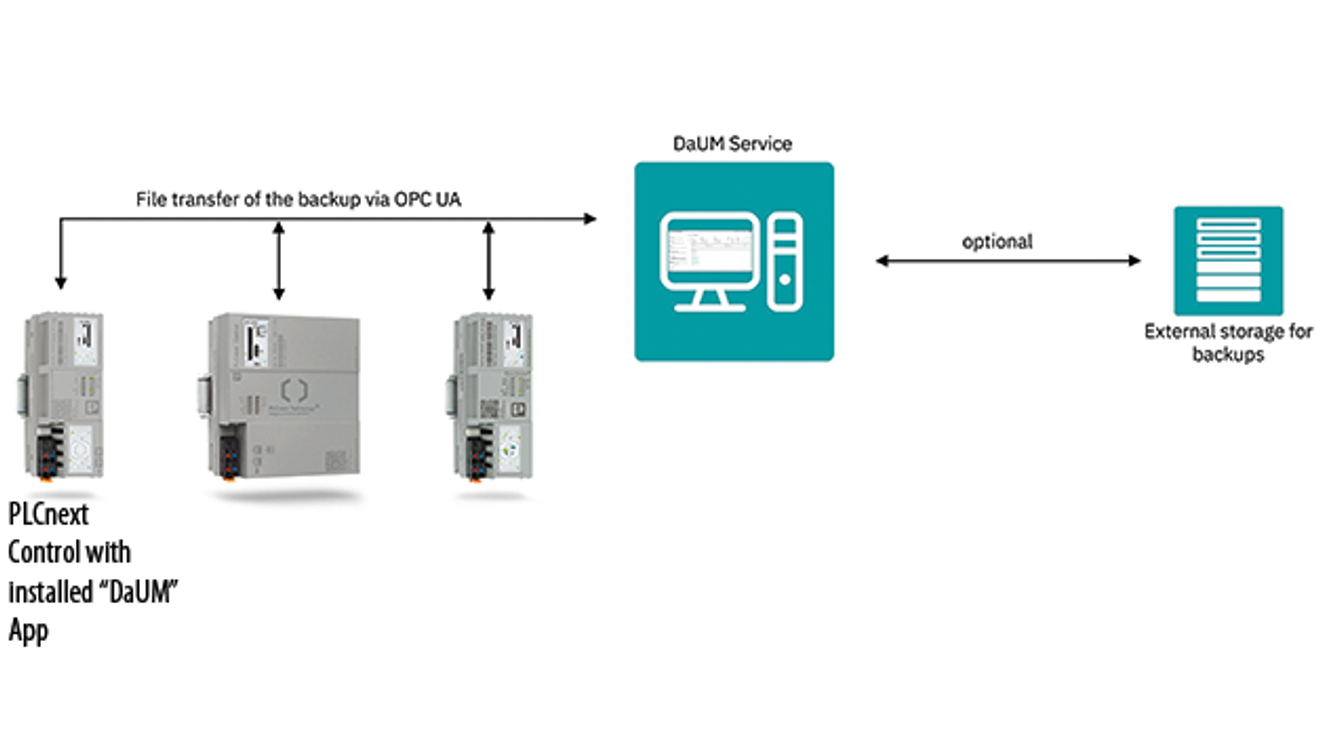
In the current version of the device and update management as well as the PLCnext Control series controllers, the 'DaUM Backup and Restore' app generates a backup on the target device and restores a provided backup. The app can be downloaded free of charge from the PLCnext Store.
To perform the backup, the user must configure and authenticate the OPC UA connection in the 'OPC UA Clients & Servers' area. As soon as the app is recognized on the device and the OPC UA file transfer settings correspond to the respective specifications, a backup of the device can be implemented. The backup is either triggered immediately with a click of the mouse or scheduled and carried out regularly. At this point, it is important that a back-up does not affect the processing of the PLC project. The back-up can therefore be created during the ongoing production process and transferred to the device and update management service(Fig. 2).
Protection of integrity and confidentiality
In the use case described, a backup is generated in order to restore it on the same asset. Consequently, data that may be related to the hardware and cannot be used on another asset of the same type can and is also backed up here. The entire list of files contained in the backup is displayed for each backup in the device and update management service. The following is a selection of the most important data for the user:
- the PLC project with the runtime data,
- network settings,
- user settings,
- log files,
- installed apps.
| Software update with OPC UA |
|---|
| With the device and update management service from Phoenix Contact, which is based on the OPC UA standard 10000-100, automation devices can be managed and updated independently of the manufacturer. A new feature is the option to update many different components from the automation system. The range includes controllers, I/O modules, frequency inverters, robots, network devices and power supplies. For the first time, security is also possible throughout all levels of the system. All communication and all commands are only authenticated and authorized, with strict reference to IEC 62443. There is also the option of operating the device and update management service at different levels - depending on the application and system size, on an edge PC in the system, in a central server instance of the user or on an automation device. |

The author: Arno Martin Fast, B.Eng., is Senior Specialist Digital Services at Phoenix Contact Electronics in Bad Pyrmont.
© Phoenix Contact ElectronicsAccording to the IEC 62443 security standard, back-ups are to be regarded as 'information at rest'. Their integrity and confidentiality should therefore be protected in the same way as that of the entire system. The device and update management service encrypts and signs each back-up. All backups include characteristic data that can be used to verify the integrity of the stored data. In this way, changes to the data and defects in the backup are detected. It also prevents the
prevents the restoration of a damaged backup. The documentation of each asset in the device and update management service shows when a backup was created. In addition to the time of creation, the data contained is also recorded and information stored so that the backed-up device can be identified.
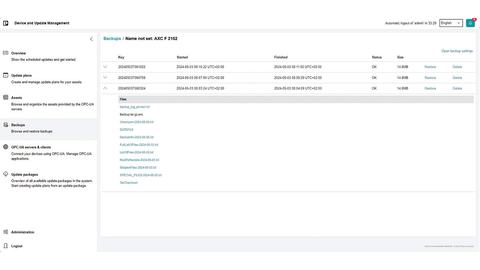
On the 'Back-ups' page in the Device and Update Management Service, users are given an overview of the files that were generated during the back-up. All back-ups performed are archived in the Device and Update Management Service for the corresponding assets. The backup files are listed in the log files supplied with the backup. By selecting the 'Restore' button, the user restores the backup to its previous state by checking the signature on the same device(Fig. 3).


You might also be interested in
Supports OPC UA encryption and authentication
If information from sensitive production networks or critical infrastructures is required for further processing, data diodes such as the cyber-diode from Genua are the ideal solution.
 read more...
Monitor and protect DC microgrids
Sustainable production using renewable energies begins with the establishment of an industrial DC grid. A multifunctional DC switching device is responsible for switching, protecting, monitoring and precharging DC sectors.
read more...Information transparency along the value chain
In the future, it will not only be about what and how quickly a factory delivers, but also how it produces. This is because purchasing decisions are increasingly dependent on various criteria.
read more...25 years of Computer&Automation - The e-paper
For 25 years, Computer&Automation has accompanied the growing influence of IT in automation technology. Ultimately, IT and automation can no longer be clearly separated. In this anniversary issue, you can read about the importance that...
read more...The e-paper for the special issue
Safety & Security 2023
The European Union's new Machinery Regulation was recently published. From this date, machine manufacturers and operators have 42 months to comply with the new requirements for machines and systems. This and more news on the topic in the interactive...
read more...One device instead of series connection
A power supply with 110 V(DC) extends the 'Quint Power' family of power supplies from Phoenix Contact. It is suitable for applications from 110 V(DC) to 135 V(DC).
read more...SPS Connect 25.11. - 14:30 - 14:50
5G and WLAN 6 - two converging technologies?
Digitalization has a fundamental building block without which progress would not be possible in the private, commercial or industrial sectors: the key is communication!
read more...PLCnext Technology - the 'ecosystem' becomes round
A new controller and a new software store: Phoenix Contact is further expanding the 'PLCnext Technology' ecosystem with these modules.
read more...The "shapers" put the pressure on
Is OPC UA plus TSN the exclusive industrial communication solution of the future? The so-called "Shaper Group" is now emphasizing this conviction with a white paper. Computer & AUTOMATION offers it for download.
read more...