
Field device management
FDT - the integration in Codesys
FDT technology standardizes device management on all common fieldbuses, regardless of the manufacturer. What components and mechanisms are required to implement the FDT interface in a PLC programming environment such as Codesys?
FDT technology has its origins in process automation. However, due to the fieldbus diversity that prevails in factory automation, this technology is also particularly useful in this environment for standardized device management. This is because the PLC programming systems commonly used here - such as Codesys - can provide significantly better device integration when FDT is used.
A software component, the so-called 'Frame Common Component', is available for implementing the FDT interfaces in an FDT application - also known as an FDT frame application. This component, which is available from M&M Software and certified by the FDT Group, serves as a basic component. Its use ultimately ensures specification-compliant implementation and improves interoperability with the various DTMs.
The 'Frame Common Component' contains all interfaces according to the FDT specification that are necessary to develop an FDT application. Such an application can cover a wide variety of applications, for example a stand-alone tool for device configuration, a diagnostic tool or an asset management tool.
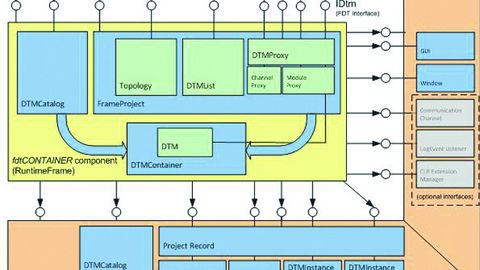
Figure 1: The architecture of an FDT application: encapsulation of functions in components and their interfaces.
© Schneider ElectricIn Figure 1, the FDT application is represented by the outer frame. All functions of the respective application are implemented in this frame. The inner part shows the base component (fdtContainer component). The interfaces that connect the two elements are located between the application and the base component. The direction of the arrow indicates whether the interface call is made to the base component or to the application.
The database adapter (DBAdaptor) can be seen in the lower part of the application. It forms the adaptation layer to the application-specific database. The functions shown in the database adapter (for example 'Project Record' or 'DTM Instance Data') are placeholders for programming the database accesses.
The base component itself contains functions for managing the DTMs (DTM Catalog) and the application project (FrameProject). The project includes the system topology, the associated DTMs (DTM List) and a proxy. This proxy resolves abstract calls online into individual FDT function calls - for example 'go online'. The instantiated DTM itself runs in the DTMContainer component.
The Codesys plug-in concept
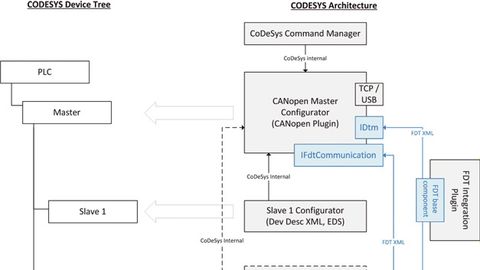
Figure 2: Section of the Codesys architecture with the FDT components. An equivalent structure is provided for other fieldbuses.
© Schneider ElectricCodesys is a software suite for automation technology. It is based on the IEC 61131-3 programming tool. It allows the integration of additional functions through customized plug-ins such as new menus, editors and so on. The FDT basic component is also embedded in the programming tool using this mechanism. Figure 2 shows a section of the Codesys architecture with the FDT components. The project structure as it is displayed in Codesys (Codesys Device Tree) can also be seen. The 'FDT Integration Plug-in' contains the FDT base component for managing an FDT project with the associated DTMs.
The architecture shown in Figure 2 illustrates the integration using the example of CANopen devices. It is possible to use both devices with and without DTMs. The CANopen master is represented by a DTM, which is used to configure the CANopen field bus. It is also the communication interface to the CANopen devices. The 'IFdtCommunication' interface, which a device DTM uses to exchange data with its device (DTM for slave 2), is used for this purpose. The CANopen master DTM converts the data from the device DTM into protocol-specific messages - in this case CANopen - and sends them to the device. The response from the device is processed accordingly in reverse order.
Device management
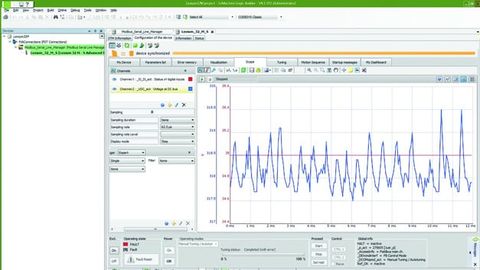
Figure 3: Example of a DTM in the Codesys tool 'SO-Machine' from Schneider Electric. The DTM for a servo drive has a wide range of functions - such as the oscilloscope shown for investigating/observing drive parameters.
© Schneider ElectricDevice management allows components that do not require an explicit DTM due to their simplicity to be mixed with devices with higher functionality, which can be used to their full extent using the DTM. A general XML device description and the corresponding fieldbus device file (e.g. EDS for CANopen) exist for all devices in Codesys. The device description contains all information about the device, its parameters and communication options.
If a device with DTM is used, the DTM is transferred from the DTM catalog to the project and the corresponding XML description is generated automatically. The system receives the required data via the IDtm interface. Among other things, information on the manufacturer, device type and version data is provided in this way. Frequency inverters are an example of a device with extensive functionality. Here it makes sense to provide a DTM for each device family that covers the entire spectrum of a device series.
The fieldbus configuration
The CANopen Master Configurator enables convenient configuration of the fieldbus. This includes parameters for the fieldbus itself, such as baud rate or heartbeat (monitoring time). This DTM also assigns the addresses for the devices (node ID) and carries out the mapping of PDOs (ProcessDataObjects). The latter establishes the relationship between the PDOs and the application objects in the object directory. The master configurator exchanges this data with the device DTMs via the IDtm interface (SetParameters). The master configurator is also informed when data is changed by the device DTM. It can then query these changes via the interface (GetParameters). Once the configuration is complete, the master configurator checks the consistency of the CANopen system data.
The CANopen data is downloaded to the master and to the devices and used at runtime for system start-up, setting the fieldbus parameters and data exchange.
Process data generation
Process data is the data that is transferred between the PLC and the slaves at runtime on the fieldbus. The description of the process data, which is defined using the device DTMs, is provided at a corresponding interface (Process Channels). In this case, the information from the EDS (Electronic Device Description) is not used, as its information is not sufficient for this. This procedure is particularly helpful for modular devices whose configuration is variable. The PDOs (Process Data Objects) are generated automatically for this process data. Existing variables can be assigned to the process data in the device DTM or new ones can be defined. The PLC tool receives the variables from the device DTM and ultimately makes them available to the PLC program, via which they can then be used directly by the PLC programmer for further processing.
Conclusion: The use of FDT technology in Codesys provides the programmer with extensive options for device management. The functionality and flexibility far exceed what is possible by using the usual description files (EDS, GSD). For example, devices from different manufacturers can be integrated into a tool in the same way and the devices can be accessed across fieldbus hierarchies. With their graphical user interface, DTMs provide easy access to the respective device and also offer device-specific diagnostic functions that allow faults to be detected quickly in the event of maintenance.
Authors:
Nuno Barral is Project Design Leader and Software Architect at Schneider Electric Automation;
Manfred Brill is Innovation & Technology Senior Manager at Schneider Electric Automation.
What is FDT technology?
FDT standardizes device management for field devices in one tool. The standardization of device management is independent of the device manufacturer and fieldbus/network used. This means that every device can be configured, operated and maintained in an FDT tool using standardized interfaces - regardless of manufacturer, type or communication protocol. The three key elements of FDT are:
- The FDT interface - the standard for device management
The FDT interface is the specification that describes the standardized data exchange between devices and the control system or the engineering and asset management tools.
- The DTM (device driver)
The DTM (Device Type Manager) provides a standardized structure for accessing the device parameters, configuring and operating the devices and for fault diagnostics. DTMs range from simple graphical user interfaces for parameterization to sophisticated applications that handle complex real-time calculations for diagnostics and maintenance. DTMs are divided into three categories:
Device DTM:
- Supplied by the device manufacturer.
- Represents the entire logic and parameterization of a device.
- Creates a standardized interface to the FDT frame application.
- Can be used in any FDT frame application.
- Based on the DTM style guide.
Comm-DTM:
- Represents communication components such as PC network cards and couplers.
Gateway DTM:
- Represents components that connect two different networks/fieldbuses.
- The FDT frame application (host system)
The frame application is a software program that integrates device, comm and gateway DTMs from different manufacturers and for different networks/fieldbuses. The frame application offers
- common, standardized environment
- user administration
- DTM management
- data management
- Network configuration
- navigation


You might also be interested in
Hans Seifert to Become Chief Sales Officer
Sigmatek has appointed Hans Seifert as Chief Sales Officer (CSO). His area of responsibility includes international sales, marketing, application engineering, and support.
 read more...
Dual leadership in Shanghai
Stefan Becker has been appointed Managing Director of Eckelmann Automation Technology in Shanghai and will manage the subsidiary together with Zhongwei Huang.
read more...Efficient Modbus gateways
Spectra's tGW-700 series Modbus TCP to RTU/ASCII gateways allow Modbus/TCP hosts to easily communicate with Modbus RTU/ASCII serial devices over an Ethernet network.
read more...Dr. Sebastian Durst becomes CEO
The Weidmüller Group is strengthening its first management level as of October 1, 2024: Dr. Sebastian Durst, previously Chief Operations Officer, will take over the newly created position of Chief Executive Officer (CEO).
read more...Joachim Herz Foundation invests
The Hamburg-based Joachim Herz Foundation acquires a stake in Weidmüller as part of a capital increase and thus holds around 20% of the shares in the family-owned company. The commitment is aimed at long-term corporate development and accelerated...
read more...Establishment of global headquarters in Switzerland
The Harting Technology Group, a provider of industrial connection technology, has announced that it will be bundling supra-regional top management positions in Switzerland to drive forward global management.
read more...Second test laboratory in China
At the end of May 2024, the China-based company Nanjing Loyst Industrial Networks was recognized as a new IO-Link test lab. This brings the number of IO-Link test labs worldwide to four.
read more...Partnership for OT security
Wago, a provider of electrical connection and automation technology, and Radiflow, a specialist in OT cyber security, are entering into a partnership and pooling their expertise. Together, they want to strengthen resilience against potential cyber...
read more...Compact communication solution
Deutschmann Automation offers an embedded version of the 'Unigate Falcon' protocol converter/gateway series that can be integrated immediately. The 'Unigate Falcon Embedded' communication solution quickly provides an Industrial Ethernet or fieldbus...
read more...