
Industrial PCs
Windows and real-time Linux combined
Until now, Linux real-time applications have run on a hardware platform that is decoupled from Windows. Now it is also possible to run Linux applications together with Windows on a PC.
In recent years, Linux has become the most popular operating system for a wide range of applications. More and more manufacturers of industrial control systems are using Linux in the real-time version with the so-called preemptive patch as the basis for their deterministic real-time behavior. Many sophisticated development tools and broad hardware driver and software support from third-party providers are available for Linux. Even Microsoft's Visual Studio development platform - including the free community version - now supports software development for Linux.
Until now, however, Linux real-time applications have run on a hardware platform alone - for example on embedded controllers or industrial PCs (IPCs). However, due to the immense increase in the performance of PC hardware, it is now possible to run one or more Linux operating systems - with or without real-time - including Linux applications together with Microsoft Windows on PCs.
But why should you do this? What are the advantages of combining real-time applications with Windows on a PC? Firstly, there is the reason of hardware consolidation to save costs. Instead of running Windows HMI and control hardware separately on two computers, a single industrial PC is sufficient for both tasks. In addition to the actual control task on the machine, however, there may be other sensible reasons for combining Linux and Windows. For example, many users want to run the same software as on the controller in an office environment on a notebook for simulation, training or presentation purposes. It can also be useful for the development department to have the control software available on Windows PCs.
The LxWin product from acontis technologies now adds a 32- or 64-bit realtime-capable Linux operating system based on Yocto to 32- or 64-bit Windows in versions 7, 8 or 10. The special feature is that both operating systems can run their applications in parallel at the same time. Windows, for example, can mainly run graphical, database or network communication applications, while Linux executes control tasks in hard real time in parallel. If Windows crashes with a blue screen error, the real-time Linux continues to run undisturbed in the background and can continue or stop the control process in an orderly fashion.
LxWin is based on the powerful embedded real-time Linux kernel Yocto, which runs alongside Windows on a type 2 hypervisor. All existing Linux applications or Linux drivers for corresponding hardware can continue to be used under this Linux variant.
Virtual worlds
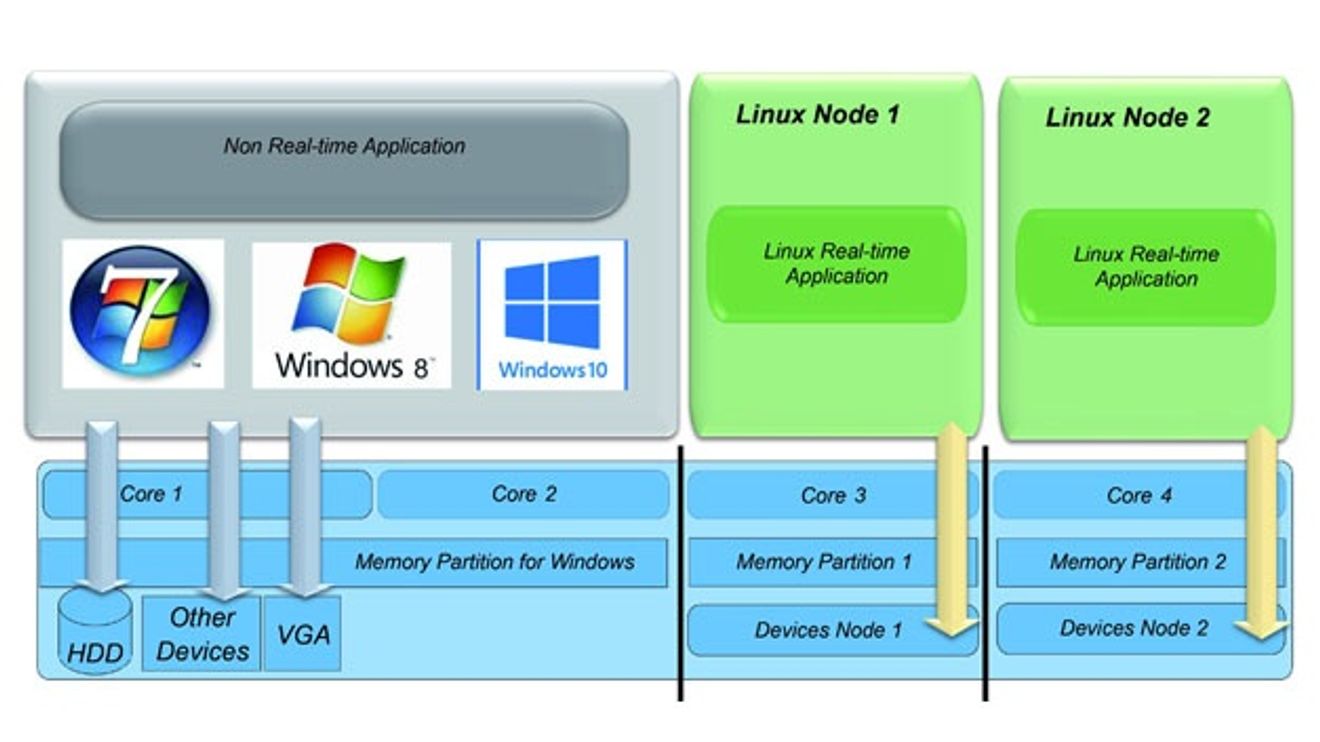
At its core, LxWin consists of a real-time virtual machine (RTVM), which offers functions that Linux calls instead of the usual direct hardware programming (Figure 1). This mechanism, called 'paravirtualization', manages the following resources: the main memory, the processor cores, the timer, interrupts and the PCI devices. Memory management makes it possible to allocate memory of any size to Linux. This memory is then no longer available to Windows after the next boot process, but only to Linux.
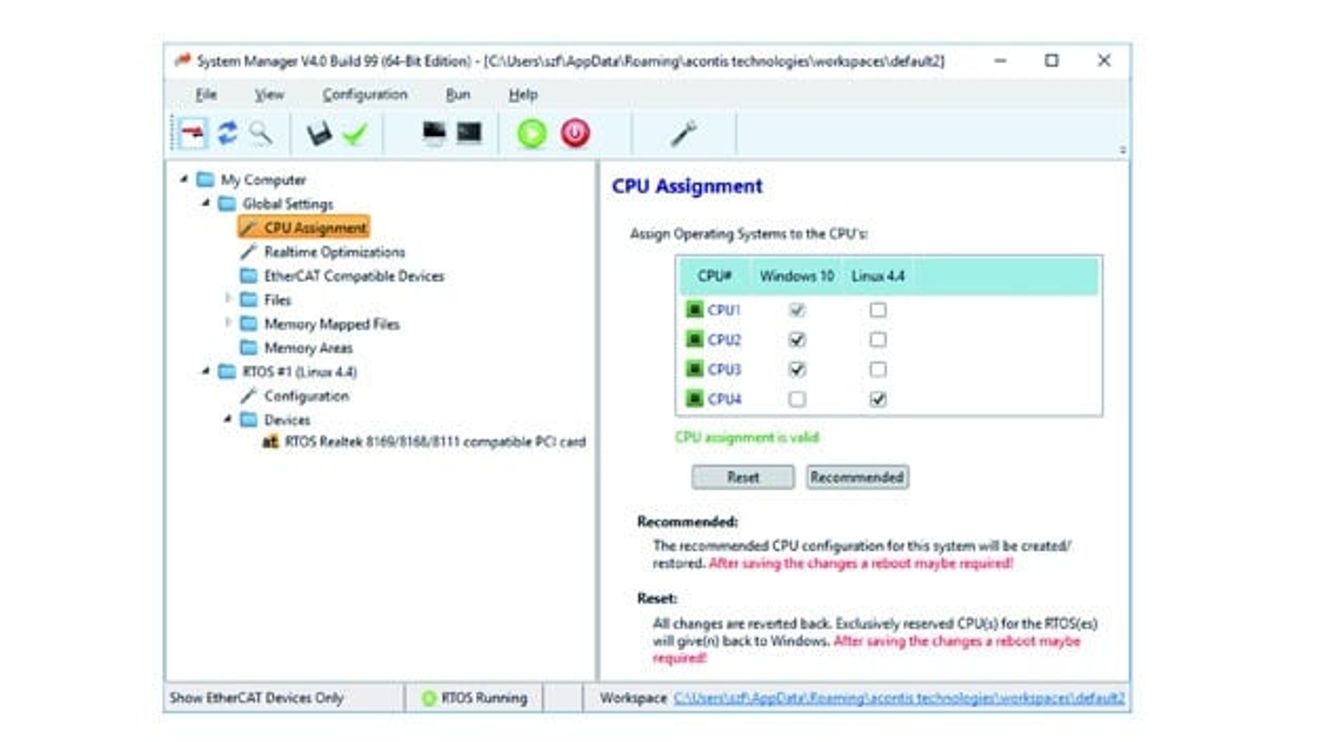
Figure 2: A graphical management tool is used to allocate existing PC resources to the operating systems.
© acontisThe processor cores can be shared in different ways: In shared core operation, Windows and Linux share a core, whereby Linux has the higher priority for real-time reasons and can be activated immediately by real-time interrupts. Windows, on the other hand, only receives computing time if Linux voluntarily surrenders the computing time of the shared core - for example after an interrupt or in the idle task. This operating mode works on x86 single-core processors and also on multi-core processors without hardware virtualization support from any manufacturer, which is usually not possible with other real-time virtualization solutions available on the market.
If additional cores are available, these can be used either by Windows or Linux in a configurable manner (Fig. 2). With a quad-core processor, two cores can be assigned to Windows and the other two cores to Linux. One core for Windows and three cores for Linux or vice versa are further options for dividing up the processor cores.
If hard real-time with maximum jitter down to the microsecond range is to be achieved, certain processor properties such as throttling and other energy-saving measures or hyperthreading should be switched off - usually in the BIOS.
In addition to two timers (system and auxiliary), the real-time virtual machine provides Linux with interrupt management. This is used to log on, log off and process real-time interrupts that are triggered by PCIe devices. The latency times of interrupt and thread handling are very short under the real-time Linux operating system, which enables low cycle times down to the 50 µs range.
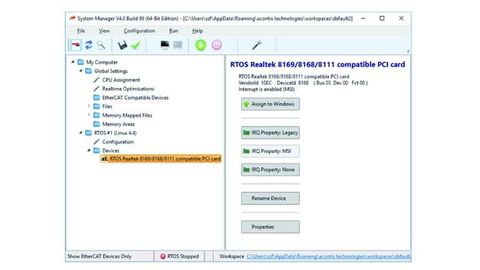
In addition to the shared resources, it is also possible to define exclusive resources. These are usually PCI/PCIe devices that are controlled either only by Linux or only by Windows. The exclusive resources for Linux are controlled by direct HW access in the same way as if Linux were running on the PC alone. This means that all device drivers that exist for Linux can also be used within the VM without modification. The management and configuration of these exclusive resources is handled by the so-called Real Time Device Management within the RTVM. Dummy drivers are installed under Windows for the devices that Linux is to control (Fig. 3). These do nothing under Windows, but only ensure that the Windows Plug&Play mechanism is satisfied and that the device resources are kept free by Windows.
The communication
With the features mentioned, the combination of Linux and Windows is basically functional. However, something crucial is still missing for daily practice: Communication between Windows and Linux. The RTVM offers several mechanisms for this: TCP/IP communication, access to the Windows file system, data exchange via shared memory, events, pipes and message queues.
TCP/IP communication is realized by network drivers on both operating system sides, which work on a common shared memory instead of controlling a real Ethernet controller. The network driver for Windows and the Linux-specific driver are part of the LxWin product. This virtual network can be used for all types of UDP and TCP/IP communication at application level, as well as for online debugging of Linux applications using Visual Studio or Eclipse under Windows (Fig. 4).
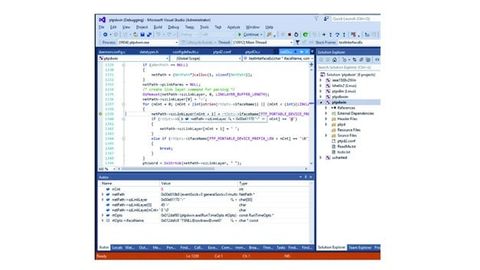
Figure 4: In addition to Eclipse, Microsoft Visual Studio can also be used under Windows for Linux software development.
© acontisCommunication across several shared memory areas can be configured in terms of size and access rights. Through corresponding API calls on both the Windows and Linux side, applications at user level receive direct pointers into the shared memory and can exchange data via it. This is supported by interlocks to synchronize access to shared memory areas (spinlocks) and by bidirectional events, i.e. asynchronous messages that are sent from one operating system to the other. This enables an application to signal to its counterpart on the other operating system that data has changed in the shared memory. There are also mechanisms for more complex types of communication between Linux and Windows, such as pipes, message queues or real-time sockets, which are all based internally on shared memory and events. Access to the Windows file system from Linux is also possible.
The use of the optional VT-x hardware virtualization technology in Intel CPUs opens up further options. For example, more than 4 GB of memory can be made available to Linux if 32-bit Linux is used. This is done by mapping any memory areas into the Linux address space.
With 64-bit Linux, VT-x is required to share individual cores with Windows. Windows is only activated when Linux has nothing more to do and has reached the idle loop. Windows thus runs in the idle loop of Linux, so to speak.
Another capability made possible by VT-x is to intercept a fatal Linux crash so that Windows continues to run completely undisturbed. Linux enters Virtual Monitor mode instead of rebooting the entire system. Activating VT-x is very simple and is done via the graphical interface of the supplied system manager tool.
Combination with Ethercat, TSN and OPC UA
A real-time-capable IPC-based control system is only useful if the corresponding sensors and actuators can be controlled in real time. Today, this is usually done via fieldbuses. If a standard Ethernet controller is exclusively available for Linux, the Ethercat Master Stack from Acontis can operate this Ethernet controller in hard real-time and control external Ethercat slaves via it. This enables cycle times down to 50 µs. The next generation of real-time network communication in the form of TSN with OPC UA Pub/Sub connection is already under development.
Author: Heinrich Munz is a silent partner of Acontis Technologies from Ravensburg, Germany


You might also be interested in
The knowledge hub of the embedded community
The embedded systems industry will meet from March 11 to 13. In seven exhibition halls, exhibitors in Nuremberg will provide information on hardware, software, services and tools. Two accompanying conferences, expert panels and exhibitor forums will...
 read more...
Customized Single Board Computer
Helbling has developed a flexible embedded vision platform based on an ARM processor that can be used as a reference design for the development of customized single board computers (SBC).
read more...Secure embedded PC for industrial applications
According to the manufacturer, the 'ReliaCOR 54-13' embedded PC from Inonet is one of the first embedded computers made in Germany to be certified for AI applications in accordance with IEC 62443-4-2. It therefore meets the requirements of...
read more...Operation via touch, glove, pen or digitizer
Getac launches the next generation of 'F110' and 'K120' tablets: The new F110 is suitable for use in a variety of harsh outdoor and indoor scenarios.
read more...IPC for IIoT gateway
The compact and energy-efficient industrial PC 'DA-1200' from Cincoze is suitable for IIoT gateways in modern industrial applications.
read more...Two new surface-mounted keyboards
Wöhr is expanding its 'Surta' industrial keyboards with versions 15 and 16, which have been specially developed for environments such as medical and dental areas, the pharmaceutical, clean room and food industries, as well as general industry and...
read more...New threat to industrial control systems
FrostyGoop is the name of a new malware variant that specializes in industrial control systems (ICS). It poses a threat to critical infrastructures worldwide. OT cyber security expert Dragos has identified FrostyGoop.
read more...Edge rack server in robust
The trend towards hyper-convergent infrastructures is not stopping at the manufacturing and automation industry. Siemens has now launched the first edge rack server in robust industrial PC quality. How is the inner workings of the server designed?
read more...Available in four sizes
KEB Automation has launched the 'Web HMI C6 X1'. The panel can be flexibly attached anywhere on the machine thanks to various mounting options.
read more...