
IEC 61131-3 - Robotics included
Simple configuration of complex axis groups
For a long time, PLC systems were fully utilized with logic applications. Inexpensive yet high-performance processor platforms now make it possible to conveniently process even sophisticated motion controls, including robotics, on a single automation device.

Many users still remember the time when they could expand the PLC memory by 16 kByte (!) for a hefty price, for example, just to avoid an even more expensive 'upgrade' to the next larger controller. Only specialized motion controllers or CNC controllers were available for controlling coordinated movements in a machine - a league of their own in terms of engineering and costs. Today, practically every school cell phone is equipped with a gigahertz multi-core processor - while many of their owners can hardly do anything with the term 'kByte'. Accordingly, intelligent automation devices with high-performance CPUs and lots of memory have long been state of the art. For example, device manufacturers have the option of combining classic control tasks and machine operation in one device in a panel controller. The integration of motion tasks in a PLC has also become established. What development steps have led to this?
Direct control of drives
A PLC can command movements per se: Connect a 24 VDC motor to an analog or digital output, set the output and the motor moves - either at a fixed or variable speed. The output simply requires sufficient power or a power amplifier. A frequency inverter can even be used to control AC motors. Drive systems with an analog ±10 VDC or fieldbus interface can be operated even more conveniently from the controller. If an encoder is connected to the motor axis, the pulse feedback to the controller can be used to determine and evaluate position or speed and thus for axis control - if the drive is not already equipped with a servo function. Some robot manufacturers even offer special PLC interfaces for their proprietary robot controllers: This allows the complete robot application to be commanded from the logic application using specific program blocks.

Axis configuration in the project tree and its parameterization: The user defines parameters such as axis type, dynamic limits or movement scaling.
© 3S - Smart Software SolutionsAs simple as such direct control is, it has a decisive disadvantage: the motion control is very specific to the drive system used or the available interface. Every time the hardware is changed, the PLC application and control system have to be adapted. Commanding is left to the discretion of the application developer and is therefore not always immediately comprehensible to others.
This is not the only reason why a 'Motion Control Technical Committee' was formed at the turn of the millennium within PLCopen, the user organization of the suppliers of IEC 61131-3 systems, for the purpose of standardization. A uniform definition of function blocks for classic motion tasks within control programs was presented as early as 2001 in an initial specification. This recommended that the defined function blocks should be stored in an IEC 61131-3 library. The availability of a library concept within the development environment is therefore already an important prerequisite for such standardized motion commanding. The block definition itself includes numerous typical single-axis functions, such as
■ for switching on and starting the axis with predefined values for position, acceleration and speed
or for reading diagnostic and status information, stopping or canceling movements.
These movement functions transfer all calculated data to the respective axis as an abstracted IEC 61131-3 data structure. The control system must therefore be able to generate such a data structure. In view of the many specific implementations of PLCopen motion functions in very different systems, it is hardly possible to prescribe a general solution for this.
Drive configuration using Codesys as an example
The example of Codesys, the manufacturer-independent IEC 61131-3 system, shows how the PLCopen specifications can be implemented in concrete terms. The data structure is generated using the integrated configurators for fieldbus and I/O systems. The user integrates the drive as a node of his device or fieldbus system using generic or specific motion drivers. This node includes the axis, whose name also represents the corresponding data structure. The motion driver in turn converts the data structure to the respective protocol or physics so that the user does not have to worry about it. In practice, this means that in a high-priority task of the PLC application, the values for position, speed and acceleration are calculated dynamically at runtime of the controller, transferred to the driver and sent to the drive.

Example of the configuration of a simple robotics function in a free graphical FBD editor (CFC).
© 3S - Smart Software SolutionsThis reveals the great advantage of this standardization: a motion application created within the PLC program can be used with different drive systems. This means that the application programmer can already develop and functionally test the application, even if he does not yet have any drives available. In Codesys, any number of virtual axes can be inserted and 'calculated' on the controller in real time, regardless of the drive system used. On the other hand, a logic application that has already been put into operation can be adapted to new machine requirements without changing the application - simply by changing the drive drivers or the drive system.
Another plus: The integrated visualization of the IEC 61131-3 environment mentioned above makes commissioning the axes very easy - regardless of whether they are virtual or real axes. Visualization templates for all function blocks can be linked to the respective FB instance and thus enable direct access to all input and output parameters of the block. In addition, the axes can be operated and initially set up independently of the application in a special configuration mode.
Far more demanding coordinated movements
Things get really challenging when the axes are to perform coordinated movements, for example to execute cam plates or CNC movements. The user plans such movements in Codesys using editors integrated into the IEC 61131 software. A cam editor enables the configuration of the interpolation points for the main and secondary axes as well as the cam switching points in a graphical or tabular view. For processing, it connects standardized function blocks in accordance with PLCopen Motion Control Part 2 from the corresponding library. CNC movements are planned in an integrated DIN 66025 editor in G-code. At the same time, the movement is displayed in a graphical 3D editor. The user can also reverse the sequence for fast implementation: He sketches the movement conveniently in the 3D editor with lines, circle segments or splines and then optimizes it in the G-code.
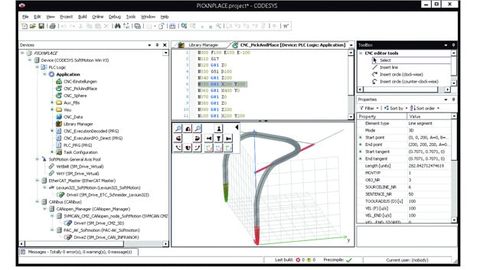
Planning a CNC movement directly in the IEC 61131-3 development environment: The CNC editor enables planning via G-code or graphical elements in 3D.
© 3S - Smart Software SolutionsIf the movement has already been described electronically, G-code can also be processed from an external table or the user can import DXF files from CAD tools into the project. Default values for parameters such as speed, acceleration and deceleration as well as origin can be defined globally or per CNC object. Functions for geometry data manipulation such as tool radius correction or corner grinding are also available. The motion processing is programmed in IEC 61131-3 languages on the basis of provided function blocks. As with single-axis movements, the required axes are processed by blocks that transfer the cyclically calculated set values to the axis data structure. In a function library, the PLC programming environment offers transformation blocks for the most important applications of coordinated movements.
Part 4 of the PLCopen motion control standardization defines function blocks for processing axis groups for complex kinematics - including MC_GroupEnable, MC_GroupHalt MC_MoveDirectRelative, MC_MoveDirectAbsolute, MC_TrackConveyorBelt or MC_TrackRotaryTable. These blocks make it even easier to configure the processing function, as complete axis groups including transformation information are transferred rather than individual axes. In 'Codesys SoftMotion CNC+Robotics', the new Codesys add-on, these are now also available in the form of a block library.
Block library for robotics functions
The axis groups are configured in a new editor, which offers numerous convenient functions: the user can select the required robot transformation from a list of robot kinematics, including for various gantry (2/3/5 axes), bipod/tripod or Scara robots. The editor explains some of the robot parameters using graphics, such as arm or tool lengths, the position or the maximum movement radius of individual axes, and allows the real values to be entered.

Axis group editor with parameterization of tripod kinematics: The editor describes the robot parameters and allows them to be entered.
© 3S - Smart Software SolutionsA documented interface can even be used to create user-specific kinematics in IEC 61131-3 languages. In addition, tool kinematics are available that can be combined with some of the kinematics mentioned in order to define tools with one or more rotary axes and tool offsets. In this editor, the user also links the axes of the axis group with the drive axes configured in the project. The integrated robotics function therefore has exactly the intended effect: the entire project planning of a robot can be carried out with the axis group definition and just a few block calls - regardless of the kinematics, which are defined in the axis group itself.
In a nutshell: The robotics function integrated into an IEC 61131-3 programming environment simplifies the configuration of complex axis groups considerably. Users benefit from hardware savings and simplified engineering in a single interface.
Author: Roland Wagner is Head of Product Marketing at 3S-Smart Software Solutions.


You might also be interested in
New board member for production and quality management
Bosch Rexroth appoints Dr. Christina Franke (49) to the Management Board with responsibility for Production and Quality Management as of April 1. She succeeds Reinhard Schäfer (60), who is retiring.
 read more...
Integrated measurement technology for condition monitoring
There are new variants of the high-precision motor feedback system 'EDS/EDM35' from Sick. Variants with additional sensors for monitoring vibration behavior and humidity supplement the standard variants.
read more...Drive controller with high-current variant
As a high-current variant, the 'SD4B' drive controller from Sieb & Meyer extends the range of possible applications: as a servo amplifier for operating rotary and linear low-voltage servo motors or as a frequency inverter for high-speed...
read more...Robust electric cylinders for indoor and outdoor use
With the 'LD' series, RK Rose+Krieger offers electric cylinders that are suitable for indoor and outdoor use.
read more...Easy to implement
Leantechnik rack and pinion gearboxes can be used to design all types of lifting and positioning systems. Integration into the application is easy thanks to the 3D product configurator from Cadenas.
read more...Increase in orders for the German electrical and digital industry
The German electrical and digital industry started the second half of 2024 with a fifth more orders (+20.8% year-on-year).
read more...Expansion of the Management Board
The Supervisory Board of Siemens has announced personnel decisions at Managing Board level in order to further expand its position as a leading technology company and to accelerate the increase in value.
read more...Relieving the load on large gearboxes with a new control strategy
The IMA at the University of Stuttgart has developed a new monitoring and control system that detects damage to large gearboxes and provides relief without affecting the overall performance of the system. Unscheduled maintenance is reduced.
read more...Precision gearboxes for the food industry
The gearboxes in the 'Neco' and 'RD-C' series from Nabtesco have a hygienic design with smooth surfaces and optimized seals, making them easy to clean
read more...